AWS Lambda Managed Instances: Serverless Simplicity with EC2 Control
Home » AWS » AWS Lambda Managed Instances: Serverless Simplicity with EC2 Control
AWS Lambda Managed Instances: Serverless Simplicity with EC2 Control
Last updated on December 23, 2025
AWS Lambda Managed Instances marks a significant evolution in serverless computing. For years, standard Lambda was the default for running code without infrastructure management, but it offered limited control over the underlying hardware. This new capability changes that by combining serverless simplicity with Amazon EC2 flexibility.
Announced at AWS re:Invent 2025, this feature enables Lambda functions to run on designated Amazon EC2 instances. You choose the hardware configuration, while AWS manages the infrastructure. This approach combines the simplicity of serverless with the control of dedicated resources.
Comparing Compute Models: AWS Lambda vs. Amazon EC2
Previously, architects chose between two models, each with significant trade-offs:
Standard Lambda: AWS runs your code in a data center. You have no hardware control, and you pay for every millisecond. While simple, the lack of visibility into vCPU or network allocation can limit specialized tasks.
Amazon EC2: Users have full control over virtual machines but must manually manage security patches, auto-scaling, and load balancer configuration.
AWS Lambda Managed Instances provides a middle ground. You define a Capacity Provider with your chosen EC2 instance family, and AWS manages the instance lifecycle within your account.
Getting started is straightforward:
Define Capacity:
Create a Capacity Provider in the Lambda console and select the EC2 instance type and size (you can specify the EC2 instance types you’d like to include or exclude, or you can choose to include all instance types for high diversity).
Connect Function:
Update your Lambda function configuration to point to this new provider instead of the default pool.
Deploy:
Deploy your code as usual. No server bootstrapping or OS configuration is needed.
Key Capabilities of AWS Lambda Managed Instances
Customizable Hardware: Select specific EC2 instance types, including the latest Graviton processors or high-bandwidth networking for data-intensive tasks.
Multi-Concurrency: Unlike standard Lambda, which processes one request per instance, this model allows a single instance to handle multiple requests simultaneously. This improves resource utilization for I/O-bound tasks.
Continuous Execution Environments: Long-running instances eliminate the initialization latency, or “cold starts,” seen in standard Lambda for active workloads.
Managed Lifecycle: AWS automates OS patching, runtime updates, instance health checks, and auto-scaling based on your defined policies.
Runtime Support
Because this model uses multi-concurrency, it requires runtimes that support safe threaded execution. Currently, the feature supports:
Java: 21 and later
Python: 3.14 and later
Node.js: 22 and later
.NET: 8 and later
with support for other languages coming soon.
Availability
AWS Lambda Managed Instances is currently available in the following regions:
US East: N. Virginia, Ohio
US West: Oregon
Asia Pacific: Tokyo
Europe: Ireland
Benefits and Use Cases of AWS Lambda Managed Instances
This feature addresses specific architectural needs and is not intended as a default replacement for standard Lambda.
Cost Optimization for Steady-State: For 24/7 workloads, paying for EC2 uptime is often more cost-effective than per-millisecond Lambda billing. EC2 Savings Plans and Reserved Instances can further reduce costs.
High-Throughput Processing: Applications processing large data streams benefit from multi-concurrency, as multiple requests share a single vCPU’s overhead.
Hardware-Specific Requirements: Suitable for workloads needing specific instruction sets or higher network throughput than standard Lambda provides.
Pricing Model
The billing structure shifts from a “duration-based” model to a “provisioned capacity” model.
Infrastructure Cost: You pay the standard hourly rate for the EC2 instances you provision.
Management Fee: A 15% premium is added to the EC2 On-Demand price to cover AWS management.
Request Fee: A charge of $0.20 per million requests applies to cover invocation overhead.
Note: You are not charged for code execution duration. Costs depend on instance uptime and request volume.
Project Showcase
As noted earlier, getting started with AWS Lambda Managed Instances is straightforward. In this section, we will walk through a practical, in-depth example of how to implement this new feature in a real-world scenario.
1. Creating IAM Role
Step 1.1: Navigate to the IAM Console
Open a new tab and go to Roles, then click “Create role”.
Step 1.2: Select Trusted Identity
Select “AWS service” and choose “Lambda” as the use case. Click “Next”.
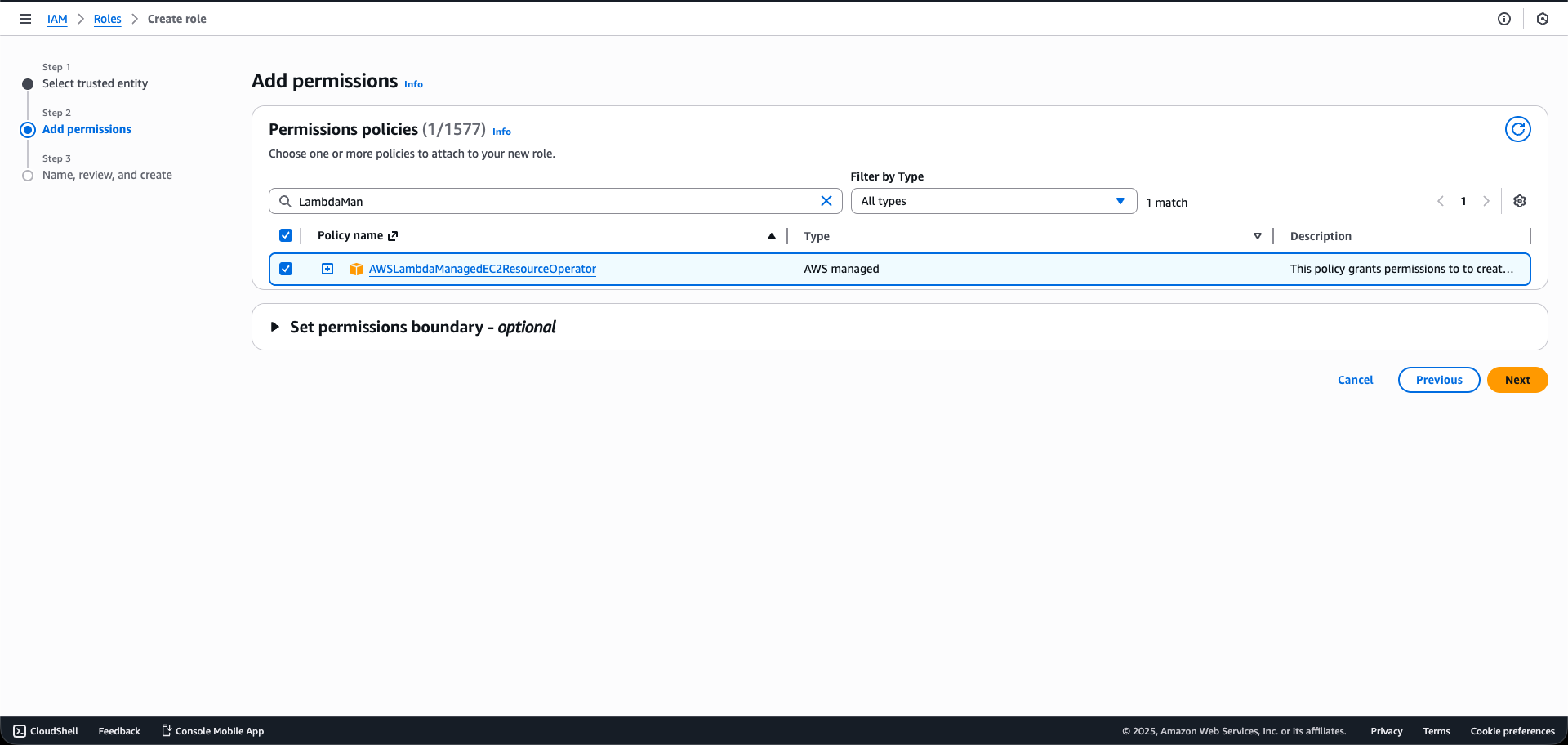
Step 1.3: Attach Policy
In the search bar, look for the AWS-managed policy: AWSLambdaManagedEC2ResourceOperator. Check the box next to it.
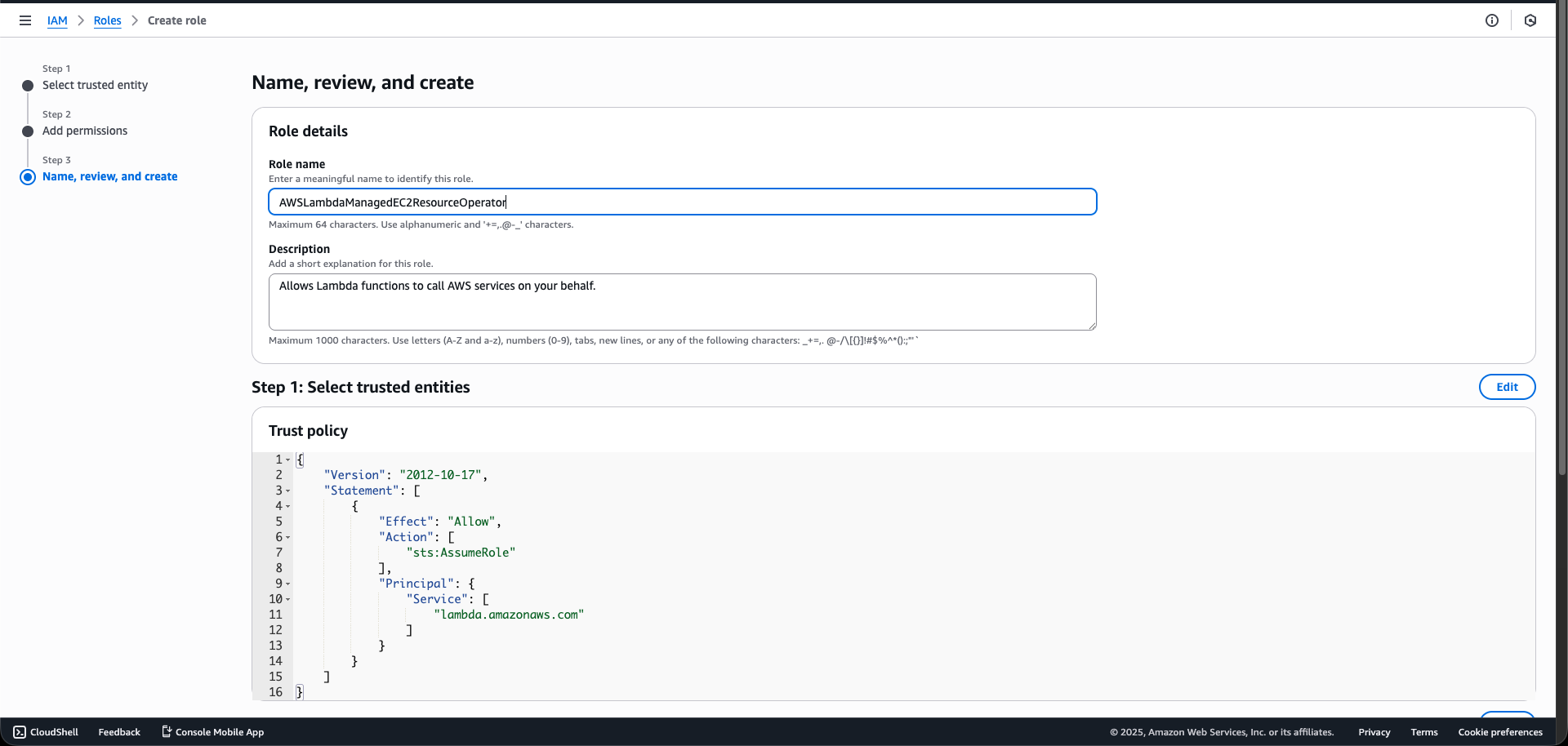
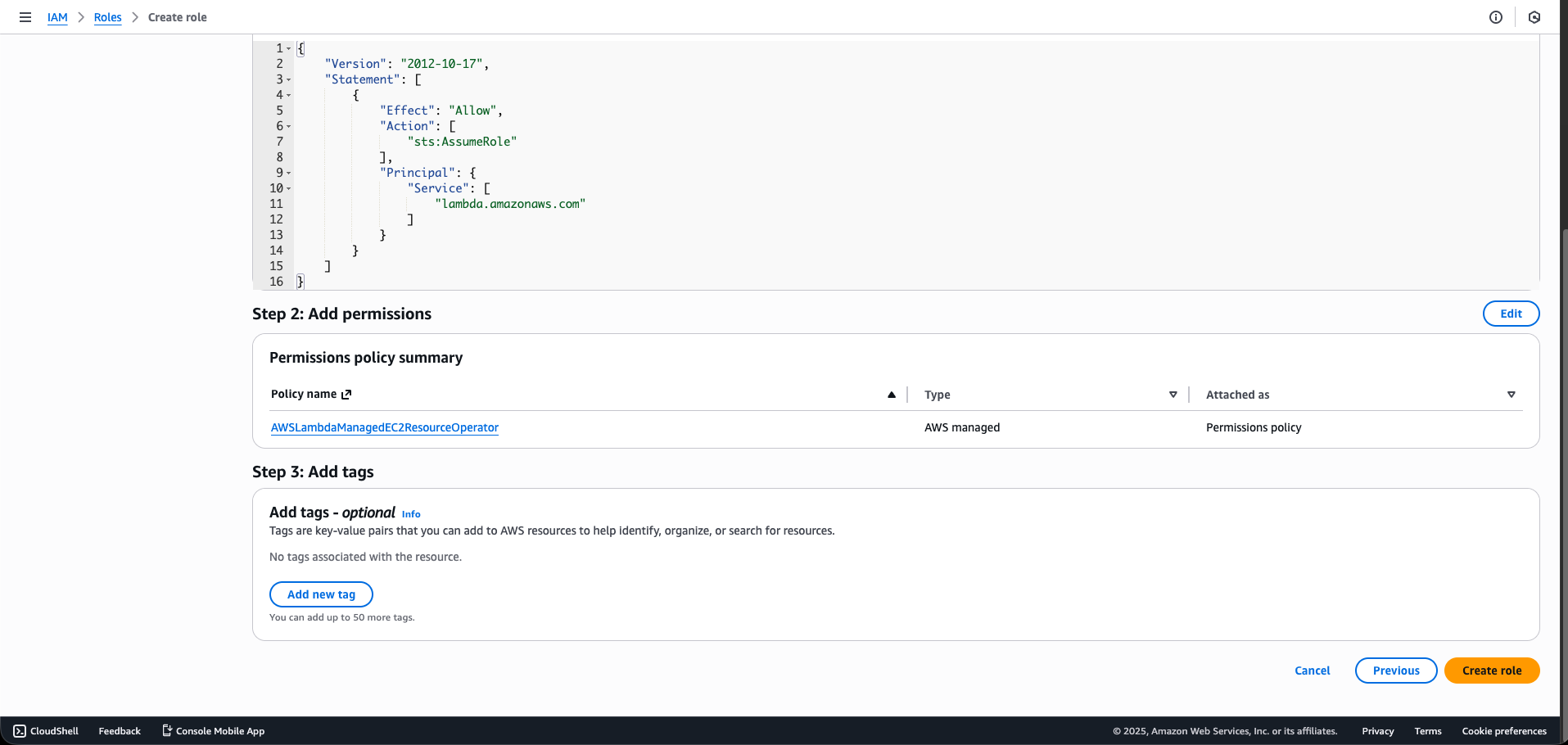
Step 1.4: Name and Create
Set the Role name (e.g., LambdaManagedInstanceOperatorRole). Review and click “Create role”.
2. Configuring the Capacity Providers
Step 2.1: Navigate to Lambda
Go to the Lambda Console.
Step 2.2: Capacity Providers
In the left navigation pane, choose “Capacity providers“. Click “Create capacity provider“.
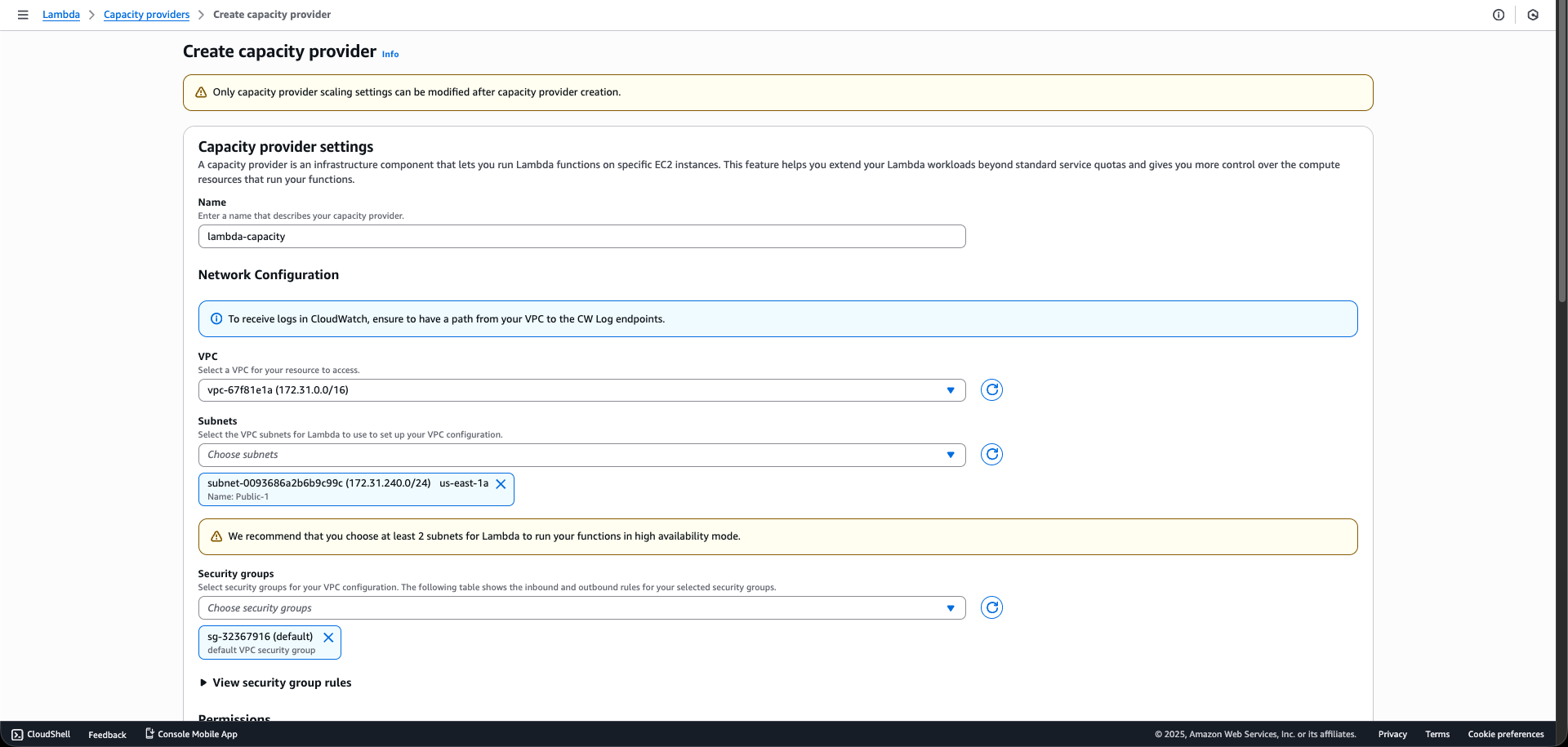
Step 2.3: Basic Settings
Set the Capacity provider name to lambda-capacity.
Step 2.4: Instance Requirements
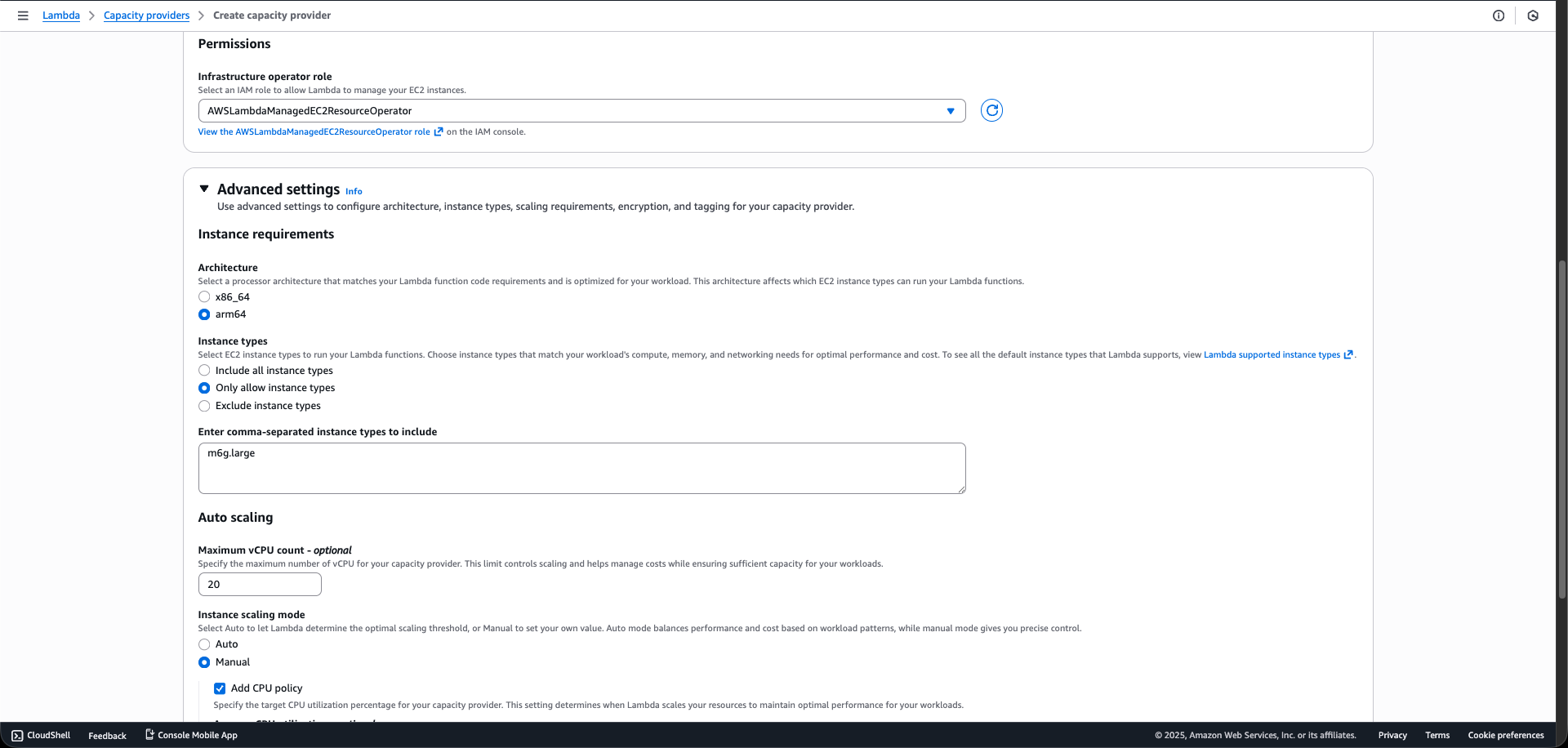
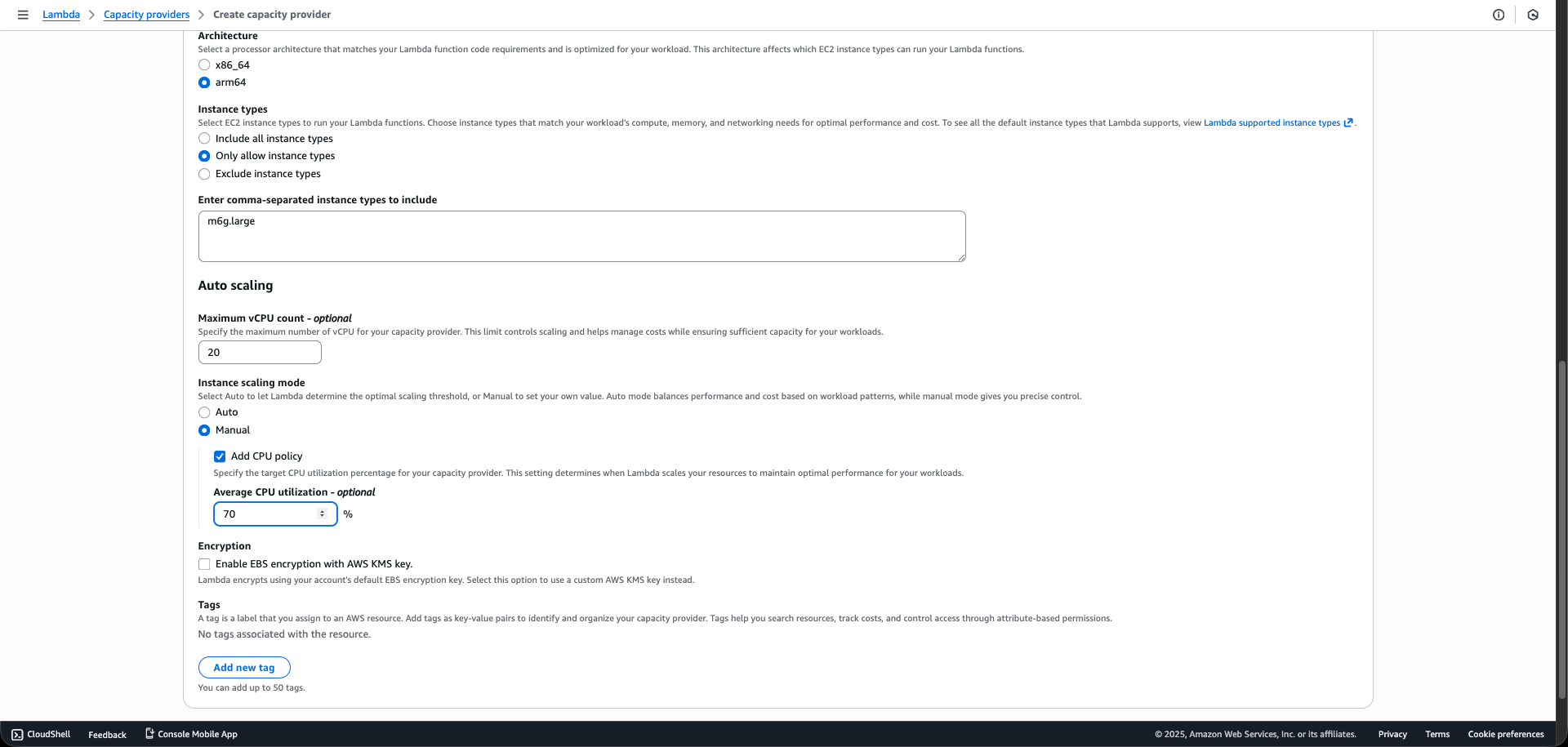
Set Architecture to arm64 (Graviton) and Allowed instance types to m6g.large (This ensures Graviton-specific optimization).
Step 2.5: Scaling Configuration
Set Scaling Mode to Manual and Target Utilization to 70% (The utilization percentage AWS will try to maintain).
Step 2.6: Network Configuration
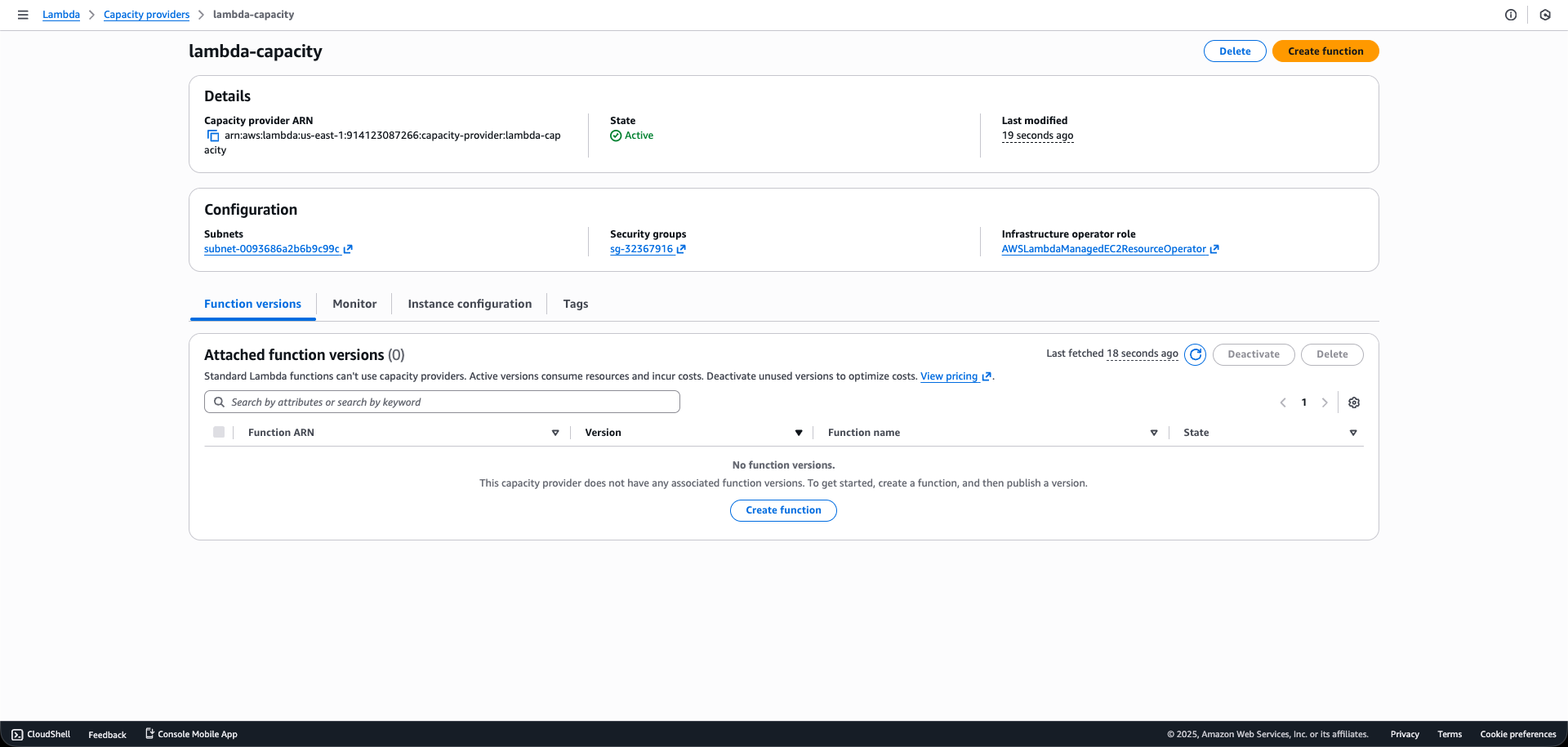
Select the Default VPC ID for your region and the single subnet named lambda capacity. Use the VPC’s default security group. For the Infrastructure operator role, select your LambdaManagedInstanceOperatorRole.
Step 2.7: Create
Click “Create capacity provider”. Wait for the status to change from CREATING to ACTIVE.
3. Creating Lambda Function
Step 3.1: Create Function
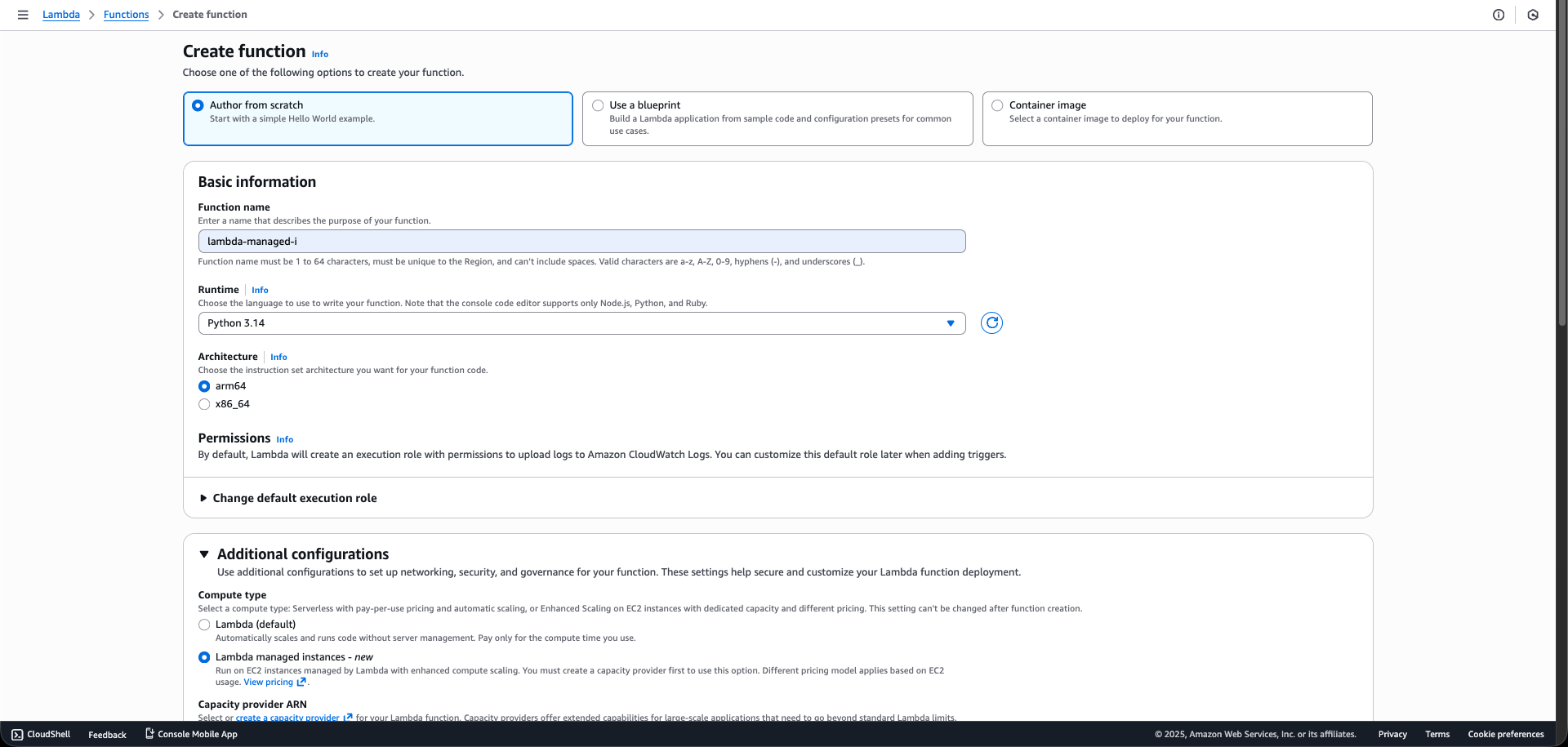
Navigate to Functions and click “Create function“.
Step 3.2: Configuration
Set Function = lambda-managed-i
Set Runtime = Python 3.14
Set Architecture = arm64
Step 3.3: Deploy Code
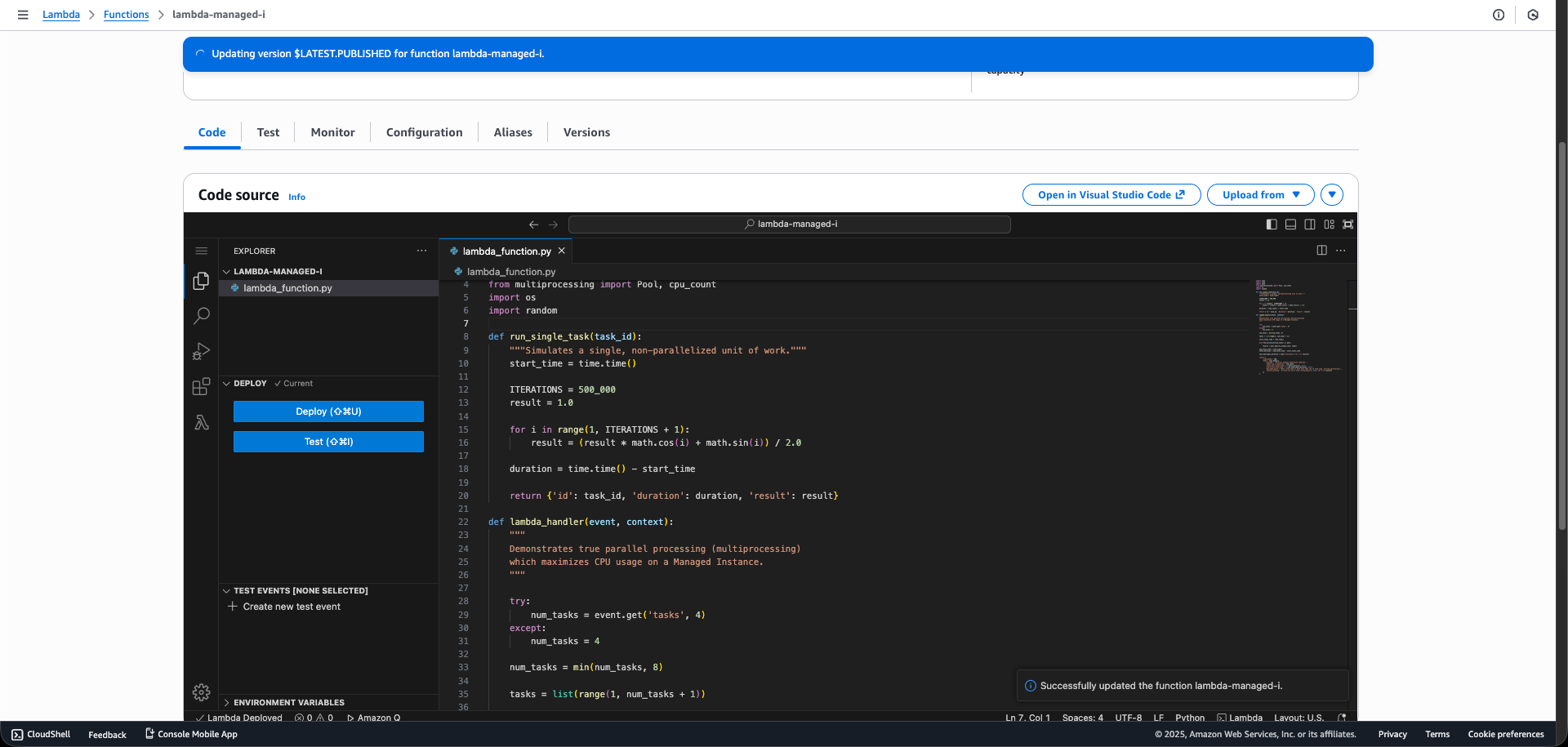
Paste the threaded Python code (using ThreadPoolExecutor) into the code editor and click “Deploy”.
Step 3.4: Enable Function URL
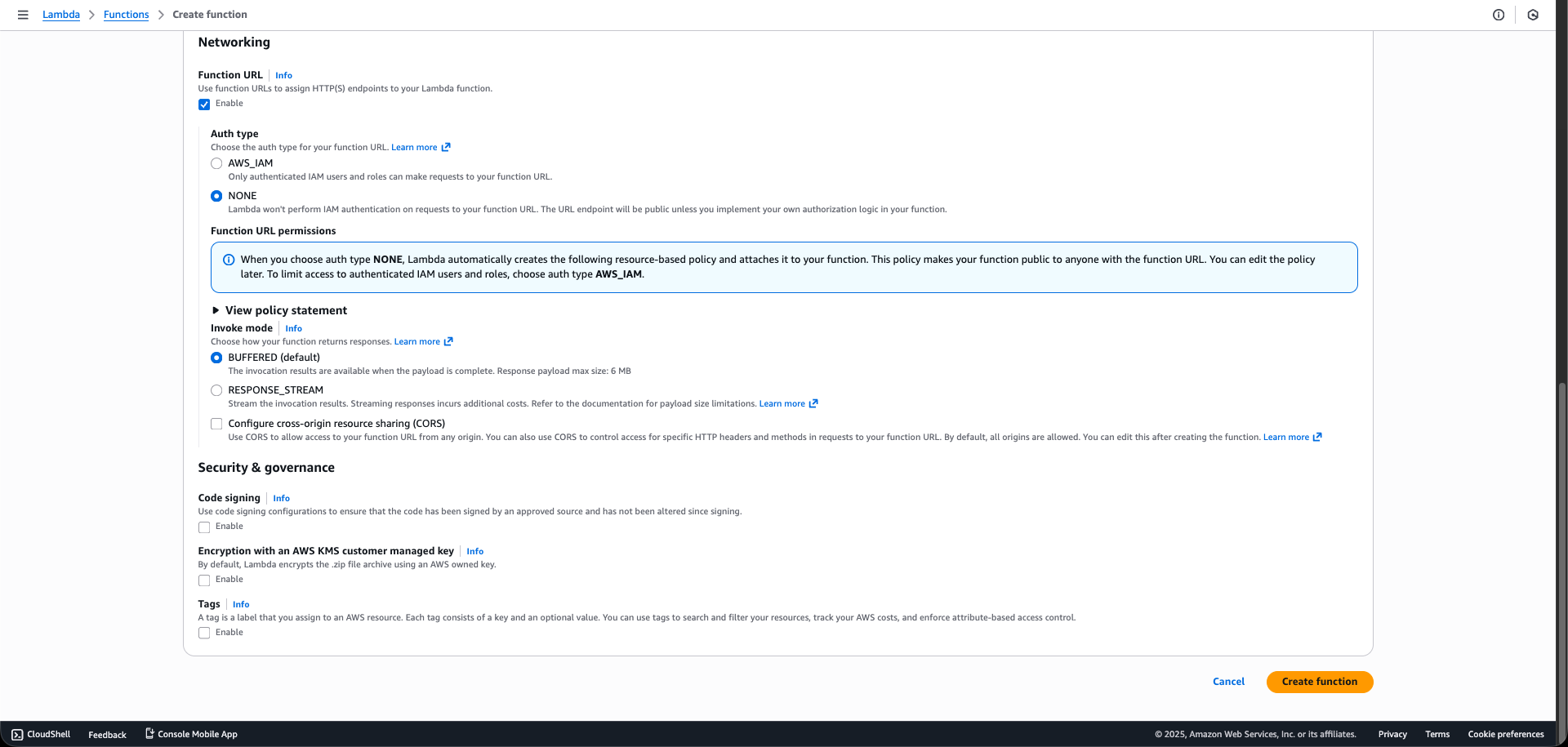
Go to the Configuration tab, choose Function URL, and click “Create function URL“. Use NONE for Auth type for a simple test.
Step 3.5: Configure General Settings
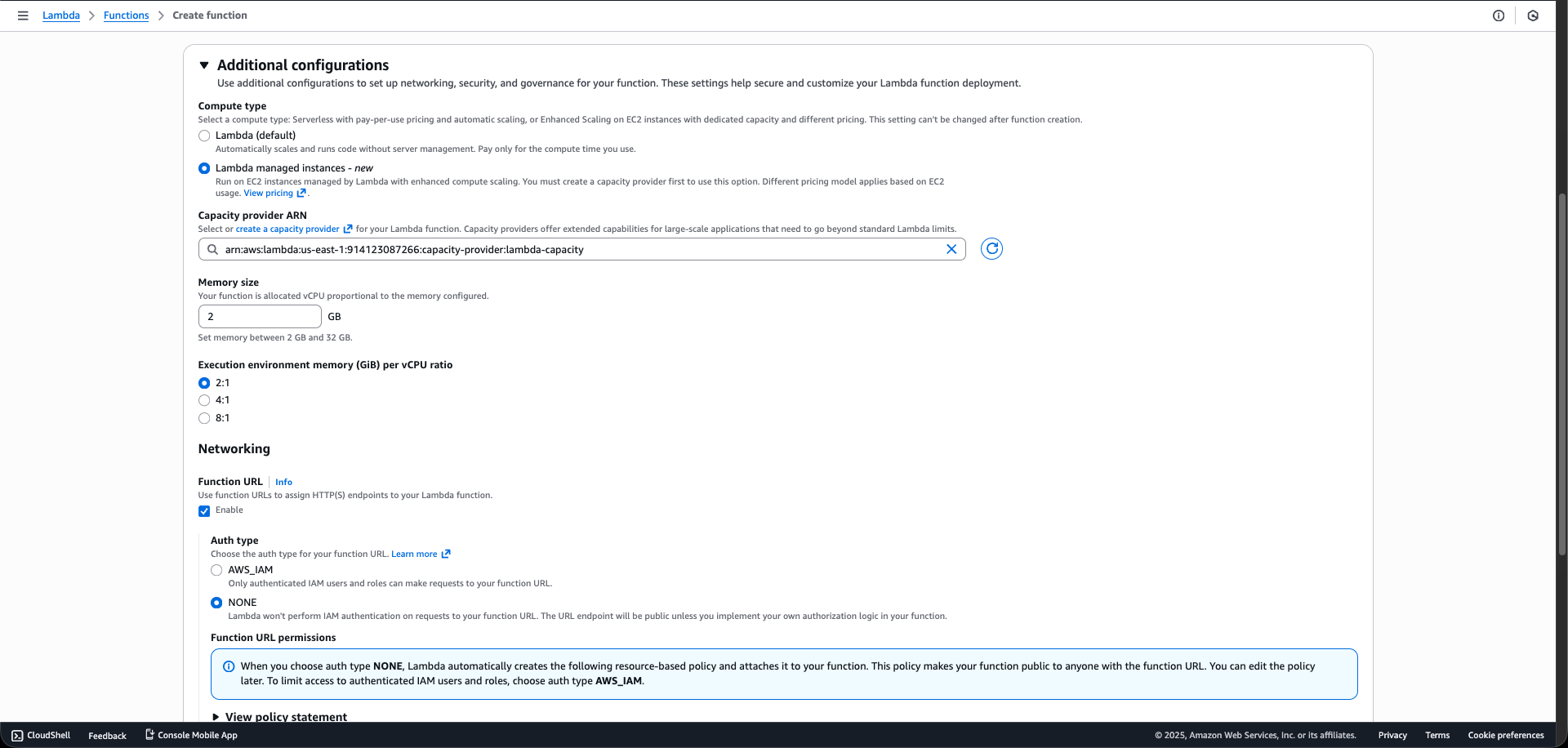
Go to General configuration and click “Edit”. Set Memory to 2048 MB (2 GB).
Step 3.6: Configure Capacity Provider
Go to Capacity Provider and click “Edit”. Change Compute type from Default to Capacity provider. Select the ARN of your lambda-capacity for Capacity Provider.
Step 3.7: Configure Concurrency
Set PerExecutionEnvironmentMaxConcurrency to 2 (This is the 2:1 ratio you requested, as the m6g.large has 2 vCPUs). Set Memory/vCPU to 2048 MB (This ensures that 2 executions share the 2GB memory total).
Step 3.8: Publish Version
After saving all configurations, go to the function dashboard, click “Actions”, and then “Publish new version”. This is critical for the Capacity Provider to start managing the function.
4. Testing Results
We compared the execution behavior of a standard Lambda function against our new Managed Instance setup to highlight the architectural differences.
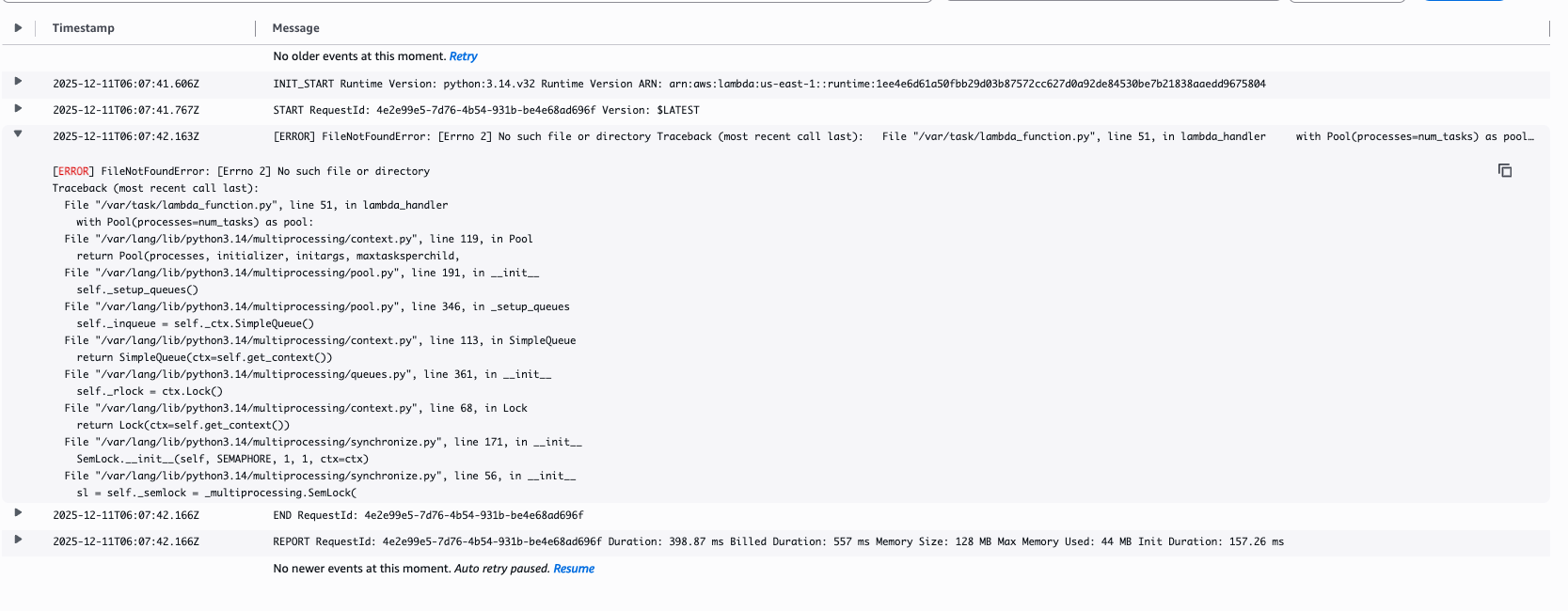
Scenario 1 – Standard Lambda Test
Observation: Runs into the FileNotFoundError with multiprocessing.Pool or is inefficient with ThreadPoolExecutor.
Key Takeaway: Technical Necessity: Standard Lambda cannot run truly parallel, CPU-bound workloads.
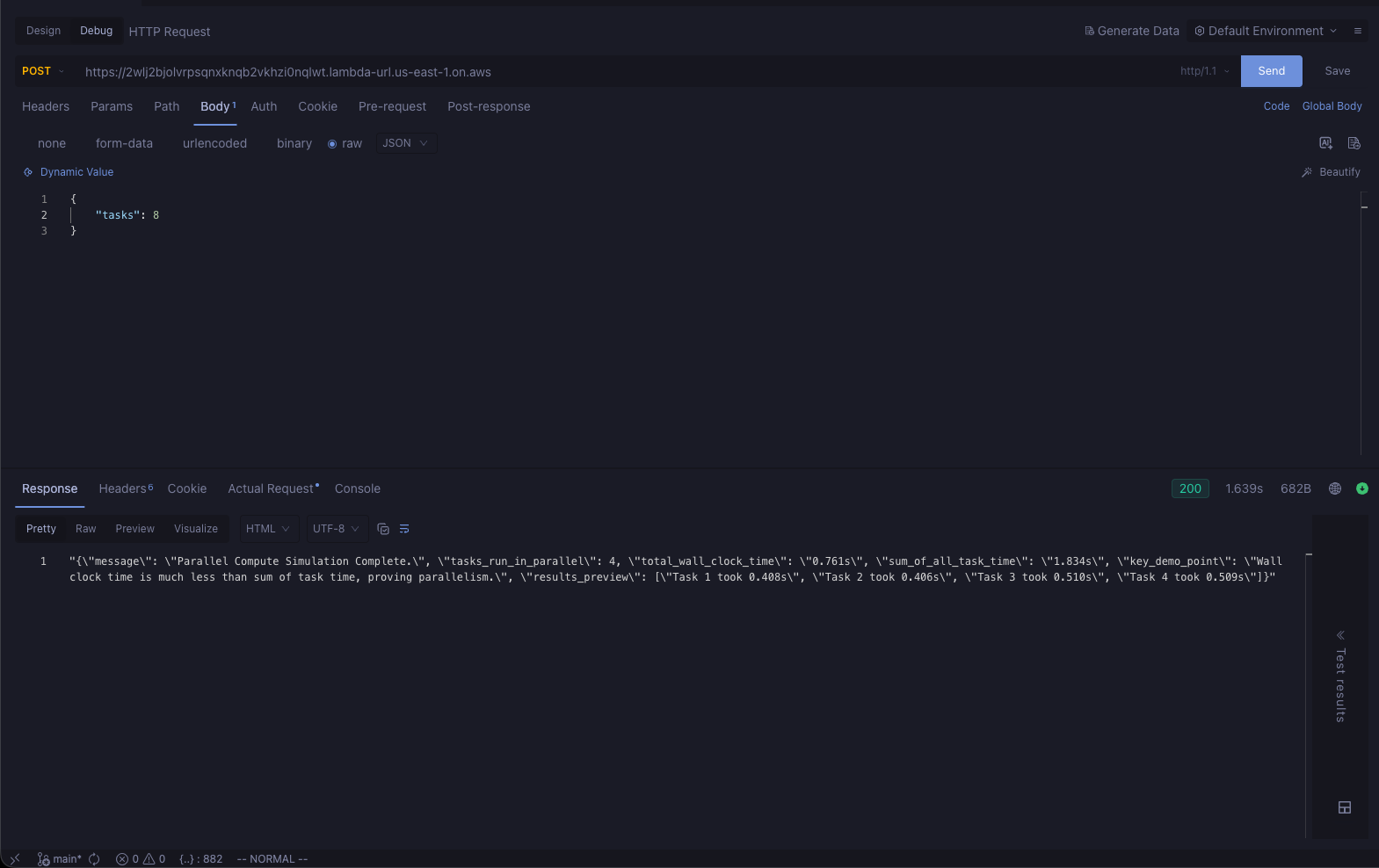
Scenario 2 – Managed Instance Test
Observation:Zero Cold Start. First invocation is fast. The total_wall_clock_time is significantly lower than the sum_of_all_task_time (due to true multi-process/multithread parallel execution).
Key Takeaway: Performance & Cost: This environment enables peak performance, and the cost is now fixed and discounted via the Graviton/Savings Plan-eligible m6g.large instance.
AWS Lambda Managed Instances: A New Era for Serverless Computing
AWS Lambda Managed Instances signal a pivotal evolution in cloud computing, breaking the long-standing trade-off between agility and control. By merging the hands-off simplicity of serverless with the power and specificity of EC2, organizations can now tailor their compute environments to their most demanding workloads without sacrificing operational efficiency. This innovation empowers teams to architect for scale, optimize for cost, and innovate faster—removing barriers that once constrained the most ambitious projects.
As the boundaries between traditional infrastructure and serverless continue to blur, Lambda Managed Instances stand as a testament to AWS’s commitment to customer-centric cloud evolution. For forward-looking teams, this isn’t just a new feature; it’s a strategic advantage and a catalyst for what’s next.
🎭 GET 22% OFF our AWS Security Specialty and AZ-500 Azure Security Engineer Associate Practice Exams – Master Cloud Security Now!
Learn AWS with our PlayCloud Hands-On Labs
$2.99 AWS and Azure Exam Study Guide eBooks
New AWS Generative AI Developer Professional Course AIP-C01
Learn GCP By Doing! Try Our GCP PlayCloud
Learn Azure with our Azure PlayCloud
FREE AI and AWS Digital Courses
FREE AWS, Azure, GCP Practice Test Samplers
Subscribe to our YouTube Channel
Follow Us On Linkedin
Written by: Cristieneil Ceballos
Cristieneil Ceballos, “Cris” for short, is a Computer Science student at the University of the Philippines Mindanao and an IT Intern at Tutorials Dojo. Passionate about continuous learning, she volunteers and engages with various tech communities—viewing each experience as both a chance to contribute and an opportunity to explore areas she’s interested in.
AWS, Azure, and GCP Certifications are consistently among the top-paying IT certifications in the world, considering that most companies have now shifted to the cloud. Earn over $150,000 per year with an AWS, Azure, or GCP certification!
Follow us on LinkedIn, YouTube, Facebook, or join our Slack study group. More importantly, answer as many practice exams as you can to help increase your chances of passing your certification exams on your first try!
Around 95-98% of our students pass the AWS Certification exams after training with our courses.
200k+
students
Over 200k enrollees choose Tutorials Dojo in preparing for their AWS Certification exams.
~4.8
ratings
Our courses are highly rated by our enrollees from all over the world.
What our students say about us?
I’m deeply impressed by the quality of the practice tests from Tutorial Dojo. They are extremely well-written, clean and on-par with the real exam questions. Their practice tests and cheat sheets were a huge help for me to achieve 958 / 1000 — 95.8 % on my first try for the AWS Certified Solution Architect Associate exam. Perfect 10/10 material. The best $14 I’ve ever spent!
S. M. Shoaib
Khulna, Bangladesh
Given the enormous number of students and therefore the business success of Jon's courses, I was pleasantly surprised to see that Jon personally responds to many, including often the more technical questions from his students within the forums, showing that when Jon states that teaching is his true passion, he walks, not just talks the talk. I much respect and thank Jon Bonso.
Rowan Williams
Brisbane, Australia
The explanation to the questions are awesome. Lots of gap exposed in my learning. I used the practice tests along with the TD cheat sheets as my main study materials. This is a must training resource for the exam.
Using the practice exam helped me to pass. I think I wouldn't have passed if not for Jon's practice sets.
Jessica Chen
Guangzhou, China
I can say that Tutorials Dojo is a leading and prime resource when it comes to the AWS Certification Practice Tests. I also tried other courses but only Tutorials Dojo was able to give me enough knowledge of Amazon Web Services. My favorite part of this course is explaining the correct and wrong answers as it provides a deep understanding in AWS Cloud Platform. The course I purchased at Tutorials Dojo has been a weapon for me to pass the AWS Certified Solutions Architect - Associate exam and to compete in Cloud World. A Big thank you to Team Tutorials Dojo and Jon Bonso for providing the best practice test around the globe!!!