I’ve always approached AI with one mindset: use whatever tool gets the job done fastest and cleanest. I’m not loyal to one model, one company, or one ecosystem. I switch between tools depending on what my day looks like. In school, that might mean summarizing academic papers. At work or during self-study, that might mean debugging code or reviewing a cloud diagram. For daily life, it might just mean drafting an email or organizing my notes.
So when Gemini 3 came out, I didn’t ask whether it was “better” in the vague, marketing sense. My question was simpler: Could it replace any of the tools I already rely on?
Before Gemini 3, I had a stable routine. For anything research-heavy, I opened Perplexity because it’s the only model that consistently provides specific, verifiable citations. For coding, I alternated between Claude and ChatGPT. Claude is excellent for long reasoning and complex technical analysis, while ChatGPT is my shortcut for quick code generation or small debugging tasks. For everyday writing, I defaulted to ChatGPT because it produces clean output with minimal effort.
Gemini 3 marketed itself as a “unified reasoning model” with stronger multimodal abilities and higher context retention. That made me curious. If one model could handle research, coding, writing, and visuals, could I finally consolidate my workflow? Or would it just become another tool added to my already crowded list?
To find out, I tested Gemini 3 using the exact tasks I perform every week: research for university, debugging, productivity tasks, and image analysis and generation.
What Is Gemini 3 and Nano Banana Pro?
Google launched Gemini 3 on November 18, 2025, positioning it as their “most intelligent model” designed to help users “bring any idea to life.” The model is described as state-of-the-art in reasoning, built to grasp depth and nuance, whether it’s perceiving subtle clues in a creative idea or peeling apart the overlapping layers of a difficult problem. According to Google, Gemini 3 is “much better at figuring out the context and intent behind your request, so you get what you need with less prompting.”
On benchmarks, the model achieved a score of 37.4 on the Humanity’s Last Exam, the highest on record, surpassing GPT-5 Pro’s previous high of 31.64. It also topped the leaderboard on LMArena, a human-led benchmark that measures user satisfaction. Beyond text, Gemini 3 introduces “generative UI,” where the AI generates both content and entire user experiences, including web pages, games, tools, and applications automatically designed in response to any prompt.
Alongside Gemini 3 came Nano Banana Pro (also called Gemini 3 Pro Image), Google DeepMind’s new image generation and editing model built on Gemini 3 Pro. It’s the successor to Nano Banana, which was released with Gemini 2.5 Flash just a few months earlier. The model uses Gemini’s reasoning and real-world knowledge to visualize information better than previous image generators, helping users create anything from prototypes to infographics to diagrams from handwritten notes.
Compared to Nano Banana’s resolution cap of 1024 x 1024px, Nano Banana Pro can generate 2K or 4K images. Users can add up to 14 input reference images to combine elements, blend scenes, and transfer designs. The model can also maintain consistency and resemblance of up to five people across different images. One standout feature is text rendering. Nano Banana Pro is described as the best model for creating images with correctly rendered and legible text directly in the image, whether it’s a short tagline or a long paragraph, in multiple languages. For transparency, all generated images include an invisible SynthID watermark to indicate they were created using AI.
Research and Academic Tasks
In my studies, I often need to research programming concepts like encapsulation in Java. This isn’t just about knowing definitions. I need explanations that are detailed, accurate, and backed by credible sources. Inline references, traceable citations, and examples I can directly include in assignments are essential.
My Prompt:
“Explain encapsulation in Java in a way that’s academically usable. Include a concise definition, a working code example, explain the benefits, and cite specific sources such as Oracle’s official Java documentation or recommended textbooks. Make sure the citations are precise, verifiable, and in APA format if possible.”
Tool A: Perplexity for Research and Academic Tasks
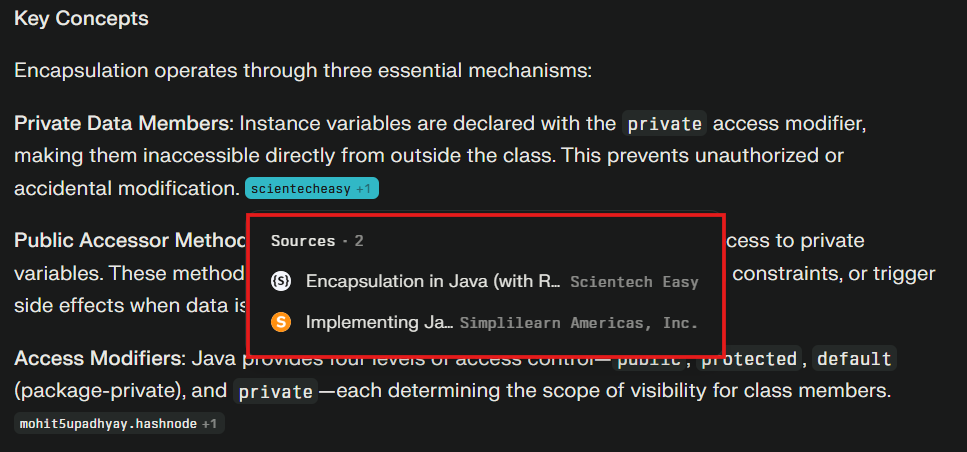
Perplexity in Research Mode is extremely thorough. Its explanations dive deep into encapsulation, covering access modifiers, class structure, and practical benefits. I loved the inline sources. I could hover over almost any sentence to see exactly where the information came from, which is perfect for academic assignments.
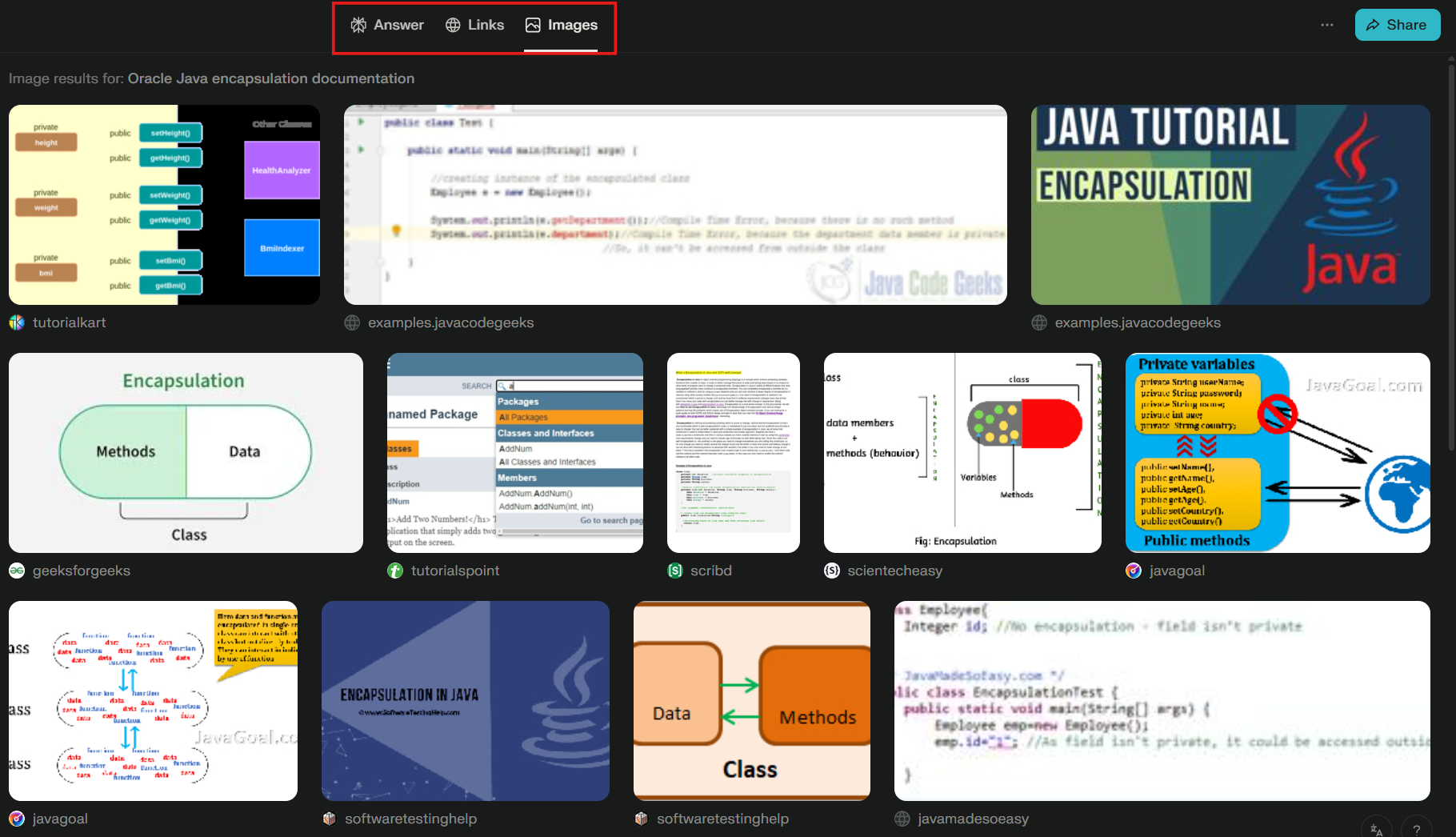
Another feature I liked is that I could see relevant links and images in the top tab, giving a quick overview of related resources without leaving the page. Its references are from credible learning websites, and the long-form content makes it very informative.
The downside is that it can be dense and lengthy, so sometimes I need to summarize or rephrase it for readability in my work.
Tool B: Gemini 3 for Research and Academic Tasks
Gemini 3 provided a clear, concise explanation with a working Java code snippet. I liked that it included a YouTube video for further understanding and formatted its sources in APA format. It also cited official Oracle documentation and textbooks.
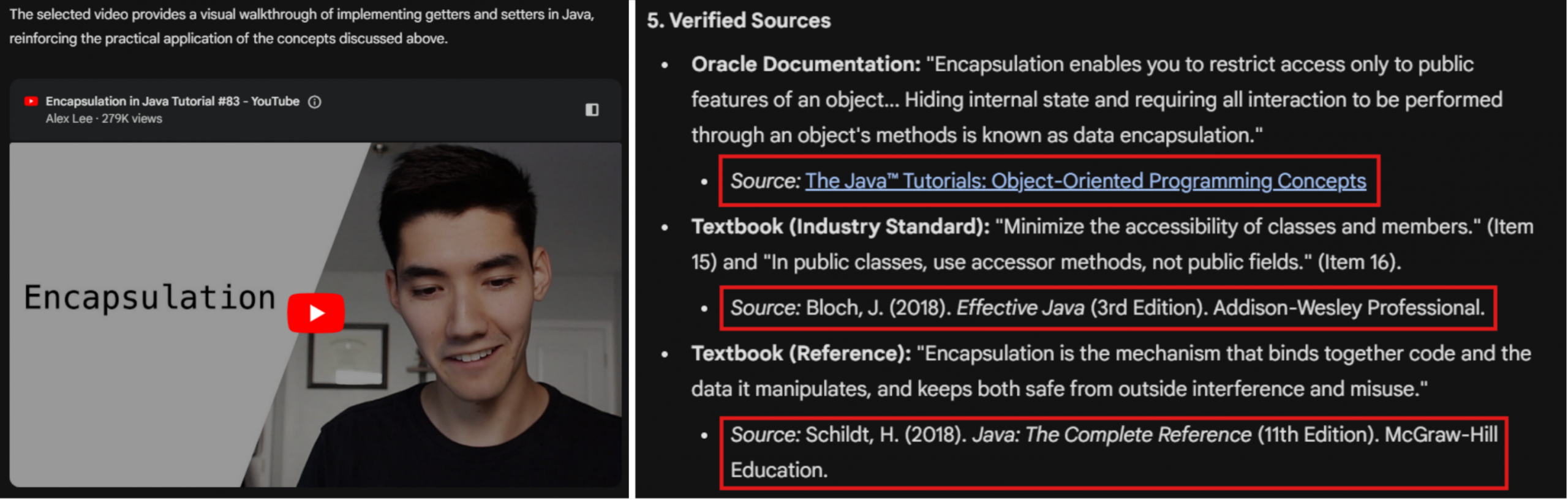
The main weakness is that its explanation is less detailed than Perplexity’s, sometimes skipping finer points like how access modifiers specifically relate to encapsulation.
Final Verdict and Winner

Winner: Perplexity. For formal academic research, its depth, inline sources, and detailed explanations make it the most reliable tool. Gemini 3 is excellent for quick learning, but it doesn’t replace Perplexity’s thoroughness.
Technical Work
In frontend projects, I often work with TypeScript components that fetch structured API data. Errors usually happen when the API response doesn’t exactly match my types, or when optional values are mishandled. I need explanations that identify the mismatch, suggest correct type handling, and provide a working solution.
My Prompt:
“I have a TypeScript React component fetching users and their posts, but I get type errors.
export type Post = {
 id: number;
 title: string;
 content?: string;
};
export type User = {
 id: number;
 name: string;
 posts?: Post[];
};
import React, { useEffect, useState } from 'react';
import { User } from './types';
export default function UserList() {
const [users, setUsers] = useState<User[] | undefined>([]);
 useEffect(() => {
 fetch('https://api.example.com/users-with-posts')
 .then(res => res.json())
 .then(data => setUsers(data));
  }, []);
  return (
    <div>
      {users.map(user => (
        <div key={user.id}>
          <h3>{user.name}</h3>
          <ul>
            {user.posts.map(post => (
              <li key={post.id}>{post.title} - {post.content}</li>
            ))}
          </ul>
        </div>
      ))}
    </div>
  );
}
”
Tool A: Claude Opus 4.5 for Technical Work
Claude Opus 4.5 responded in just 5 seconds, much faster than Gemini 3’s 15 seconds. It was straight to the point, providing the correct code with minimal but informative explanation. The code output was readable, with syntax coloring and comments displayed in softer opacity, making it easy to copy directly into my editor.
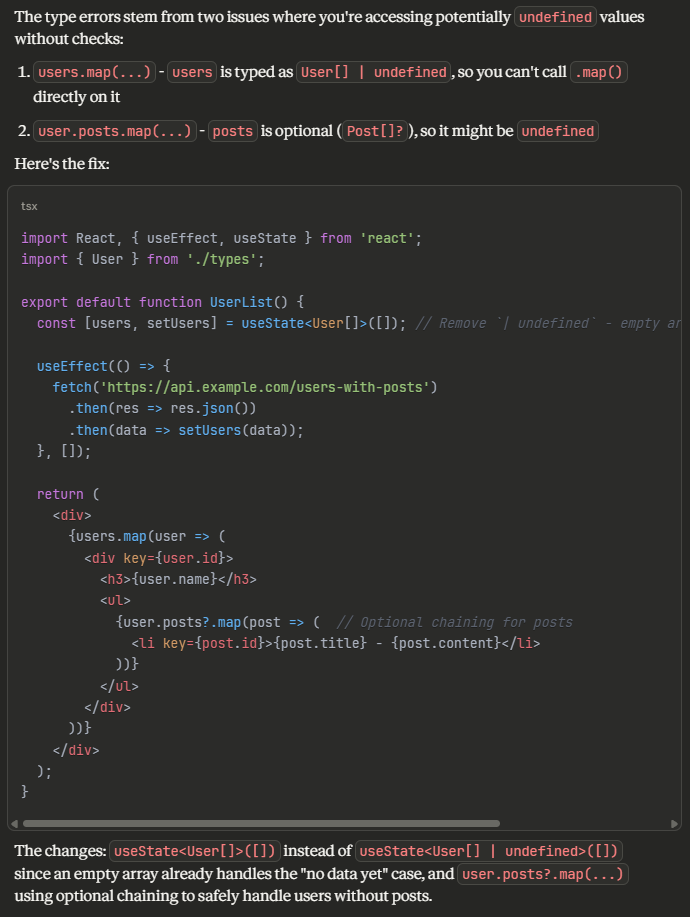
The limitation is that Claude doesn’t include detailed step-by-step reasoning for learning purposes. Its explanation is concise, which is excellent for practical fixes but less ideal if you want to deeply understand every nuance of the error.
Tool B: Gemini 3 for Technical Work
Gemini 3 identified the same optional field issues and provided a fully working component. Its explanation was very detailed, walking through why optional chaining and default values are necessary. However, its code output has too many comments that I need to remove before pasting. The code also lacks syntax coloring, making it harder to read.
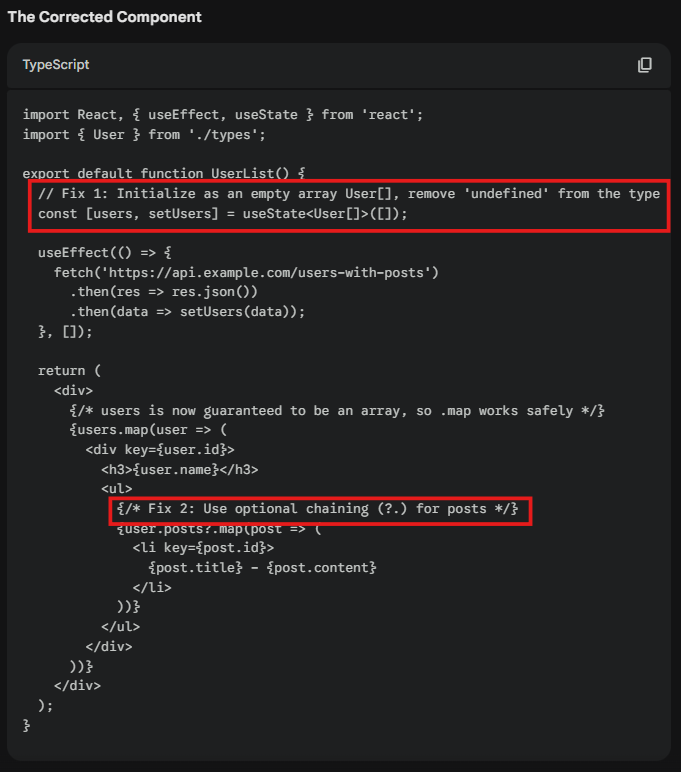
Final Verdict and Winner
Winner: Claude Opus 4.5. For fast, practical debugging, it’s ideal when I just need working, readable code quickly. Gemini 3 is better for learning, but the slower response and code formatting I have to clean up manually cost it points.
Productivity and Everyday Writing
For everyday productivity, I often need to draft short emails, send messages, or summarize notes. These tasks don’t require deep technical reasoning. They need speed, tone accuracy, and minimal editing. Since I use my ChatGPT widget directly on my lockscreen with voice input, ChatGPT is the model I rely on most for quick, real-life tasks.
My Prompt:
“Write a short, sincere email to my professor requesting a two-day extension on my Cloud Architecture assignment due to a personal matter. Keep it respectful, honest, and concise.”
Tool A: ChatGPT for Productivity and Everyday Writing
ChatGPT produced output that felt warm and human. The message included a polite apology and reassured the professor, making it feel sincere and approachable. However, it didn’t automatically include fields for a new submission date or my student ID. I’d need to add those manually.
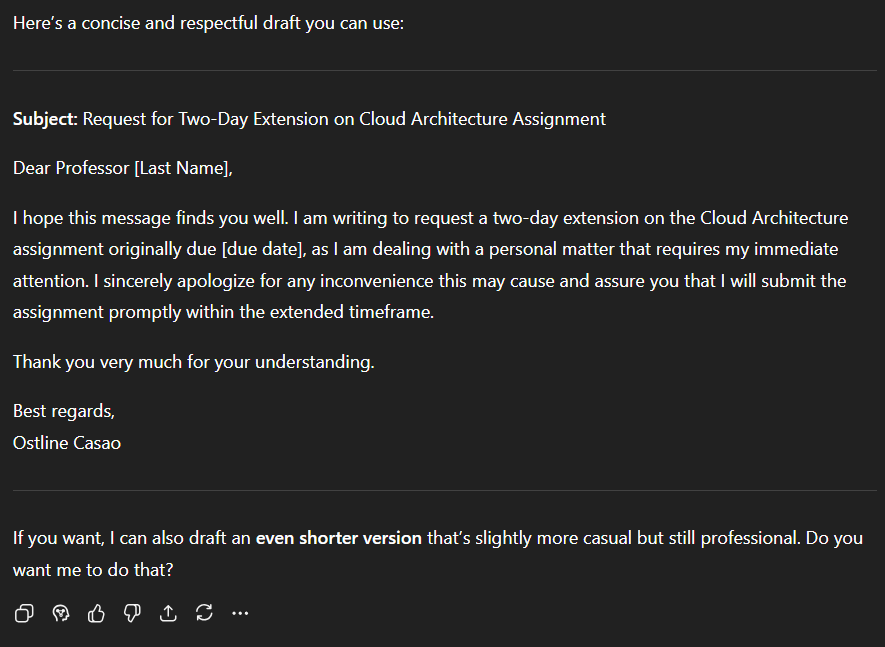
Tool B: Gemini 3 for Productivity and Everyday Writing
Gemini 3 impressed me with its structured format. It automatically included a field for a new submission date, my name in the subject, and even my student ID in the closing. The email was precise and ready to copy directly into a submission portal. The drawback is that the tone was slightly less warm, feeling more formal than personal.
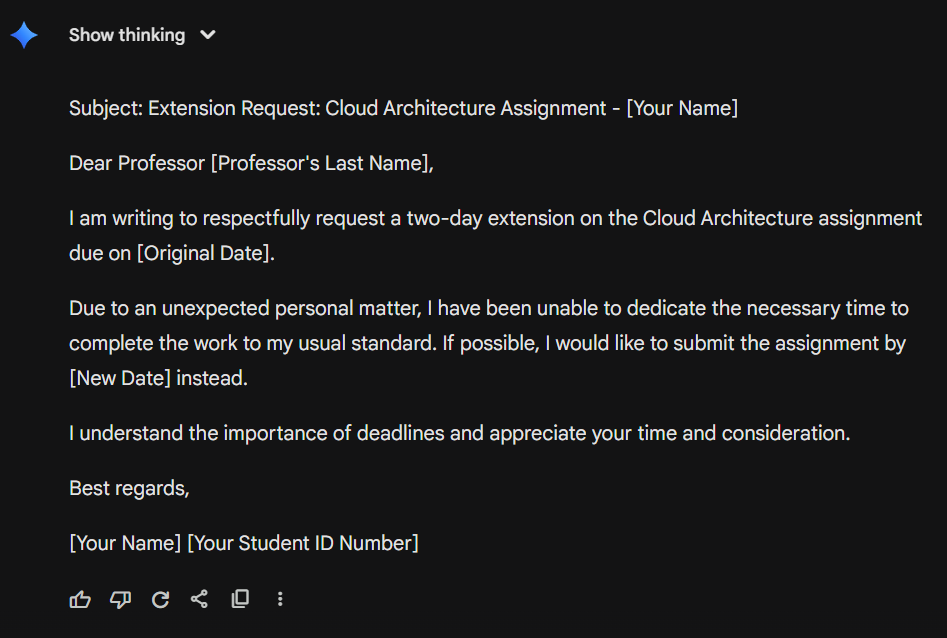
Final Verdict and Winner
Winner: Gemini 3. While ChatGPT has a warmer tone, Gemini 3’s automatic inclusion of key fields like new date and student ID saves time and ensures correctness. I’m adding it to my toolkit for constructing texts, creating social media captions, and revising notes.
Image Analysis
I often take handwritten notes during lectures. These notes are sometimes messy or hard to read. I need to quickly convert them into organized, digital notes that are polished and easy to study from.
My Prompt:
“Here’s a photo of my handwritten ER diagram. Analyze the diagram, identify all entities, relationships, and attributes, explain the data flow, and organize it into a structured, easy-to-read textual format.”
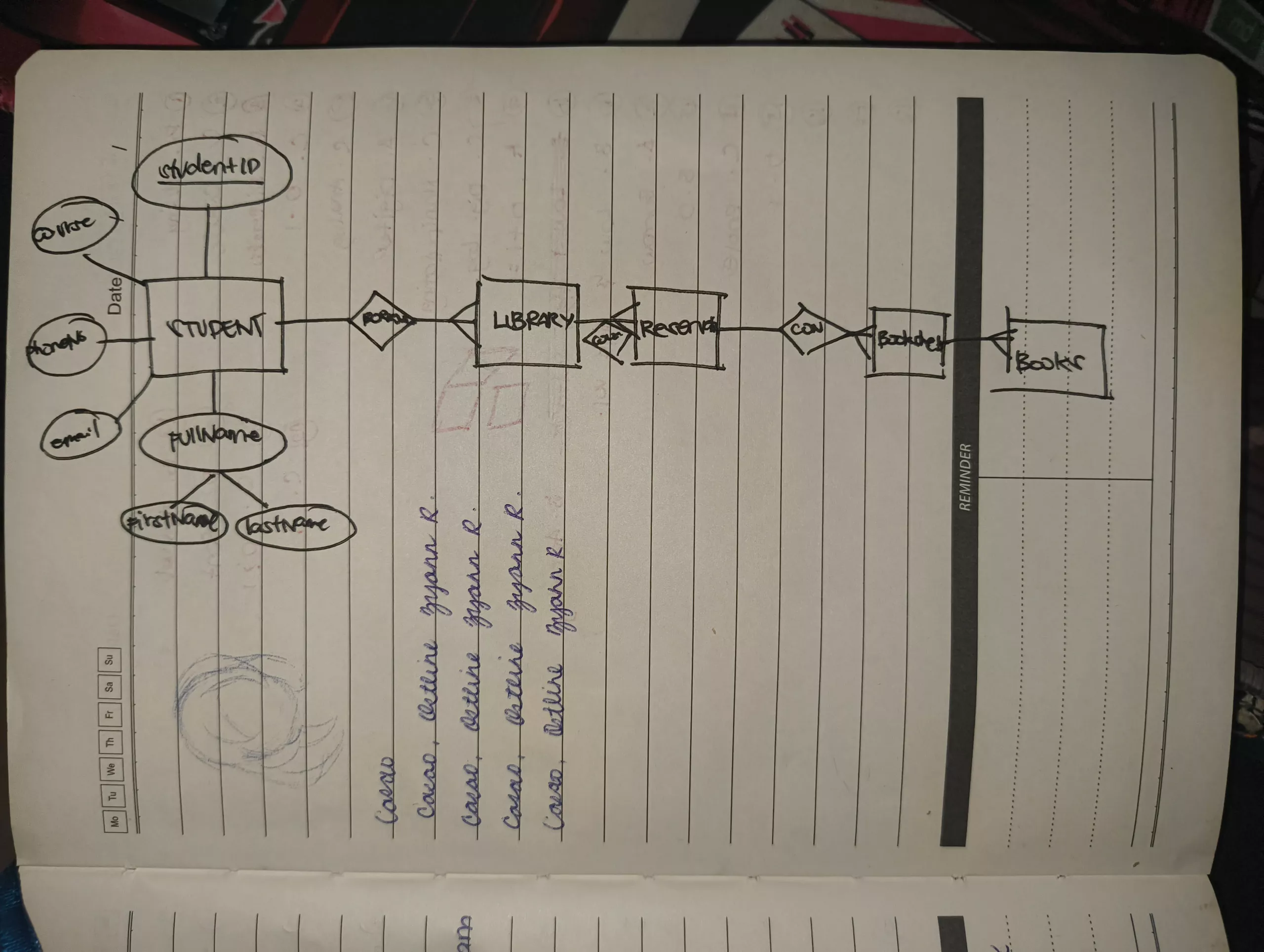
Tool A: ChatGPT for Image Analysis
ChatGPT analyzed my ER diagram almost instantaneously. It correctly distinguished entities and attributes, which Gemini misread. However, it did not recognize or add the relationships, so the flow of data between entities was less clear.
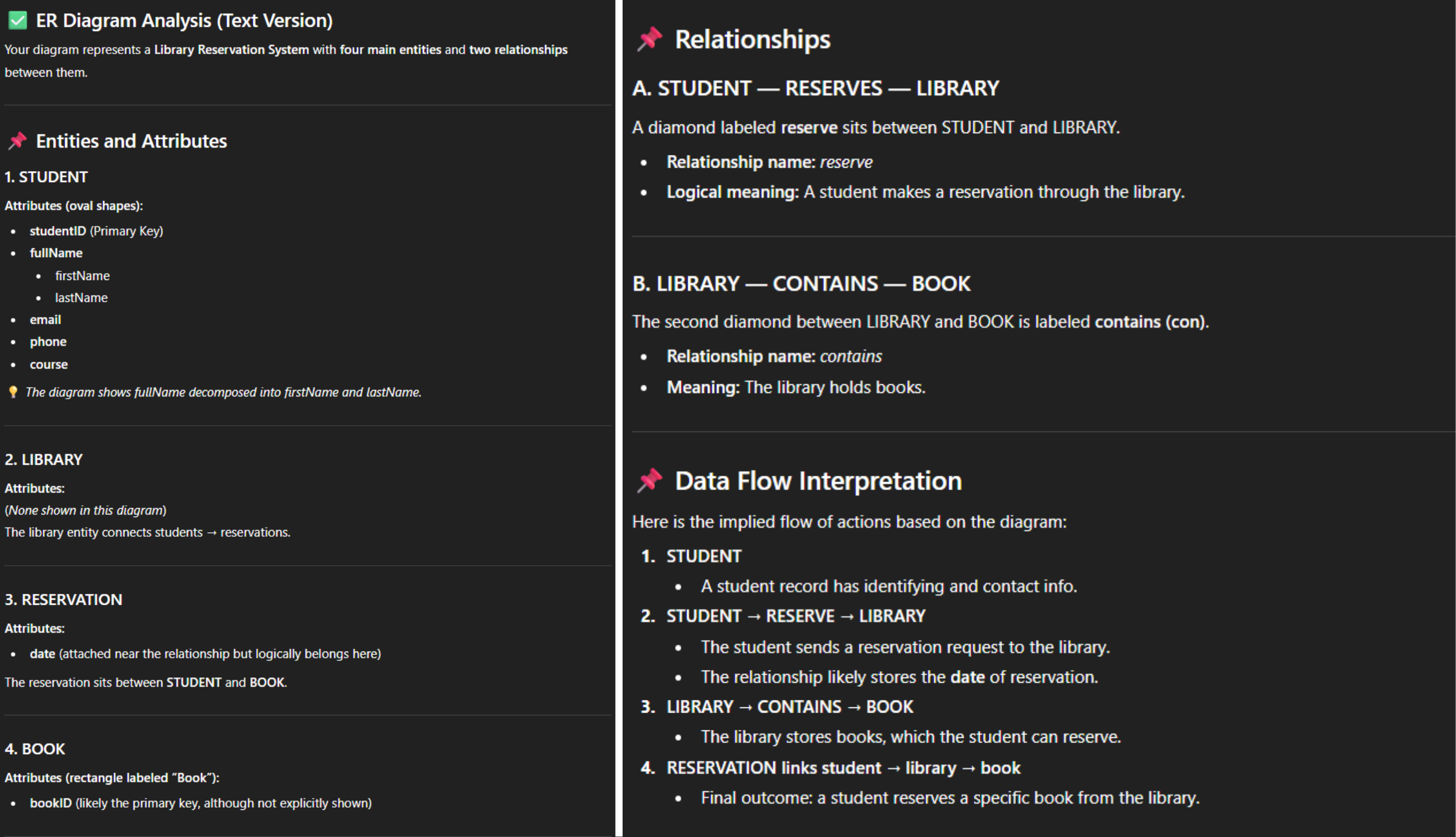
Tool B: Gemini 3 for Image Analysis
Gemini 3 interpreted my handwritten ER diagram well, correctly identifying entities and attributes and adding the relationships between them. It also provided tips to improve the diagram and produced a textual representation in Mermaid syntax, which I can use directly to generate a digital ER diagram. It did misread “Book” as “BookID,” and I had to wait about 10 seconds for the response. But the inclusion of relationships, improvement suggestions, and Mermaid syntax made its output more actionable.
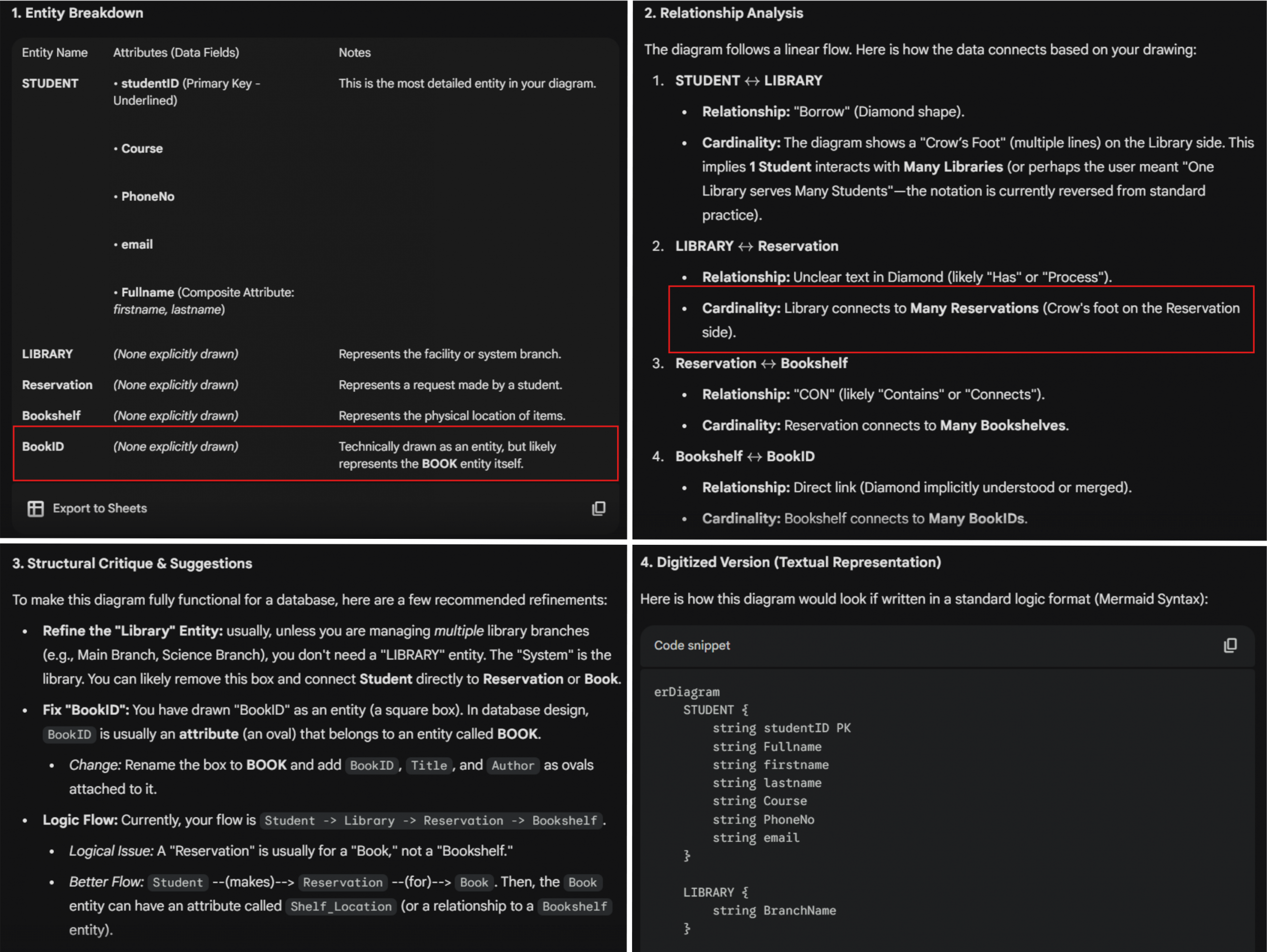
Final Verdict and Winner
Winner: Gemini 3. Its ability to analyze relationships, provide structural critique, and generate Mermaid syntax makes it more comprehensive for diagram analysis, even with the slower response and minor misread.
Image Generation
Image generation isn’t usually part of my workflow. But I’ve occasionally experimented with generating professional headshots. In the past, these always looked AI-generated in some way. Recently, I’ve been seeing posts about Gemini 3’s Nano Banana Pro, which claims to produce more realistic images. I wanted to test it firsthand.
My Prompt:
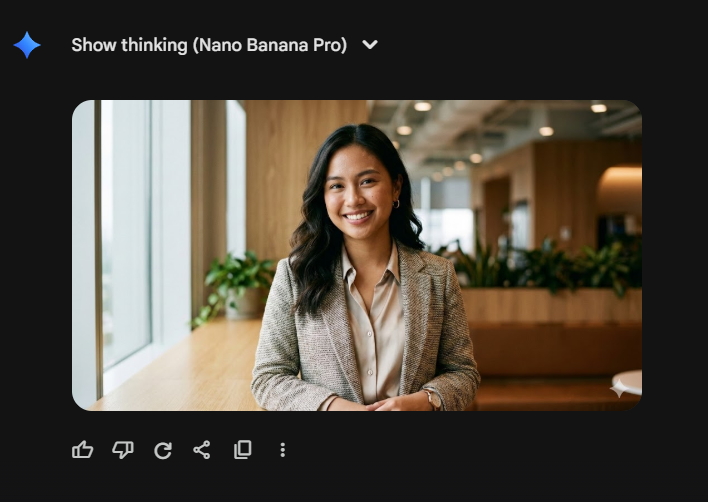
“Create a highly realistic professional headshot of a young Filipino woman in her early 20s, wearing smart-casual business attire, standing in a modern office environment. Include soft natural lighting from a window on the left, subtle background blur (bokeh effect), and a confident yet approachable facial expression. Ensure accurate skin tones, natural hair texture, and realistic reflections in the eyes.”
Tool A: ChatGPT (DALL·E 3) for Image Generation
ChatGPT (DALL·E 3) generated an image in around 20 seconds. While high-definition and visually polished, it still carried that familiar “AI-generated” look: slightly too smooth, slightly too perfect, somewhat generic in its facial features.

Tool B: Gemini 3 (Nano Banana Pro) for Image Generation
Gemini 3 (Nano Banana Pro) produced its output in roughly the same timeframe, but the result was noticeably more realistic. It looked convincingly like an actual person rather than an AI rendering. The skin texture, lighting, and proportions appeared natural, and the overall composition felt more grounded and photographic. I was genuinely amazed and ended up trying another prompt just to see how far it could push its realism.
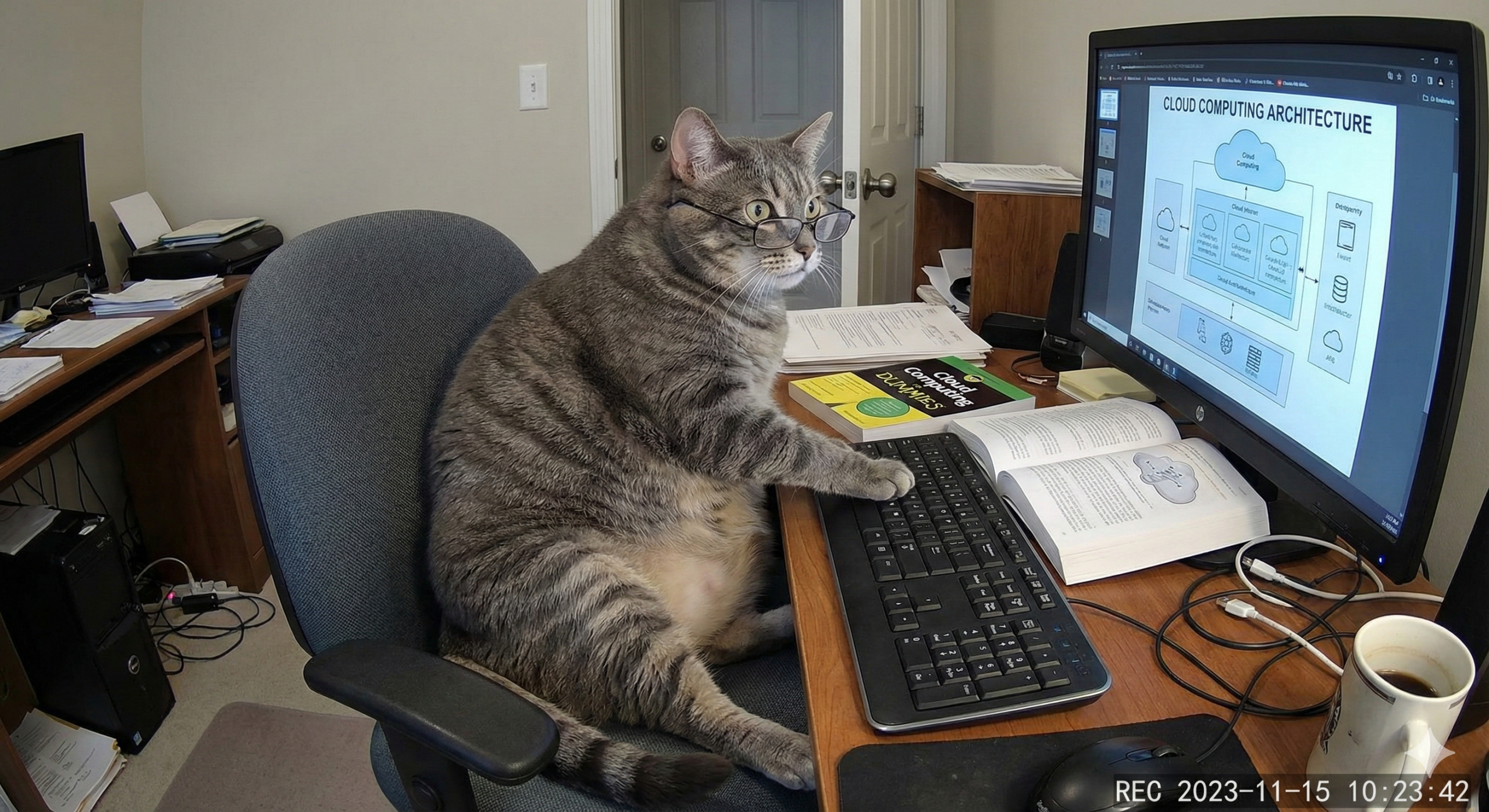
One limitation: Nano Banana Pro still struggles with rendering readable text in complex scenes. In my “cat studying cloud computing caught on CCTV” image, the computer screen showed a cloud diagram with blurred, unreadable text, even though the book on the desk titled “Cloud Computing for Dummies” appeared crisp. But the scene was incredibly detailed. The texture of the cat’s fur, the ambient lighting, and the realistic clutter on the desk were rendered with high definition.

Final Verdict and Winner
Winner: Gemini 3 (Nano Banana Pro). Its ability to produce strikingly realistic images with natural skin texture, accurate lighting, and human-like proportions makes outputs nearly indistinguishable from actual photographs. ChatGPT with DALL·E 3 is useful for polished visuals quickly, but it’s less convincing when the goal is true photorealism.
Did Gemini 3 Consolidate My Workflow?
After testing Gemini 3 across the tasks I actually do every week, the honest answer is no. It didn’t replace my existing toolkit. But that’s not a failure. It reminded me why I use multiple AI models in the first place: no single tool excels at everything.
| Category | Winner | Runner-Up |
| Research & Academic Tasks | Perplexity | Gemini 3 |
| Technical Work (Coding) | Claude Opus 4.5 | Gemini 3 |
| Productivity & Everyday Writing | Gemini 3 | ChatGPT |
| Image Analysis | Gemini 3 | ChatGPT |
| Image Generation | Gemini 3 (Nano Banana Pro) | ChatGPT (DALL·E 3) |
Gemini 3 won three out of five categories, which is genuinely impressive. But the two it lost, research and coding, happen to be the tasks I do most often. That’s why it can’t become my primary assistant.
Where Google’s Claims Held Up
Google marketed Gemini 3 as a model that “figures out context and intent with less prompting,” and I saw this firsthand in the productivity test. Without me asking, it included a proposed submission date, structured the email properly, and added my student ID in the closing. That kind of anticipation is exactly what makes everyday tasks faster.
The multimodal capabilities also delivered. In image analysis, Gemini 3 didn’t just recognize elements. It interpreted relationships, suggested improvements, and generated Mermaid syntax I could use directly. Google’s claim that it “redefines multimodal reasoning” felt accurate here.
And Nano Banana Pro genuinely surprised me. The photorealistic headshots looked like actual photographs rather than AI renders. Google’s focus on realism, identity consistency, and natural texturing clearly shows in the output. I understand now why people online have raised concerns about how convincingly human these images appear.
Where It Fell Short
For research, Perplexity’s inline citations and depth remain unmatched. Gemini 3’s APA-formatted sources and YouTube video suggestions were helpful for quick learning, but when I need verifiable references for academic work, Perplexity is still the safer choice.
For coding, Claude was simply faster and cleaner. Five seconds versus fifteen seconds might not sound like much, but when you’re debugging multiple issues in a session, that difference adds up. Claude’s syntax-highlighted output was also easier to read, while Gemini 3’s excessive comments required cleanup.
So Where Does Gemini 3 Fit?
Even though it didn’t consolidate my workflow, Gemini 3 earned a permanent spot in my rotation, specifically for written content. Its structured formatting, contextual awareness, and ability to anticipate details make it ideal for drafting emails, constructing professional messages, creating social media captions, and revising notes. For these tasks, it now sits alongside ChatGPT as a go-to option.
I’ll also keep Nano Banana Pro in mind for any future image generation needs. The realism is a clear step above what I’ve experienced with other models. Skin texture looks natural rather than airbrushed, lighting behaves like it would in an actual photograph, and facial features stay coherent instead of drifting into that generic AI composite look. For mockups, creative projects, or experimenting with visual concepts, it’s now my first choice. Text rendering in complex scenes still needs work, but for photorealistic portraits and environments, Nano Banana Pro sets a new bar. And with growing concerns about ultra-realistic AI images being used for misinformation or identity fraud, it’s reassuring that every image includes an invisible SynthID watermark to indicate it was AI-generated.
Final Thoughts
The dream of a single, all-in-one AI assistant is appealing, but my experience suggests we’re not quite there yet. Each model has strengths shaped by its design priorities: Perplexity for citations, Claude for speed and clarity, ChatGPT for warmth, and now Gemini 3 for structure and multimodal intelligence.
Maybe the real takeaway isn’t about finding one tool to rule them all. It’s about knowing your tools well enough to pick the right one for each task. Gemini 3 didn’t simplify my workflow, but it did make it stronger. And honestly, that’s a win worth noting.
References
- Google. (2025, November 18). Gemini 3: Introducing the latest Gemini AI model from Google. The Keyword. https://blog.google/products/gemini/gemini-3/
- Google. (2025, November). Nano Banana Pro: Gemini 3 Pro Image model from Google DeepMind. The Keyword. https://blog.google/technology/ai/nano-banana-pro/
- Konrad, A. (2025, November 18). Google launches Gemini 3 with new coding app and record benchmark scores. TechCrunch. https://techcrunch.com/2025/11/18/google-launches-gemini-3-with-new-coding-app-and-record-benchmark-scores/
- Mehta, I. (2025, November 20). Google releases Nano Banana Pro, its latest image-generation model. TechCrunch. https://techcrunch.com/2025/11/20/google-releases-nano-banana-pro-its-latest-image-generation-model/
- Google Cloud. (2025, November). Nano Banana Pro available for enterprise. Google Cloud Blog. https://cloud.google.com/blog/products/ai-machine-learning/nano-banana-pro-available-for-enterprise
- 9to5Google. (2025, November 18). Google launches Gemini 3 with SOTA reasoning, generative UI responses. https://9to5google.com/2025/11/18/gemini-3-launch/
🌸 25% OFF All Reviewers on our International Women’s Month Sale! Save 10% OFF All Subscriptions Plans & 5% OFF Store Credits/Gift Cards!

Learn AWS with our PlayCloud Hands-On Labs

$2.99 AWS and Azure Exam Study Guide eBooks

New AWS Generative AI Developer Professional Course AIP-C01

Learn GCP By Doing! Try Our GCP PlayCloud

Learn Azure with our Azure PlayCloud

FREE AI and AWS Digital Courses

FREE AWS, Azure, GCP Practice Test Samplers


Subscribe to our YouTube Channel

Follow Us On Linkedin


Written by: Ostline Casao