In my previous article, I demonstrated how to use the Amazon Comprehend console to manually detect and redact Personally Identifiable Information (PII) from text files. While this hands-on method is excellent for learning the fundamentals of PII detection, it’s not practical in real-world, high-volume environments where speed and accuracy are essential. In such scenarios, organizations need more than just a simple, one-time approach—they require a robust, fully automated pipeline that sanitizes sensitive data as soon as it enters the system, without the need for manual intervention.
This article will walk you through the creation of an automated workflow that solves this challenge. We’ll design a solution where uploading a text file to Amazon S3 will automatically trigger PII detection and redaction using Amazon Comprehend. The sanitized output will then be stored back in S3, neatly organized under a dedicated folder (prefix) for easy access.
This approach not only ensures that sensitive data is processed securely but also eliminates delays associated with manual processes, enabling real-time data sanitization at scale. By the end of this guide, you’ll have a production-ready pipeline that can handle thousands of files daily while ensuring compliance with data protection regulations
Why Automate Personally Identifiable Information (PII) Redaction?
- Compliance: Regulations like GDPR, HIPAA, and PCI DSS require strict handling of PII. Automation reduces human error.
- Scalability: Manual console jobs don’t scale when you’re processing thousands of files daily.
- Real-time processing: Event-driven pipelines ensure sensitive data is sanitized before it’s consumed downstream.
Architecture Overview
Here’s the high-level flow:
- Upload to S3 → A text file containing raw data is uploaded to the
raw/folder of an S3 bucket. - S3 Event Notification → The bucket is configured to trigger an AWS Lambda function whenever a new object is created in
raw/. - Lambda Function → The function retrieves the file, calls Amazon Comprehend’s PII detection API, redacts sensitive entities, and saves the sanitized version.
- Output Storage → The redacted file is written back to the same bucket under the
redacted/folder.
Step-by-Step Implementation:
1. Create an S3 Bucket

- Bucket name: Enter a unique bucket name.
- Inside this bucket, organize files with prefixes:
raw/→ for unprocessed input filesredacted/→ for sanitized output files
2. Create the Lambda Function
Lambda retrieves the file from raw/, processes it with Amazon Comprehend, and writes the redacted version back to redacted/
3. IAM Permissions
Ensure that the Lambda function has the necessary permissions to interact with S3 and Amazon Comprehend. You can create an inline policy for the Lambda execution role as follows:
{
    "Version": "2012-10-17",
    "Statement": [
        {
            "Sid": "VisualEditor0",
            "Effect": "Allow",
            "Action": [
                "s3:PutObject",
                "s3:GetObject",
                "s3:ListBucket",
                "comprehend:DetectPiiEntities"
            ],
            "Resource": "*"
        }
    ]
}
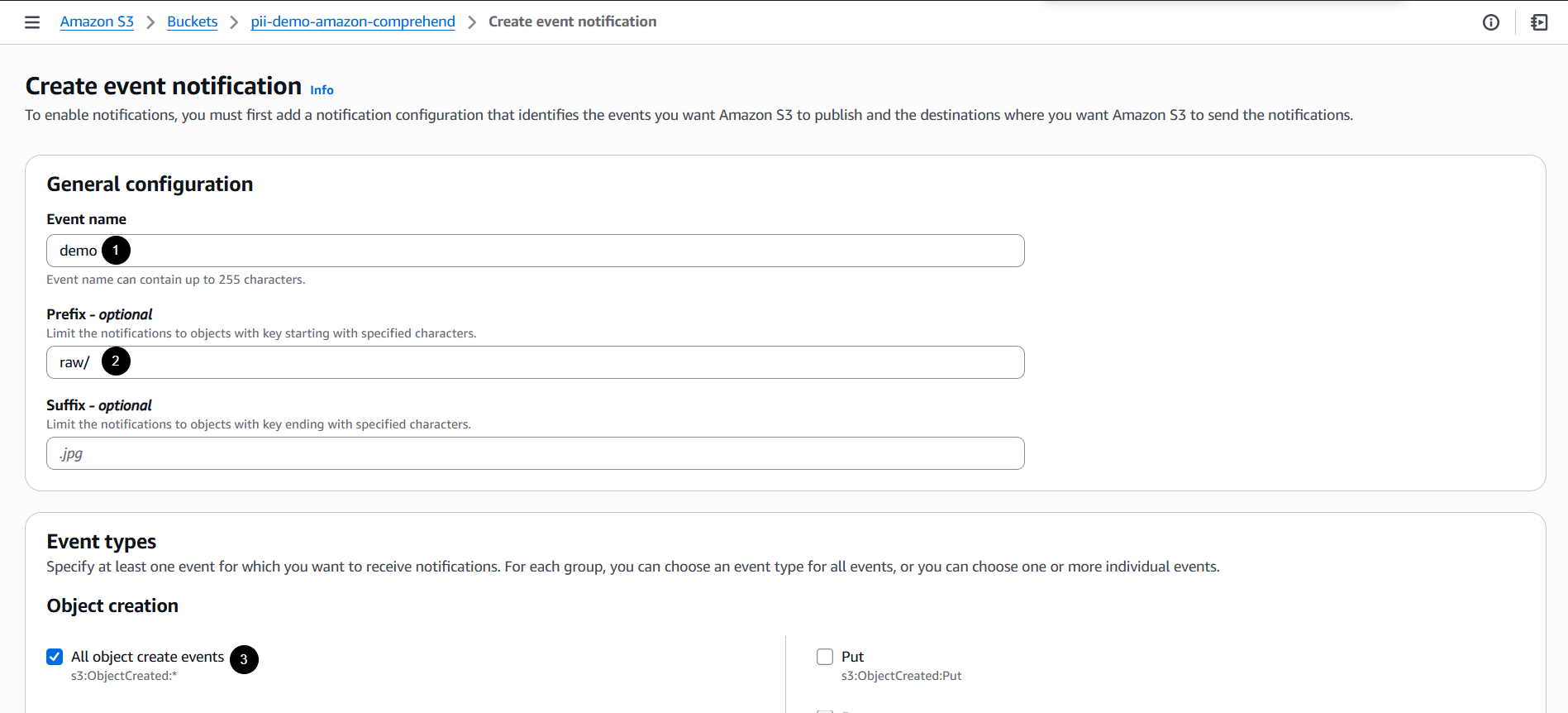
4. Configure S3 Event Notifications
- On the bucket, go to the Properties tab.
- Scroll down, then navigate to Event notifications
- Click Create event notification.
- Set up an event notification:
- Event name: Enter desired name.
- Prefix filter:
raw/(so only new raw files trigger the workflow) - Event type:
s3:ObjectCreated:*
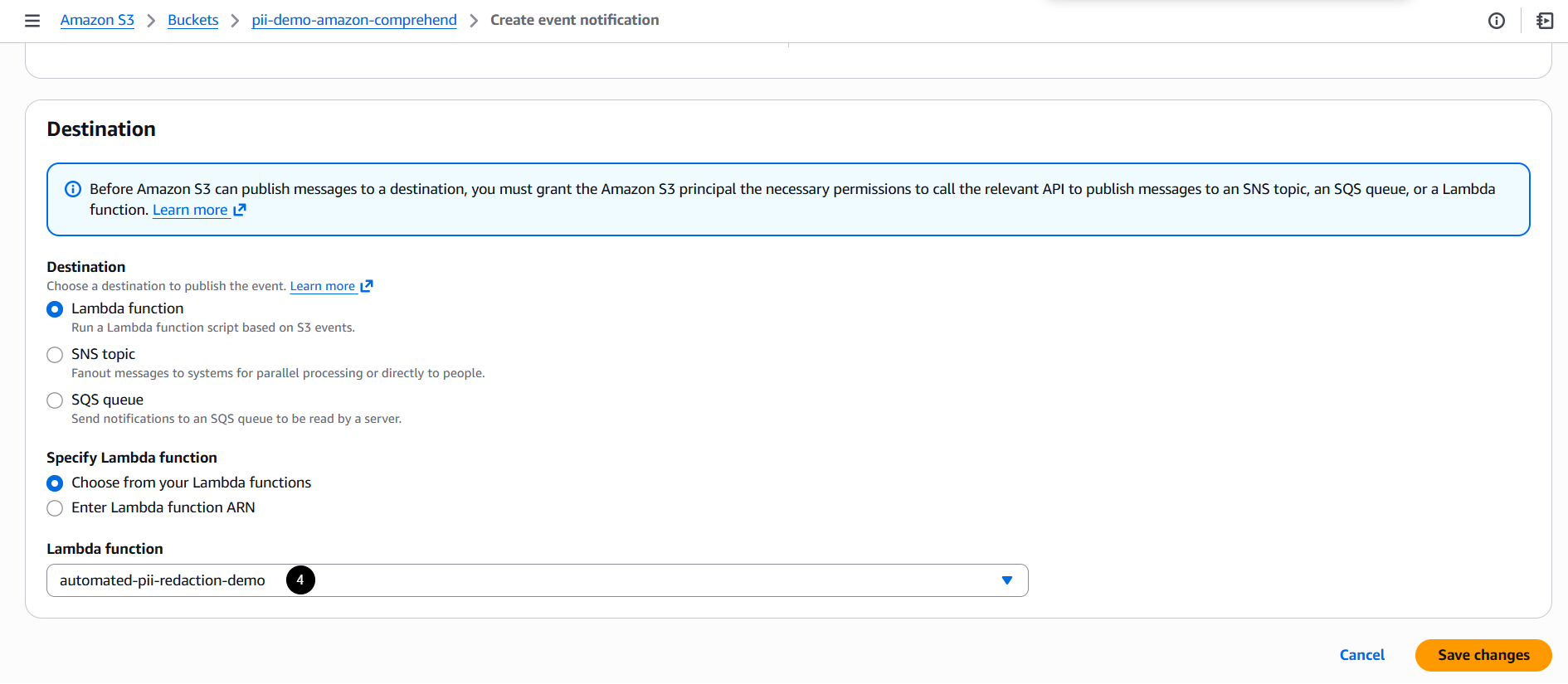
- Destination: AWS Lambda function

5. Test the Workflow
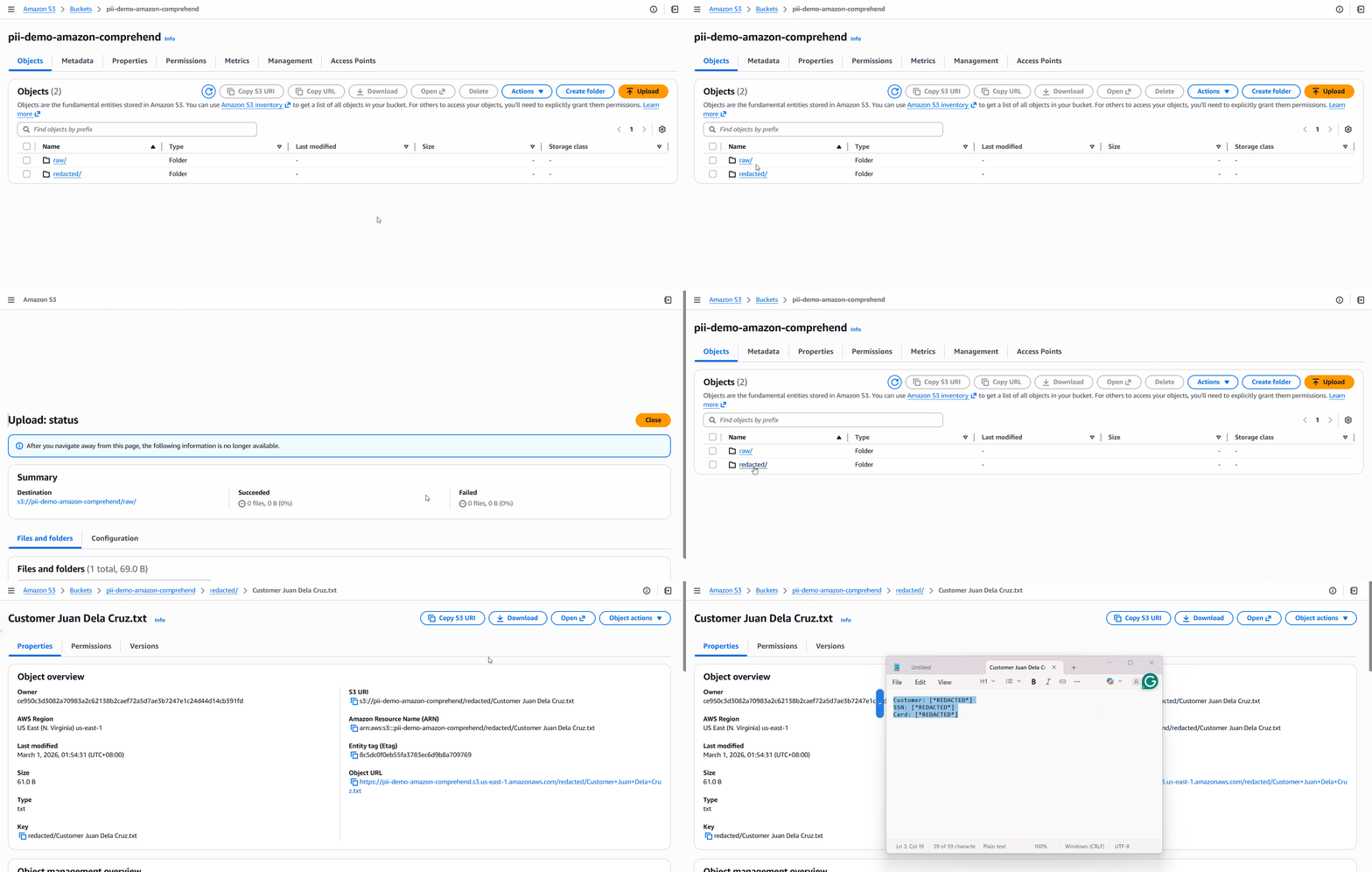
Upload a file to raw/. The Lambda function will automatically generate a redacted copy in redacted/.
Input:
Customer: Juan Dela Cruz
SSN: 123-45-6789
Card: 4111 1111 1111 1111
Output (redacted):
Considerations:
- File size limits:
DetectPiiEntitiessupports up to 100 kilobytes of UTF-8 encoded characters. For larger files, use asynchronous batch jobs (StartPiiEntitiesDetectionJob). - Latency: Synchronous detection is fast for small files; batch jobs scale better for large datasets.
- Cost: Amazon Comprehend charges based on the volume of text processed. You can monitor your usage and costs using AWS Cost Explorer to keep track of your expenses.
- Bucket vs. Prefix: For simplicity, it’s generally advisable to use one bucket with appropriate prefixes (e.g.,
raw/andredacted/). However, if your organization has strict compliance or IAM isolation requirements, you might opt for separate buckets
Automate File Uploading with Slack
For even more convenience, you can automate file uploads directly from Slack to your S3 bucket using AWS Lambda. This way, whenever a file is uploaded to a designated Slack channel, it can be automatically processed and uploaded to the raw/ folder in your S3 bucket. For more details, refer to this: https://tutorialsdojo.com/automating-file-uploads-from-slack-to-amazon-s3-harnessing-aws-lambda-and-slack-api/
Conclusion:
By combining Amazon S3 event notifications, AWS Lambda, and Amazon Comprehend, organizations can set up a real-time, automated pipeline for Personally Identifiable Information (PII) redaction. This approach enhances compliance, scalability, and security while minimizing the need for manual intervention.
By transforming a console-based workflow into a production-ready architecture, this solution is ideal for organizations handling sensitive customer data at scale.
References:
https://docs.aws.amazon.com/comprehend/latest/APIReference/API_StartPiiEntitiesDetectionJob.html
https://docs.aws.amazon.com/comprehend/latest/dg/realtime-pii-api.html
🌸 25% OFF All Reviewers on our International Women’s Month Sale! Save 10% OFF All Subscriptions Plans & 5% OFF Store Credits/Gift Cards!

Learn AWS with our PlayCloud Hands-On Labs

$2.99 AWS and Azure Exam Study Guide eBooks

New AWS Generative AI Developer Professional Course AIP-C01

Learn GCP By Doing! Try Our GCP PlayCloud

Learn Azure with our Azure PlayCloud

FREE AI and AWS Digital Courses

FREE AWS, Azure, GCP Practice Test Samplers


Subscribe to our YouTube Channel

Follow Us On Linkedin


Written by: Nestor Mayagma Jr.