
Search your notes for “cloud bill” and keyword search comes back empty, even if you wrote a note about exactly that. Your note says “AWS Budgets” and “spending”, but keyword search only matches words that appear in the text. Semantic search matches meaning instead, and Amazon Bedrock embeddings let you build it with a few short Python scripts. In this tutorial, you index ten study notes with Amazon Titan Text Embeddings V2, then run semantic search and BM25 keyword search against the same eleven questions. Semantic search put the right passage in its top 3 for all ten answerable questions; keyword search missed one, and it was the cloud bill question.
- What you build: a command-line search over a folder of Markdown notes, in six short Python scripts.
- What you compare: semantic search with Titan Text Embeddings V2 against BM25 keyword search, scored against answers written down before the test.
- What you need: an AWS account you can sign in to through the AWS Management Console, and Python 3.12 or later. You don’t need the AWS CLI.
- What it costs: 659 input tokens for the whole tutorial, about $0.000013, with no AWS resources to clean up.
What Are Amazon Bedrock Embeddings?
An embedding is a list of numbers that represents what a piece of text means. Amazon Bedrock serves embedding models through the same runtime API as its text models: you send text and get a vector back. Texts with similar meaning produce vectors that point in similar directions, even when they share no words. Semantic search uses that property to find a note that answers a question written in different words.
This tutorial uses Amazon Titan Text Embeddings V2, model ID amazon.titan-embed-text-v2:0. It accepts up to 8,192 tokens or 50,000 characters per request and returns a vector of 1,024, 512, or 256 numbers. The model returns the vector and nothing else. Storing and comparing vectors is therefore up to you, in your own code or in a vector database.
Search returns passages from your notes, but it does not write answers. That retrieval step is the first half of retrieval-augmented generation (RAG), and this tutorial stops before the generation half. Because nothing is generated, a bad result shows up as the wrong passage instead of a plausible-sounding answer. You also see which passage matched each question and its score.
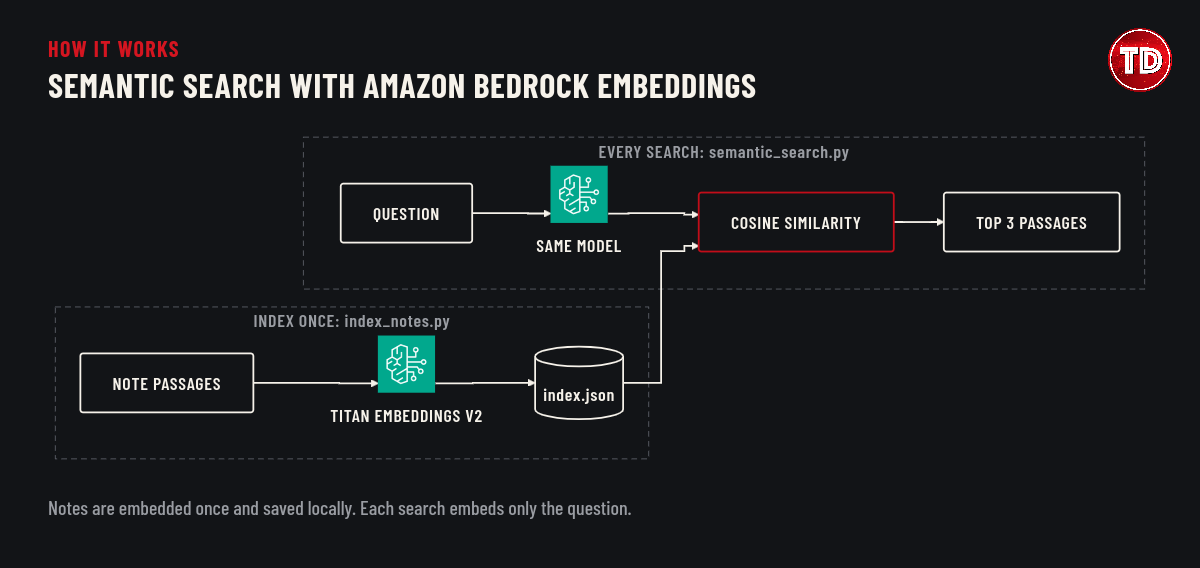
What You Will Build with Amazon Bedrock Embeddings
You will build a command-line tool that searches a folder of Markdown notes. It splits each note into passages, one per paragraph, embeds every passage once with Amazon Bedrock, and saves the vectors in a local index.json file. A second script ranks the same passages with BM25, a long-established keyword-ranking formula, so you can compare both methods on the same questions. You use the Amazon Bedrock console to look up the model and generate a short-term API key, and the scripts send that key with each request. Everything runs on your computer except the embedding calls, and no AWS resources are created.
| File | What it does |
|---|---|
passages.py |
Splits each note into passages, one per paragraph |
embedding.py |
Calls Titan Text Embeddings V2 through Amazon Bedrock |
index_notes.py |
Embeds every passage once and saves index.json |
semantic_search.py |
Ranks passages by meaning |
keyword_search.py |
Ranks passages by shared words (BM25) |
queries.json |
Eleven test questions, ten of them with the passage that should answer them |
compare.py |
Runs the test questions through both searches and prints a table |
Prerequisites
- An AWS account and an IAM user or role that can sign in to the AWS Management Console. Avoid the root user for everyday work.
- Permission to use Amazon Bedrock in
us-east-1. The AWS managed policy AmazonBedrockLimitedAccess, which the console’s API keys page recommends, covers the console pages and the API calls in this tutorial. - Python 3.12 or later. This tutorial was tested with Python 3.14.6 and 3.12.12.
- A code editor and a terminal. The screenshots use Visual Studio Code on macOS.
If you prefer a narrower policy, the scripts need two permissions. bedrock:InvokeModel lets the identity send text to the model, and bedrock:CallWithBearerToken lets it authenticate that call with an Amazon Bedrock API key:
However, this policy covers the scripts only. Browsing the console in Steps 1 and 2 needs more, such as the bedrock:Get* and bedrock:List* read permissions in AmazonBedrockLimitedAccess. You can test the policy in the IAM policy simulator before you attach it. In the test run for this tutorial, the simulator allowed bedrock:InvokeModel on Titan Text Embeddings V2 in us-east-1 and denied it for the older Titan Embeddings G1 model and for us-west-2. If you change the model or the Region, change the ARN to match, or the first call fails with AccessDeniedException.
Titan Text Embeddings V2 costs $0.02 per 1 million input tokens on demand in us-east-1 (Amazon Bedrock pricing, checked November 16, 2026). The complete run in this tutorial used 659 input tokens, which comes to about $0.000013. Your notes are sent to Amazon Bedrock as plain text. For this reason, use the sample notes, or notes that contain nothing sensitive.
Implementation Steps
Step 1: Find Titan Text Embeddings V2 in the Amazon Bedrock Console
Sign in to the AWS Management Console and set the Region selector at the top of the page to US East (N. Virginia), which is us-east-1. Open the Amazon Bedrock console, choose Model catalog in the left navigation pane, and search for Titan Text Embeddings V2. Then choose the model to open its details page. The Details section lists what the scripts depend on: the model ID amazon.titan-embed-text-v2:0, text input of up to 8k tokens, and an embedding output of 1,024, 512, or 256 numbers.
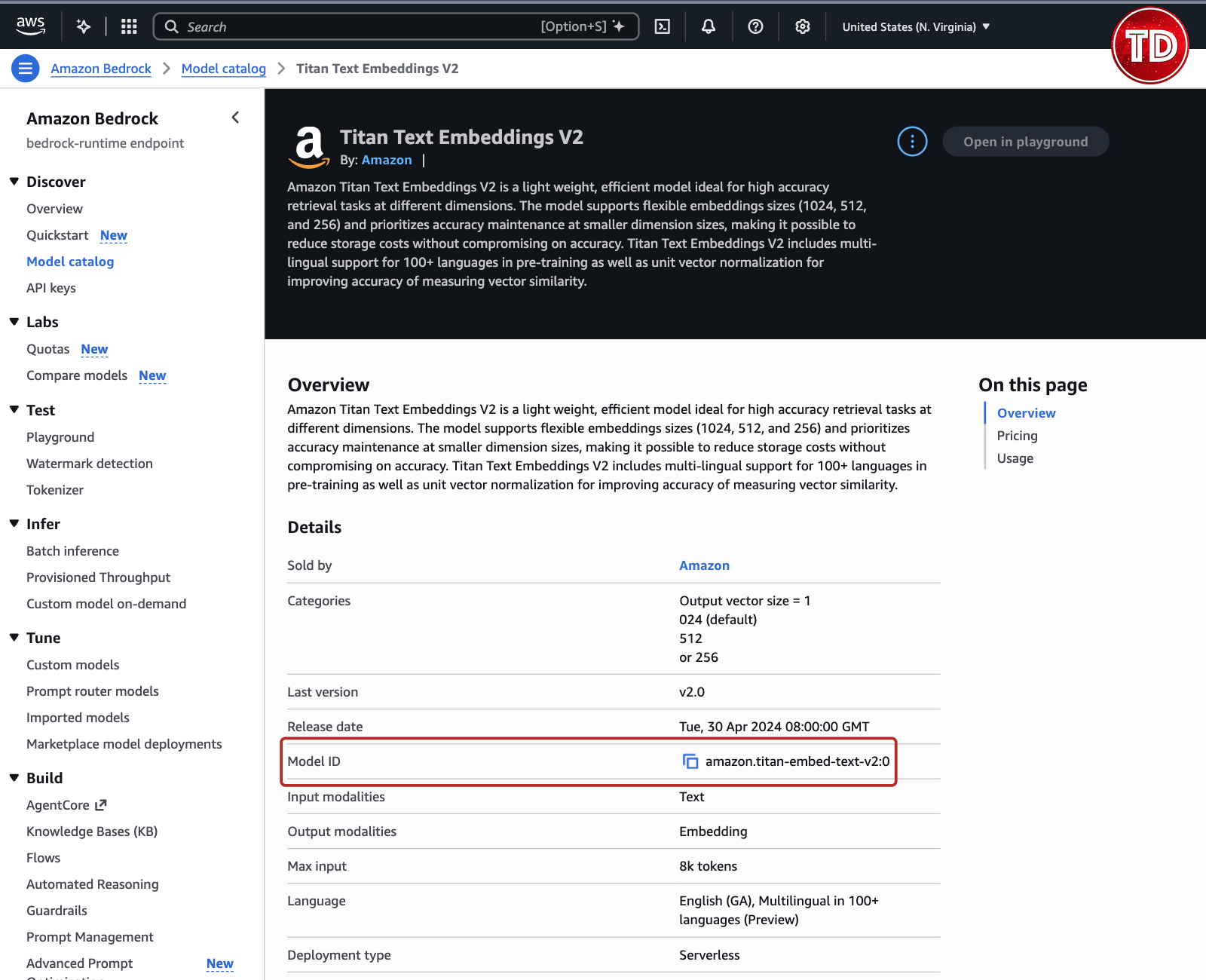
You don’t need to request access to this model first, because Amazon Bedrock enables access to Amazon’s serverless models by default. The model ID on this page is the MODEL_ID value that embedding.py uses later, in Step 5. The Open in playground button is unavailable for this model, so you call it from Python instead. The model returns a vector of numbers rather than text, and the later steps compare those vectors.
Step 2: Generate a Short-Term Amazon Bedrock API Key
Before the scripts can call Amazon Bedrock, they need a way to prove who is calling. Instead of installing the AWS CLI and signing in from the terminal, you can generate an Amazon Bedrock API key in the console. A short-term key inherits the permissions of your console session and works only in the Region where you generate it. It expires when your console session does, after 12 hours at most, and it creates no IAM user or other AWS resource.

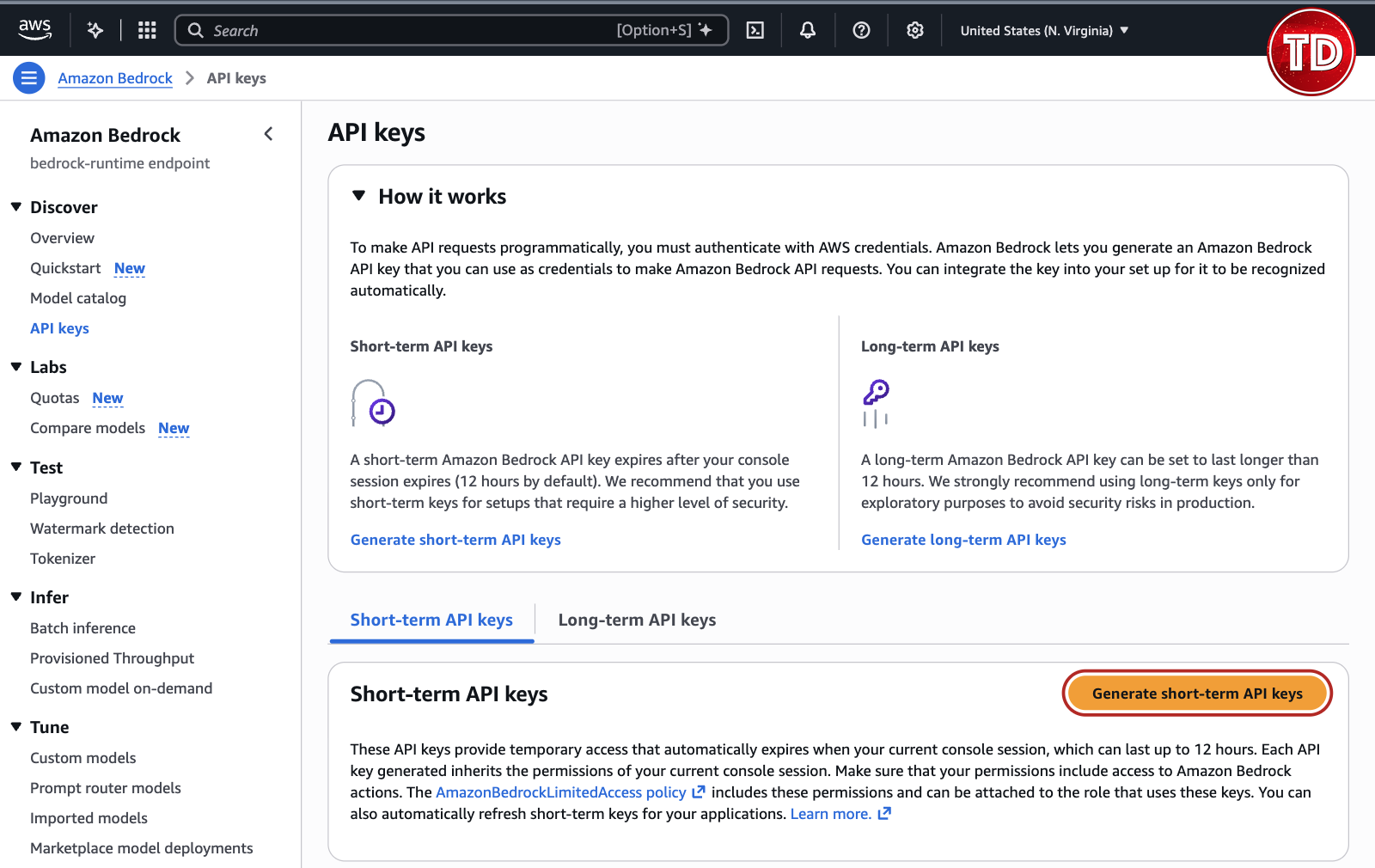
In the left navigation pane, choose API keys. The page offers two key types: a long-term key creates an IAM user, and AWS recommends long-term keys only for exploration. This tutorial uses a short-term key instead. Then, on the Short-term API keys tab, choose Generate short-term API keys.
The dialog that opens shows the key only once. Under Use your API key, keep the MacOS/Linux shell tab selected and choose Copy API Key next to the export AWS_BEARER_TOKEN_BEDROCK= command. You paste that command into your terminal in Step 3. The dialog warns that you can’t retrieve the key after you leave it, so if you lose it, generate a new one.
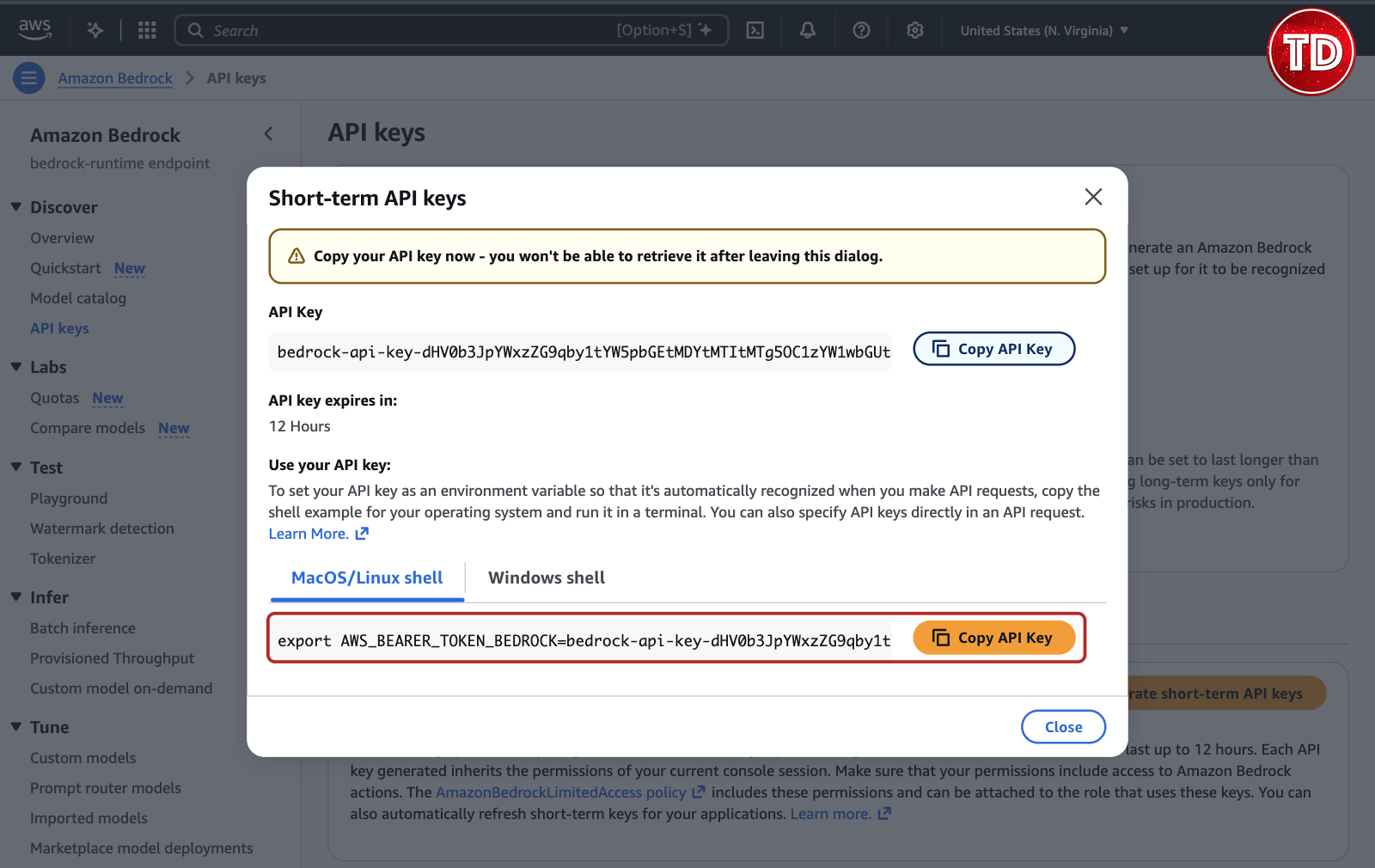
Treat the key like a password. Don’t paste it into your code, commit it to Git, or show it in a screenshot; the key in the screenshot above was replaced with a sample value. The dialog shows an expiry of 12 hours, but the key stops working sooner if your console session ends first. A copy left in your shell history stops working at the same time.
Step 3: Set Up Python for Amazon Bedrock Embeddings
Create a project folder and a Python virtual environment, then install boto3, the AWS SDK for Python. Boto3 1.39.0 and later read an Amazon Bedrock API key from the AWS_BEARER_TOKEN_BEDROCK environment variable. The scripts therefore need no AWS credentials file, CLI profile, or access keys. Run these commands in a terminal:
Next, paste the export command you copied in Step 2 and press Enter. It has this form, with your key in place of the placeholder:
Then check that the terminal has the key, without printing the key itself:
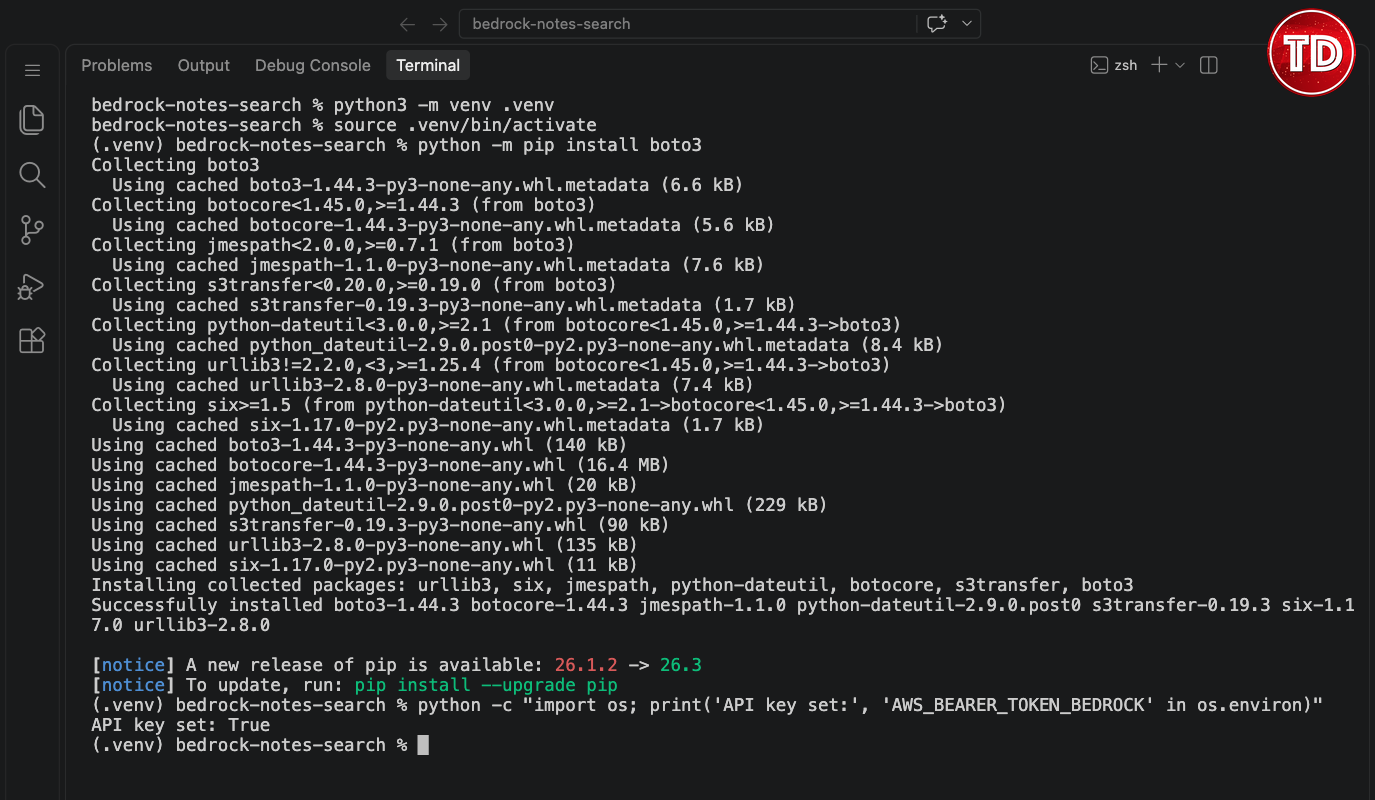
Open the bedrock-notes-search folder in your editor and run every later command from it. The variable lasts only as long as this terminal session. When you open a new terminal, run source .venv/bin/activate and paste the export command again. If the key has expired by then, generate a new one in Step 2.
Step 4: Create the Sample Notes
The sample set has ten short study notes on AWS topics, each with one or two paragraphs. Using the same notes also lets you compare your Amazon Bedrock embeddings results with the ones in this tutorial. Run this script from the project folder. It creates the notes folder and all ten files:
Next, create passages.py. It splits each note on blank lines and turns every paragraph into a passage with an ID made from the file name and the paragraph number, such as s3-versioning.md#1. A paragraph is a useful unit for notes because it usually covers one idea. Much smaller pieces lose context, while much larger ones mix several ideas into one vector.
Check the split:
Step 5: Generate Your First Amazon Bedrock Embedding
Create embedding.py. The embed() function sends one InvokeModel request and returns the vector with the number of input tokens you are billed for. The code contains no key, because boto3 reads it from the AWS_BEARER_TOKEN_BEDROCK variable you set in Step 3. Setting normalize to True scales every vector to a length of 1, which makes the comparison in Step 7 a plain dot product. DIMENSIONS = 1024 is the model’s default size; 512 and 256 produce smaller vectors.
Run it:
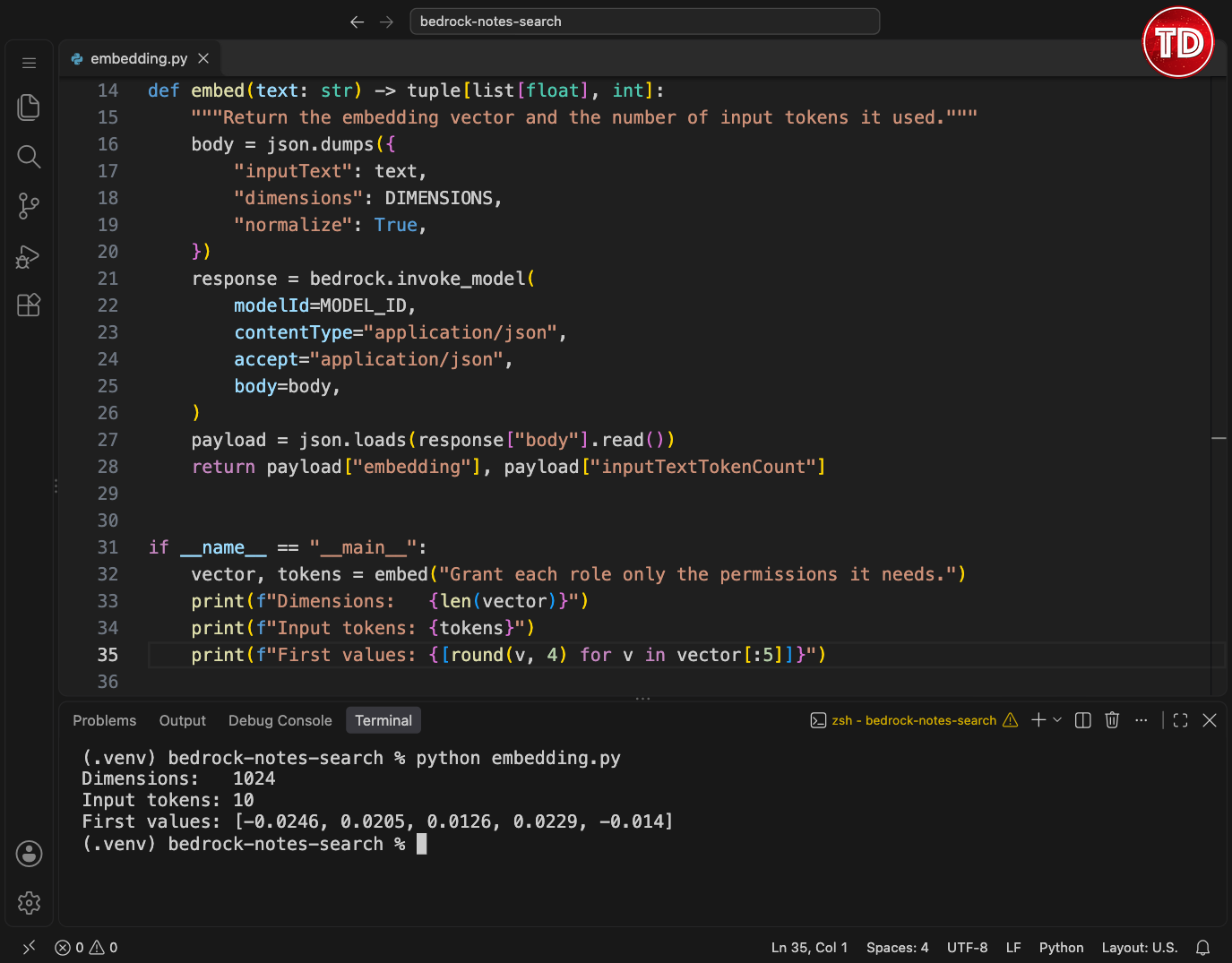
The vector has 1,024 numbers, and no single number means anything on its own; the meaning is in the comparison with another vector. Step 7 then makes that comparison. The sentence passed to embed() in embedding.py used 10 input tokens. At $0.02 per million input tokens, that call therefore cost $0.0000002.
Step 6: Build an Index of Amazon Bedrock Embeddings
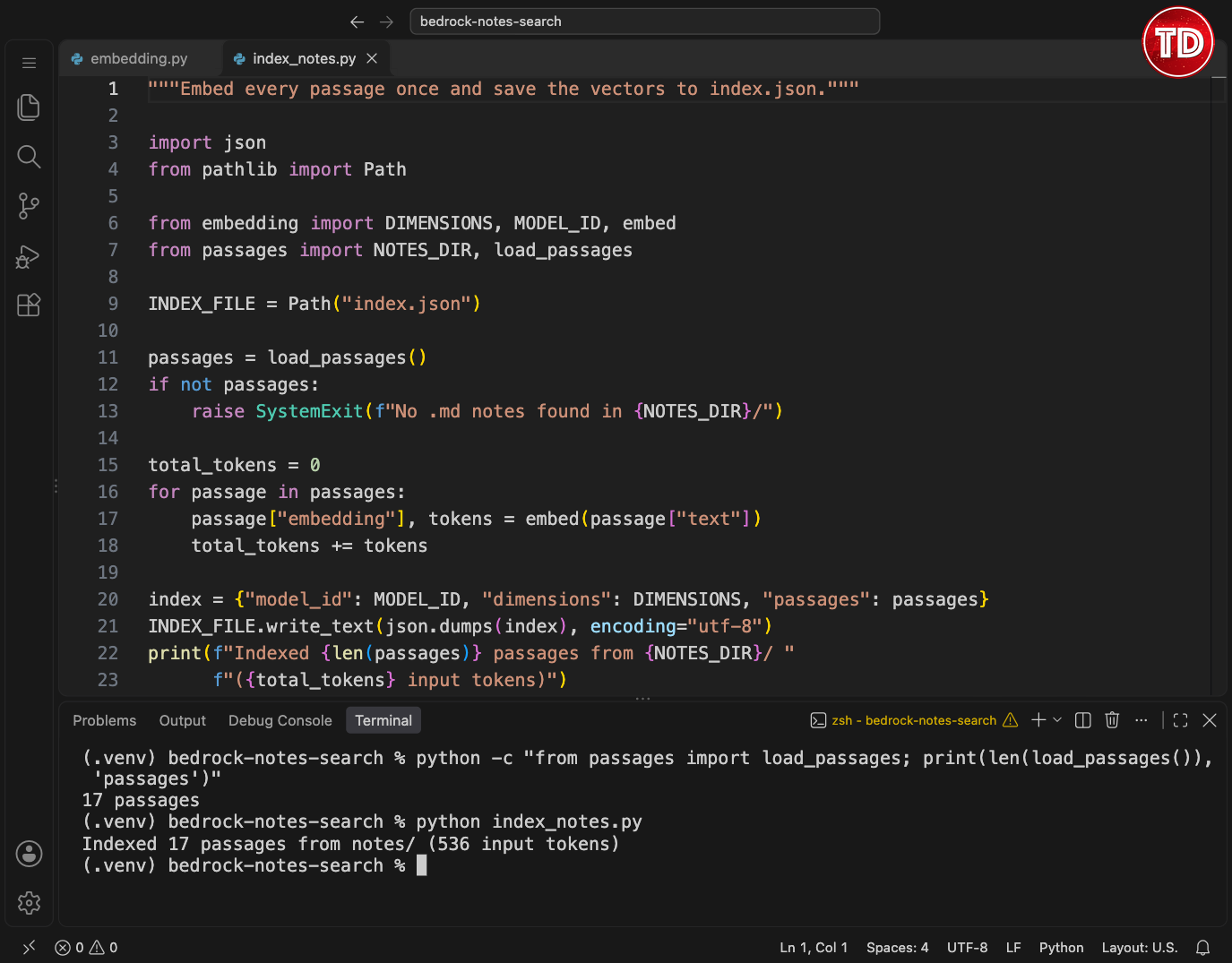
Embedding every passage again on every search would be slow, and it would also cost tokens each time. Instead, create index_notes.py, which embeds every passage once and saves the vectors in index.json together with the model ID and vector size. Later, the search script checks those two values and refuses to compare vectors made with different settings. Run this script again whenever you add or change a note.
Build the index:
Step 7: Search Your Notes with Amazon Bedrock Embeddings
Create semantic_search.py. It embeds the question with the same model and then compares that vector with every saved vector. Because all vectors have a length of 1, their dot product equals their cosine similarity: values closer to 1 mean closer meaning. The score ranks passages against each other, but it is not a probability that a passage is correct.
Ask a Paraphrased Question
Try a question that describes least privilege without naming it:
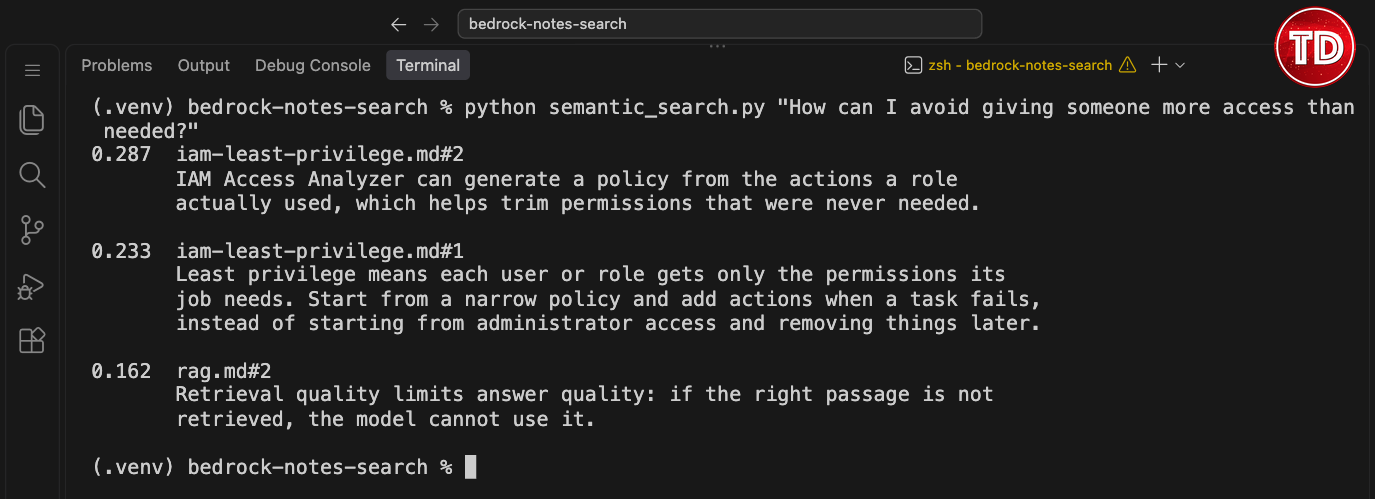
Both top results come from the least-privilege note, although the question never mentions IAM or least privilege. The paragraph about IAM Access Analyzer ranks first at 0.287, just ahead of the paragraph that defines least privilege at 0.233. The third result, from rag.md, scores 0.162 but has nothing to do with permissions. So read the scores as an order and a gap between results, not as percentages.
Step 8: Add a BM25 Keyword Search Baseline
Create keyword_search.py, the baseline that the Amazon Bedrock embeddings search is compared against. It runs locally without calling Amazon Bedrock and implements BM25, which scores a passage by the question words it contains. Rare words count more than common ones, repeated words add less each time, and long passages are scored down slightly. K1 sets how fast repeated words stop adding to the score, and B sets how much passage length matters. The script has no stop-word list, so common words such as “how” count too.
Write the BM25 Script
Apart from passages.py, the script uses only the Python standard library:
Run the Keyword Search
Run the same question:
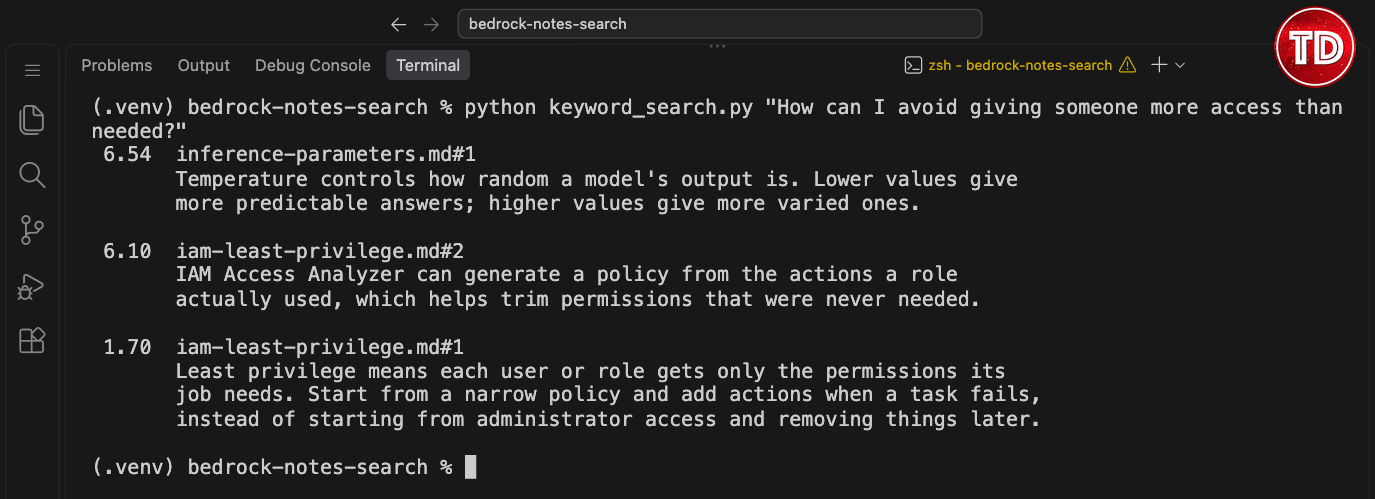
However, keyword search ranks the temperature passage from inference-parameters.md first. That passage shares only “how” and “more” with the question, and BM25 cannot tell that those words carry little meaning. The two least-privilege passages follow because they contain “access”, and one of them also contains “needed”. Still, keeping every word is deliberate: the point is to test plain BM25, not a tuned version.
Step 9: Compare Keyword Search with Semantic Search
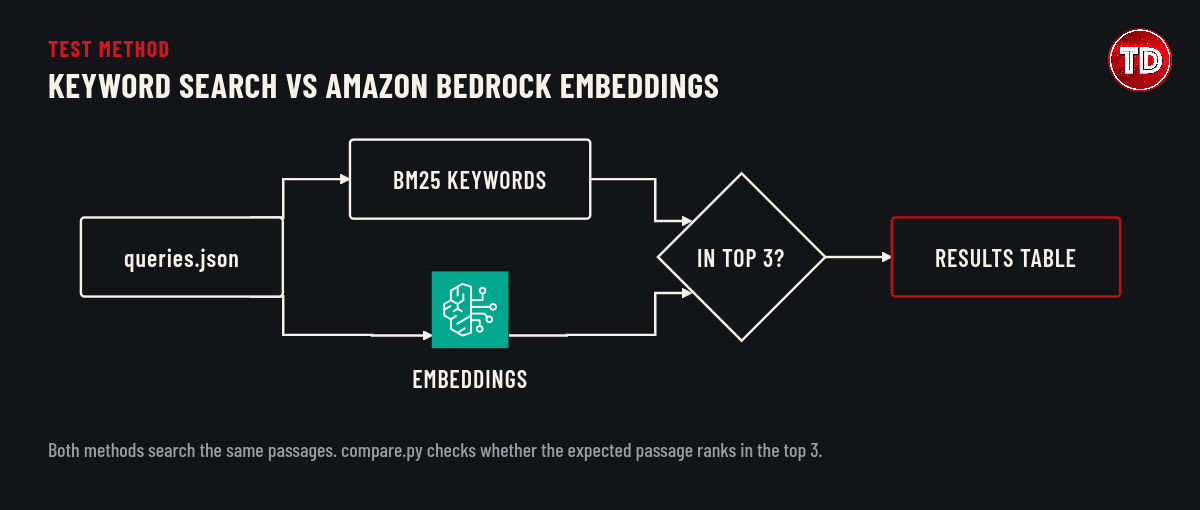
One question proves little, so create queries.json with eleven questions. Seven are paraphrases; one is an exact term, one is an error code, one is an acronym, and one has no answer in the notes. Every question except the unrelated one names the passage that should answer it, and those expected passages were chosen before running either search. Write them down first in your own experiments too; otherwise, the test will drift toward whatever the search returns.
Create the Comparison Script
Create compare.py. It runs every question through both searches and prints the rank of the expected passage in each search’s top 3, or miss when the passage is not there. For the unrelated question, it prints the top score instead, because there is no right answer to find. Long questions are shortened with “…” so the table fits a terminal. Two summary lines follow: how many answerable questions found their passage in the top 3, and the fastest and slowest semantic search times, including the Amazon Bedrock call.
Run the Comparison
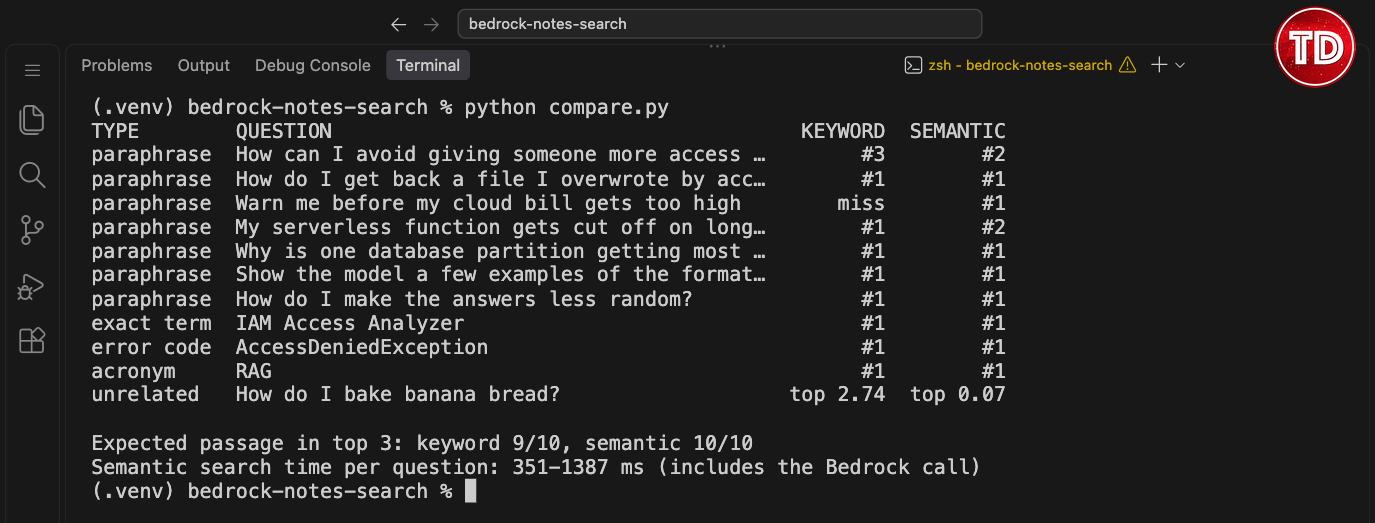
Then start the comparison from the project folder:
Results: Keyword Search vs. Semantic Search
| Question type | Questions | Keyword search (top 3) | Semantic search (top 3) |
|---|---|---|---|
| Paraphrase | 7 | 6 of 7 | 7 of 7 |
| Exact term, error code, acronym | 3 | 3 of 3 | 3 of 3 |
| Unrelated (no right answer) | 1 | Returned a passage, score 2.74 | Best score only 0.07 |

Across the ten questions with an expected passage, semantic search put it in the top 3 every time and ranked it first eight times. Keyword search found it in the top 3 nine times and also ranked it first eight times. When semantic search ranked the expected passage second, the first result was the other paragraph of the same note. Step 7 shows this for the least-privilege question, and running the Lambda question through semantic_search.py also shows it. Keyword search missed only “Warn me before my cloud bill gets too high”, which shares no word with the AWS Budgets note.
The unrelated question shows a different weakness in each method. Keyword search returned the temperature passage for “How do I bake banana bread?” because both contain “how”. Semantic search always returns its top 3, but the best score for that question was 0.07, far below the 0.287 that the least-privilege question scored in Step 7. That gap comes from a small test, so it is not a tested cutoff.
Most paraphrases still share a word or two with their notes, such as “file”, “partition”, and “examples”, because the same person wrote the notes and the questions. As a result, keyword search ranked five of the seven paraphrased passages first. Semantic searches took 351 to 1,387 ms per question, including the Amazon Bedrock call. In contrast, keyword search runs locally and makes no network call.
What Worked and What Didn’t
Semantic search with Amazon Bedrock embeddings handled the case that keyword search cannot: it matched “Warn me before my cloud bill gets too high” to the AWS Budgets note even though the two share no words. The unrelated question scored 0.07, against 0.287 for a real match in Step 7, and because semantic search always returns its top 3, that low score is the only sign that nothing matched. Exact terms worked with both methods, since “IAM Access Analyzer”, “AccessDeniedException”, and “RAG” ranked first in both searches. In other words, semantic search matched the paraphrases without giving up exact-term matches.
The gap was one question: keyword search found 9 of 10 expected passages, and semantic search found 10 of 10. The test itself explains why the gap is small, because the same person wrote the notes and the questions, so most paraphrases still share a word with their note. Twice, semantic search ranked the other paragraph of the right note first, which is fine for finding a note but matters if a RAG pipeline passes only the top passage to a model. Eleven questions, ten notes, and one model are enough to see the pattern, not to settle which method is better; a fairer test would use questions written by someone who has not read the notes.
Troubleshooting Amazon Bedrock Embeddings
Each item starts with the error or symptom you see:
NoCredentialsError: Unable to locate credentials. The terminal has no API key, which happens in a new terminal or when theexportcommand was skipped. Paste theexportcommand from Step 2 again, or generate a new key if you closed the dialog.AccessDeniedExceptionwithInvalid API Key format. The variable holds only part of the key, or extra characters came along with it. Generate a new key and copy the whole command with Copy API Key instead of selecting the text by hand.AccessDeniedExceptionwithAuthentication failed: Please make sure your API Key is valid. The key can’t be used for this request. In the test run, this happened when a key generated inus-east-1was used forus-west-2, because a short-term key works only in its own Region. An expired key also stops working, so generate a new key inus-east-1and run the newexportcommand.AccessDeniedException: Your account is currently being verified. The AWS account is new, and AWS has not finished verifying it. Wait and retry; AWS says verification normally takes less than 2 hours.ThrottlingException: Too many requestson the very first call. The account’s on-demand quota for the model is 0, which can happen on new accounts. In the Service Quotas console, open Amazon Bedrock and check On-demand model inference requests per minute for Amazon Titan Text Embeddings V2. If it shows 0, ask AWS Support for an increase or use an account with a non-zero quota.AccessDeniedExceptionabout authorization. The identity that generated the key is not allowedbedrock:InvokeModelon this model and Region, or not allowedbedrock:CallWithBearerToken. Compare the ARN in your policy withMODEL_IDandREGIONinembedding.py.index.json not found. The index was never built. Runpython index_notes.py.index.json was built with different settings.MODEL_IDorDIMENSIONSchanged after indexing. Runpython index_notes.pyagain.
Clean Up and Cost of Amazon Bedrock Embeddings
This tutorial creates no AWS resources, so there is nothing to delete in your AWS account. The short-term API key creates no IAM user either, and it expires on its own when your console session ends, after 12 hours at most. If a key leaks before then, you can block it by attaching a policy to the identity that generated it that denies bedrock:CallWithBearerToken and bedrock-mantle:CallWithBearerToken. Your costs come only from the embedding calls, which used 659 input tokens in the test run.
When you are done, remove the key from the terminal and delete the project folder if you no longer need it. The unset command clears the variable from the current terminal only. The index.json file contains your note text, so delete it if you indexed anything private. Run these commands from the project folder:
Conclusion
Amazon Bedrock embeddings turn a folder of notes into something you can search by meaning, with one Bedrock call per question. The whole tool fits in six small Python files and a local index file. Semantic search put every expected passage in its top 3, including one that shared no words with its question, while keyword search missed that question and matched “how” for a question that had no answer at all. Keyword search still matched every exact-term question, needs no network call, and costs nothing per request.
One next step is a hybrid search that combines both scores, so a passage can rank well through shared words, shared meaning, or both. Another is to pass the top passages to a text model on Amazon Bedrock and build the generation half of RAG on top of this index, as in Building a Cost-Aware RAG Application with Amazon Bedrock. Either way, keep the habit from Step 9 and write down the expected answers before you run the search. Otherwise, it is easy to accept whatever the search returns as correct.
References
- Amazon Titan Text Embeddings models, Amazon Bedrock User Guide
- Titan Embeddings request and response format, Amazon Bedrock User Guide
- InvokeModel, Amazon Bedrock API Reference
- Generate an Amazon Bedrock API key, Amazon Bedrock User Guide
- Use an Amazon Bedrock API key, Amazon Bedrock User Guide
- Control permissions for generating and using Amazon Bedrock API keys, Amazon Bedrock User Guide
- AmazonBedrockLimitedAccess, AWS Managed Policy Reference
- Testing IAM policies with the IAM policy simulator, IAM User Guide
- Amazon Bedrock pricing
- The Probabilistic Relevance Framework: BM25 and Beyond, Robertson and Zaragoza
📚 $2.99 eBooks and Get 30% OFF AWS Pro, Specialty, & Claude Practice Exams & Courses

Turn Your Team Into Cloud-Ready Professionals Today

Learn AWS with our PlayCloud Hands-On Labs

$2.99 AWS and Azure Exam Study Guide eBooks

Learn GCP By Doing! Try Our GCP PlayCloud
Learn Azure with our Azure PlayCloud
FREE AI and AWS Digital Courses

FREE AWS, Azure, GCP Practice Test Samplers


Subscribe to our YouTube Channel

Follow Us On Linkedin


Written by: Danilo Casim Jr.