
Last updated on September 3, 2026
A practical Claude Code workflow that combines a disciplined delivery lifecycle, React Native expertise, project rules, and real-device proof—without making developers manage skills by hand. Vibe coding feels fast until the app stops compiling, a “finished” screen breaks on Android, or a feature drifts away from the original idea. The bottleneck is rarely code generation. It is the missing development loop around the code. Addy Osmani’s Agent Skills provide that loop: define, plan, build, test, review, and ship. It is not a React Native framework, and it should not try to be one. The strongest mobile setup uses Addy’s pack as the process controller, then routes platform work to a React Native skill and closes the loop with evidence from a running app. The operating rule is simple: one controller, many specialists. Each layer has one job. Keeping those responsibilities separate makes the workflow predictable and prevents multiple skill packs from competing for control. Figure 1. The lifecycle, platform guidance, project context, and device evidence converge on one shippable mobile app. Complete all four steps once per machine or repository. The fourth step—adding CLAUDE.md—is required; without it, automatic skill routing and verification are not guaranteed. After setup, developers only choose a lifecycle command. This installs Addy’s lifecycle commands and their underlying engineering workflows in Claude Code. Start with one broad React Native skill. Add Callstack’s focused skills later for deep profiling, upgrades, brownfield migration, or CI workflows. Loading every mobile skill on day one adds noise without adding speed. Keep an iOS Simulator or Android Emulator available. Agent Device’s installed help is the source of truth for exact commands and platform prerequisites. Save CLAUDE.md at the repository root. This file is required: it holds project rules and maps every lifecycle command to the supporting skills and verification that Claude must run automatically. The following Pocket Pantry example is ready to copy and adapt: The key usability choice is that developers do not load supporting skills by hand. They invoke the lifecycle phase—spec, plan, build, review, or ship—and CLAUDE.md routes the relevant expertise and verification. The simplest path has five entry points. Testing stays inside the build and ship gates, while /test remains available for a focused test pass. When the spec is stable and the work is low-risk, /build auto can create the plan and implement it in one approved pass. It still pauses on failures or risky decisions. Here is a complete Claude Code sequence for an offline-first Expo app. The prompts are deliberately specific: each command has a clear input, output, and verification boundary. Required routing note: after the one-time setup, the user only invokes /spec, /plan, /build, /review, or /ship. The prompts below intentionally omit instructions such as “load the React Native skill” or “run Agent Device.” CLAUDE.md selects supporting skills and required verification automatically for every command. Expected result: A useful plan might contain: Expected result: Repeat /build for each approved phase. Use /build auto only when the spec is stable, the plan has been reviewed, and the change is low-risk. The review should separate: Expected result: This sequence keeps the developer-facing interface small while making the work behind each command rigorous. Speed comes from moving through clear gates without repeatedly explaining the workflow. Superpowers is a complete development methodology and a strong alternative controller. Use it instead of Addy’s lifecycle when you prefer its brainstorming, planning, worktree, and test-driven flow. Avoid running both as co-equal routers; duplicated process rules create conflicting instructions. Matt Pocock’s Skills is more modular. Its requirements-grilling flows can be useful before /spec when a feature is unusually ambiguous, and its smaller engineering skills can be added selectively. Treat them as specialists, not a second lifecycle. Callstack Agent Skills is the mobile-specific escalation path. Reach for it when the task needs serious React Native profiling, a framework upgrade, brownfield adoption, or simulator and emulator artifacts in CI. A useful rule of thumb: if a skill changes how every task moves from idea to release, it is a controller. Choose one. If it adds expertise for a particular task, let CLAUDE.md route to it on demand. Do not create a custom skill just to repeat public React Native advice. Create one after you notice a project-specific decision recurring across several sessions—for example: Keep CLAUDE.md short and use it as the router. Put detailed, task-specific instructions in the custom skill so Claude only loads that context when it is relevant. AI-assisted mobile development becomes dependable when the agent follows a repeatable loop, receives the right platform context, and can inspect the app it changed. Install Addy Osmani’s Agent Skills as the controller, add one React Native skill, route behavior through CLAUDE.md, and use Agent Device to verify reality. Then the developer’s job stays simple: invoke the phase you are in. The system handles the expertise behind it.
Ship React Native Apps Faster With Addy Osmani’s Agent Skills
The stack: one controller, three specialists
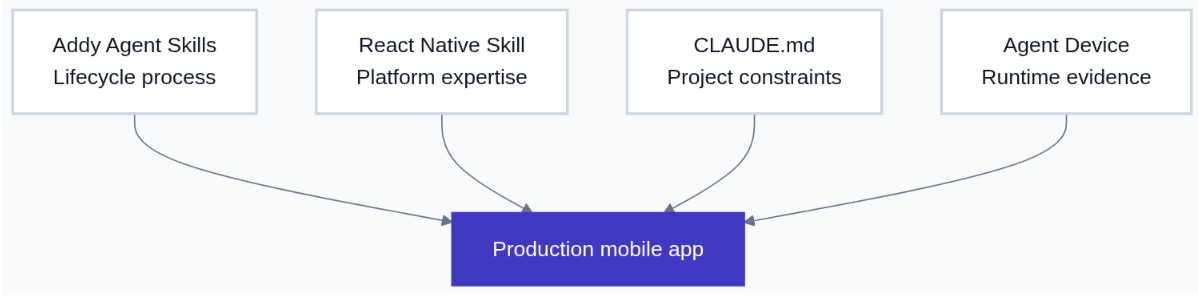
One-time setup
1. Install the lifecycle controller
/plugin marketplace add addyosmani/agent-skills
/plugin install agent-skills@addy-agent-skills2. Add React Native expertise
npx skills add vercel-labs/agent-skills
# Select react-native-guidelines and Claude Code when prompted3. Give the agent a device feedback loop
npm install -g agent-device@latest
agent-device help workflow4. Required: add a project-level CLAUDE.md

# Pocket Pantry — Claude Code project guide

## Product
- Expo and React Native app for iOS 16+ and Android 10+.
- Core flows: add, edit, search, archive, and receive expiry reminders.
- The core pantry flow must work offline and survive an app relaunch.

## Approved stack
- Expo Router and TypeScript in strict mode.
- expo-sqlite for local persistence.
- React Native Testing Library and Jest for behavior tests.
- Do not add or replace a dependency without explaining the trade-off first.

## Architecture
- Organize code by feature under src/features.
- Keep screens thin; business rules belong in feature services or hooks.
- UI components must not call storage APIs directly.
- Isolate platform-specific code in .ios.ts or .android.ts files only when behavior differs.

## Agent skill routing
- Use Addy Osmani’s lifecycle commands as the primary workflow.
- For React Native or Expo implementation and review, use react-native-guidelines automatically.
- Use a Callstack skill only for profiling, upgrades, brownfield work, or mobile CI.
- Use Agent Device for changed user flows before review and ship.

## Required command routing
- The user only invokes /spec, /plan, /build, /review, or /ship. Never ask them to load a supporting skill.
- /spec: run Addy’s requirements and specification workflow; use mobile guidance to surface platform constraints.
- /plan: run Addy’s planning workflow; consult mobile guidance for native dependencies and verification tasks.
- /build: run incremental implementation and test-driven workflows; apply React Native guidance and automatically verify the changed flow with Agent Device.
- /review: run quality and security review; apply React Native guidance and automatically collect runtime evidence.
- /ship: run the shipping workflow; complete required Android and iOS verification and pause before credentials, signing, or store submission.

## Working rules
- Work in small implementation phases tied to SPEC.md and tasks/plan.md.
- Preserve existing architecture unless the approved plan changes it.
- Ask before changing the data model, permissions, native configuration, or release settings.
- Update tests and documentation in the same phase as the code.

## Quality gates
- npm run typecheck
- npm run lint
- npm test
- Run the changed flow on iOS and Android with Agent Device.
- Capture a screenshot and relevant logs for the review report.

## Required device scenarios
- Add an item, relaunch the app, and confirm it persists.
- Edit, search, and archive an item.
- Verify empty, validation, permission-denied, and offline states.
- Confirm controls have accessible labels and adequate touch targets.

## Definition of done
- Acceptance criteria pass and non-goals remain out of scope.
- Type checks, lint, tests, and device scenarios pass.
- The review records evidence, known limitations, and a go/no-go decision.
The daily workflow: five commands
Example: Pocket Pantry, command by command
1. /spec — define the product
/spec Build Pocket Pantry, an offline-first Expo app for iOS and Android.
Users can add, edit, search, and archive pantry items and receive reminders before expiry.
Ask one question at a time until scope, user flows, edge cases, permissions, and non-goals are clear.
Write SPEC.md with user journeys, acceptance criteria, risks, unresolved decisions, and release boundaries.
Do not write implementation code.
2. /plan — turn the spec into implementation phases
/plan Read SPEC.md and CLAUDE.md.
Break the MVP into the smallest implementation phases that each end in working, testable app behavior.
For every task, list the files likely to change, tests to add, device scenario to run, and completion evidence.
Sequence data-model or permission decisions before dependent UI work.
Write tasks/plan.md and tasks/todo.md. Do not implement yet.
3. /build — implement one verified phase
/build Implement Phase 2 from tasks/plan.md only.
Add the local data model, add-item form, pantry list, persistence, and behavior tests.
Keep scope limited to the approved phase and preserve the existing architecture.
Stop if a data-model, permission, native configuration, or dependency change needs approval.
4. /review — audit code and observed behavior
/review Review the Pocket Pantry branch against SPEC.md, tasks/plan.md, and CLAUDE.md.
Report findings by severity with file references, missing tests, captured evidence, and a clear pass or changes-required decision.
5. /ship — make a go/no-go release decision
/ship Prepare a Pocket Pantry release candidate; do not submit it to an app store yet.
Confirm the approved spec is complete and review blockers are resolved.
Produce a go/no-go report with evidence, known limitations, release notes, and the exact human approvals still required.
Stop before changing credentials, signing, production data, or store listings.

Where the other skill packs fit
When to create your own React Native skill
Guardrails that keep speed real
The practical takeaway
References
⏳ Get 30% OFF on Microsoft Azure and GitHub Reviewers this Black Friday Sale!

Turn Your Team Into Cloud-Ready Professionals Today
Learn AWS with our PlayCloud Hands-On Labs
$2.99 AWS and Azure Exam Study Guide eBooks

Learn GCP By Doing! Try Our GCP PlayCloud

Learn Azure with our Azure PlayCloud
FREE AI and AWS Digital Courses

FREE AWS, Azure, GCP Practice Test Samplers

Subscribe to our YouTube Channel

Follow Us On Linkedin
Written by: Danilo Casim Jr.