
Why I chose DigitalOcean over AWS for OpenClaw comes down to one thing: matching infrastructure complexity to project stage. When building AI infrastructure in 2026, the default answer seems obvious: use Amazon Web Services (AWS). After all, it dominates the cloud market: It powers startups, governments, enterprises, and hundreds of other services. So when I started building a simple OpenClaw project, AWS seemed like the natural choice.
But I didn’t choose AWS. I chose DigitalOcean instead. Here’s why.
What Is OpenClaw?
Before explaining the infrastructure decision, it’s important to understand what I was deploying.
OpenClaw (formerly known as Clawdbot or Moltbot) is a free, open-source autonomous artificial intelligence (AI) agent created by Peter Steinberger. It is an automated agent capable of carrying out tasks using massive language models, with messaging platforms serving as its primary user interface.
Because OpenClaw can read files and execute commands, running it locally to your machine can expose your system and data to significant risks if not configured correctly. As such, there are currently two primary ways to safely host OpenClaw:
- A dedicated local machine (e.g., a Mac mini).
Purchasing a separate device like a Mac mini lets you keep OpenClaw isolated from your main computer’s data and workflows. This local hardware approach gives full control and privacy since everything runs on your own network and storage. It also avoids recurring cloud costs, though it requires upfront investment. - Cloud hosting (Amazon Web Services (AWS), DigitalOcean droplet, etc.).
Deploying OpenClaw on a remote server via providers like AWS or a cloud “droplet” offers isolation from your personal device and makes it easier to secure and monitor. Cloud VPS setups can be configured with firewalls, SSH keys, and automated backups, and are often preferred for persistent uptime.
For a solo developer who is still building and experimenting, cloud hosting made more financial sense. But once I decided on the cloud, the real question became:
Which provider should I use?
The AWS Temptation
Amazon Web Services (AWS) is powerful. Incredibly powerful.
It offers:
- Amazon EC2
- AWS Lambda
- Amazon S3
- Amazon Bedrock
- IAM
- VPC
- And more than 200 other services
On paper, this is ideal. Everything you could ever need is available.
But power comes with complexity.
When I tried mapping OpenClaw’s architecture onto AWS, I immediately faced decisions like:
- EC2 or ECS?
- Should I use Lambda for parts of it?
- How should the VPC be configured?
- Do I need a NAT Gateway? (extra cost)
- What IAM roles are required?
- How do I secure internal communication?

This wasn’t for a distributed enterprise system. It was for a single AI agent framework. That’s when I paused.
DigitalOcean’s Simplicity
DigitalOcean is designed for simplicity, with an easy UI that allows customers to deploy virtual machines, databases, and Kubernetes clusters with a few clicks.
The platform provides a focused set of services that reduce configuration effort. For a solo developer, that means:
- One Droplet
- One firewall
- One SSH key
- Done
No deep IAM policy trees, VPC routing diagrams, and hidden NAT charges.
Cost Comparison of AWS and DigitalOcean
For independent developers building OpenClaw, cost isn’t just about raw price. It’s about predictability.
Below is the feature-to-feature price comparison of AWS and DigitalOcean:
Pricing is based on publicly available data and may vary by region and tiered usage as of 2026
|
Feature |
AWS (Singapore) |
DigitalOcean |
AWS (Hong Kong) |
DigitalOcean |
|
Instance name |
t3.micro |
Basic Droplet |
c6a.xlarge |
CPU-optimized Droplet |
|
vCPU |
1 |
1 |
4 |
4 |
|
Memory |
1 GiB RAM |
1 GiB RAM |
8 GiB RAM |
8 GiB RAM |
|
Storage |
Not included |
25 GiB included |
Not included |
50 GiB included |
|
Bandwidth |
Not included |
1000 GiB included |
Not included |
5000 GiB included |
|
Instance Price |
$9.636 |
$6 |
$141.912 |
$84 |
|
Instance price with storage |
$11.636 (after adding 25 GiB EBS general purpose gp3) |
$6 |
$145.912 (after adding 25 GiB EBS general purpose gp3) |
$84 |
|
Instance price with bandwidth |
$129.636 (after adding 1000 GiB DT Outbound Internet) |
$6 |
$741.912 (after adding 5000 GiB DT Outbound Internet) |
$84 |
With AWS:
- Storage is separate (EBS).
- Bandwidth (Data Transfer Out) is charged.
- Costs scale unexpectedly if traffic increases.
With DigitalOcean:
- Storage is included for OpenClaw.
- Generous bandwidth is included for OpenClaw.
- The bill is usually the bill.
For someone experimenting with an AI agent that may generate unpredictable traffic or logs, that pricing difference is not trivial.
How I Deployed OpenClaw on DigitalOcean (Step-by-Step)
To demonstrate the simplicity I’ve been talking about, here is the exact process I used to deploy OpenClaw on DigitalOcean.
Total time: ~15–20 minutes.
Total services used: One Droplet.
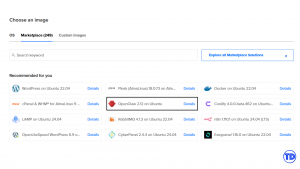
Step 1: Create a Droplet
- Log in to DigitalOcean.
- Click Create → Droplet.
- Under Marketplace, search for OpenClaw.

- Choose the recommended plan (at least 4GB RAM).
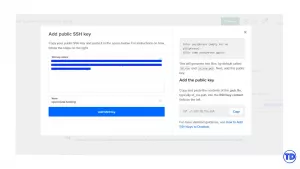
- Add your SSH key.

- Click ‘Create Droplet’
Step 2: SSH Into the Server
ssh root@your_droplet_ip
After logging in, OpenClaw was already installed and ready to configure:
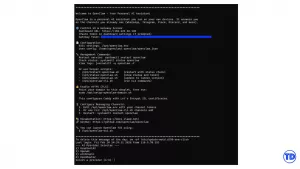
From here, the setup wizard prompted me to:
- Choose an AI provider (Anthropic / Gradient)
- Enter my API key
- Generate a Gateway token
It then provided a Dashboard URL.
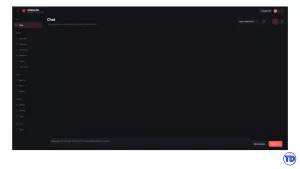
I opened it in my browser.
OpenClaw was live.
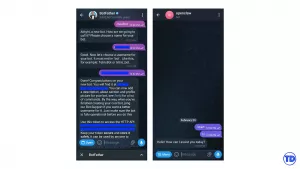
Step 3 (Optional): Connecting OpenClaw to Telegram
One of OpenClaw’s most powerful features is its ability to communicate through popular messaging platforms. Instead of interacting only through a browser or terminal, you can chat with your AI agent directly from apps you already use — including Telegram.
Here’s how I connected OpenClaw to Telegram using the DigitalOcean App Platform deployment
When you initiate the console session, you will be accessing it as the root user. So first, you need to change to the openclaw user:
su openclaw
Then you need to change directories into the home directory of the openclaw user:
cd
To connect your OpenClaw application to Telegram, go to the Console of your OpenClaw application enter the following command:
openclaw channels add

Select Telegram, follow the instructions, provide your Telegram bot token, and complete the pairing process.
Once configured, I could message my OpenClaw instance directly through Telegram.
When AWS Makes Sense
This is not an anti-AWS argument.
AWS absolutely wins when:
- You need enterprise-grade compliance (SOC2, FedRAMP, etc.)
- You are deploying multi-region architectures
- You need managed AI services like Bedrock
- You are building event-driven systems using Lambda
- You require deep IAM segmentation
- You plan to scale to millions of users
AWS is unmatched in ecosystem depth.
But for simple AI projects — especially single-node agent deployments, experimental builds, or solo developer workflows — it’s better to go in the Ocean.
Conclusion
Choosing between AWS and DigitalOcean wasn’t about which platform was more powerful.
It was about which platform matched my stage.
AWS is unmatched for:
- Large-scale distributed systems
- Enterprise compliance
- Multi-region architectures
- Deep service integrations
But OpenClaw, at this stage, is:
- A single-node AI agent
- Experimental
- Developer-driven
- Focused on iteration speed
I didn’t need 200 services.
I needed clarity.
With DigitalOcean, deployment took minutes.
Costs were predictable.
Security best practices were pre-configured.
And I could focus on building the AI agent — not architecting cloud infrastructure.
For a solo developer in 2026 experimenting with autonomous AI systems, simplicity wasn’t a luxury.
It was leverage.
And that’s why I chose DigitalOcean.
References
🌸 25% OFF All Reviewers on our International Women’s Month Sale! Save 10% OFF All Subscriptions Plans & 5% OFF Store Credits/Gift Cards!

Learn AWS with our PlayCloud Hands-On Labs

$2.99 AWS and Azure Exam Study Guide eBooks

New AWS Generative AI Developer Professional Course AIP-C01

Learn GCP By Doing! Try Our GCP PlayCloud

Learn Azure with our Azure PlayCloud

FREE AI and AWS Digital Courses

FREE AWS, Azure, GCP Practice Test Samplers


Subscribe to our YouTube Channel

Follow Us On Linkedin


Written by: Harvey Ermitanio




