
Last updated on July 2, 2026
Have you ever had an app idea that you wanted to build? Maybe you searched, “What’s the first step to creating a mobile app?” only to end up asking, “Why do I need all these tools before I can even build a simple app?”
Many beginners expect mobile development to start with designing screens and writing code. Instead, they often find tutorials introducing several unfamiliar tools and frameworks, along with instructions on how to install them. For someone just getting started, this can feel overwhelming.
Today, there are several ways to set up a mobile development environment. We have come from native app development, where developers use platform-specific languages such as Java or Kotlin for Android applications and Swift for iOS applications, to cross-platform development.
What does this mean? Simply put, developers can now create a single application that works across multiple platforms. By using frameworks like React Native, we can simplify the development process and turn ideas into working applications.
We now know that mobile development has evolved, but the question remains: Why do so many tools and setups exist?
The answer is simple: each tool solves a different problem. Some help write code, others manage project dependencies, while others provide the Android-specific tools required to build and test applications.
Understanding the role of each tool makes the setup process less intimidating and helps developers understand what happens behind the scenes when building their first mobile application.
In this article, we will explore the “whys” behind React Native and Expo.
Why Mobile Development Requires Multiple Tools
Unlike a simple web page that can run directly in a browser, mobile applications must interact with operating systems, devices, build tools, and platform-specific environments.
No single tool can handle every aspect of development.
Instead, modern mobile development relies on an ecosystem of tools:
- React Native provides the framework.
- JavaScript is a programming language.
- Expo simplifies development and testing.
- Node.js powers development tooling.
- Developers write code in VS Code.
- Expo Go enables testing on a physical device.
Understanding these responsibilities makes the development environment much less intimidating. And don’t worry if some of these tools are unfamiliar—I will explain each one so we can better understand the entire process.
What is React Native?
Traditionally, developers created separate applications for Android and iOS.
This approach required:
- Learning multiple programming languages.
- Maintaining multiple codebases.
- Rebuilding the same features for different platforms.

React Native was created to address these challenges. It is an open-source framework developed by Meta that allows developers to build mobile applications using JavaScript and React concepts.
So, instead of writing separate Android and iOS applications, developers can share much of their code across platforms, helping them focus on application functionality rather than the platform differences.
React Native applications are primarily written using JavaScript. A programming language used to create dynamic and interactive applications. According to MDN Web Docs, JavaScript allows developers to implement features that go beyond static content, enabling user interaction and application logic.
In React Native, JavaScript handles:
- User interactions
- Application behavior
- Data processing
- Navigation
- Communication with external services.
Because JavaScript is widely used in web development, developers can apply many of their existing skills when transitioning to React Native.
To summarize, React Native is a framework that uses JavaScript to build mobile applications. It is also important not to confuse React Native with React. React Native is used for mobile applications, while React is primarily used for web applications.
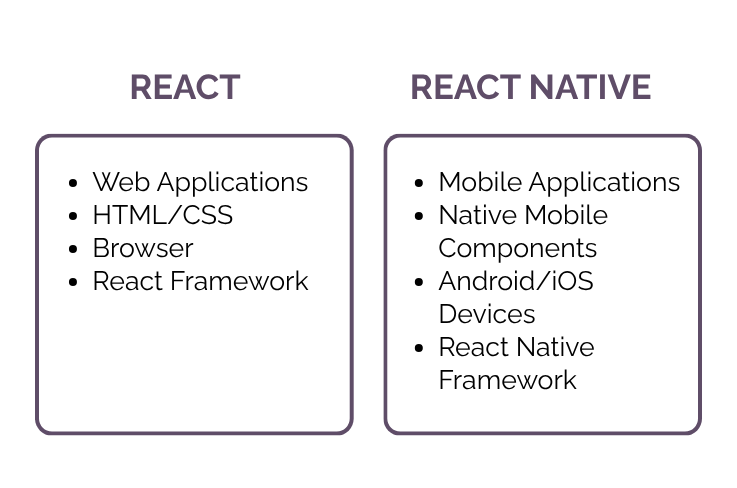
A side-by-side look at how React targets web browsers while React Native targets mobile operating systems.
Expo: Simplifying React Native Development
One of the most common beginner questions is:
If React Native already exists, why do I need Expo?
The answer is that Expo is built on top of React Native. It is both a framework and a platform designed to simplify the React Native development experience.
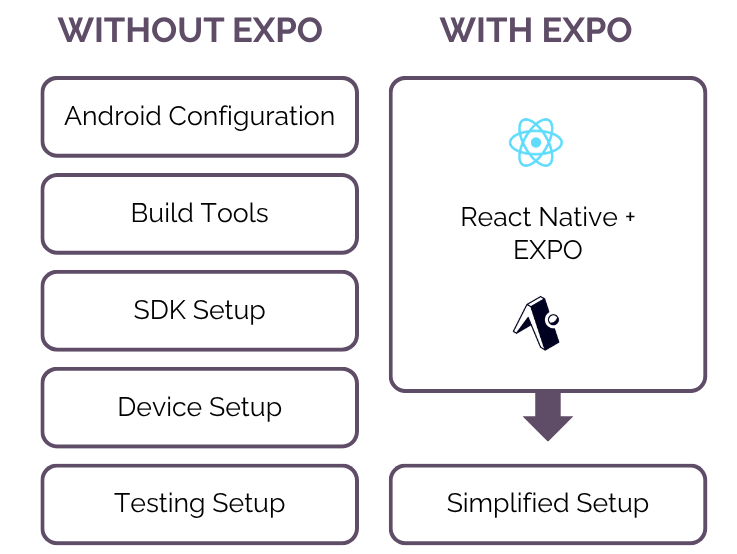
React Native gives developers access to native mobile capabilities, but that flexibility comes with additional configuration. Developers may need to manage Android projects, install platform-specific dependencies, and configure build settings before an application can run.
Expo was created to reduce that complexity. Instead of requiring beginners to understand every native configuration immediately, Expo provides tools and services that simplify development.
Without Expo, developers often need to configure:
- Android project settings
- Native build tools
- Platform-specific dependencies
- Device testing environments
Expo automates much of this setup. This allows beginners to focus on building features first rather than spending time configuring native environments.
Why Does React Native Require Node.js?
One of the most confusing parts of starting React Native development is being asked to install Node.js.
After all, if the goal is to create an Android application, why is JavaScript software being installed first?
The answer is that Node.js powers the tools used during development. Node.js is a JavaScript runtime that allows JavaScript to run outside a web browser.
Although the final mobile application does not run on Node.js, many development tools depend on it.
Node.js powers:
- Development servers
- Build processes
- Command-line tools
- Package managers
Without Node.js, the React Native development environment would not function. When setting up a React Native project, developers often encounter package managers such as npm and pnpm. This is because Expo and React Native projects rely on external packages. These package managers help download and manage project dependencies.
Modern applications rarely start from scratch. Instead, they rely on external libraries for functionality such as:
- Navigation
- User interfaces
- Network requests
- Authentication
- State management
And so, rather than manually downloading every library, package managers automate the process.
VS Code: Where Development Happens
One of the first tools many developers install is Visual Studio Code, commonly known as VS Code. VS Code is a source code editor developed by Microsoft that supports numerous programming languages and extensions.
For React Native projects, VS Code is commonly used alongside Expo to:
- Write application code.
- Manage project files.
- Install development extensions.
- Run terminal commands.

It is also important to note that VS Code does not build Android applications by itself. Instead, it serves as the primary workspace where developers write and edit code.
Expo Go: Running Apps on a Phone
Expo Go is a mobile application developed by Expo that allows developers to preview React Native applications on a physical device.
After starting a project, Expo generates a QR code. And by scanning this QR code using Expo Go, we can immediately run and test the application using our phone.
Benefits include:
- Faster testing.
- No emulator required for simple projects.
- Reduced setup complexity.
- Immediate feedback during development.
For many beginners, Expo Go is the first place they see their mobile application running.
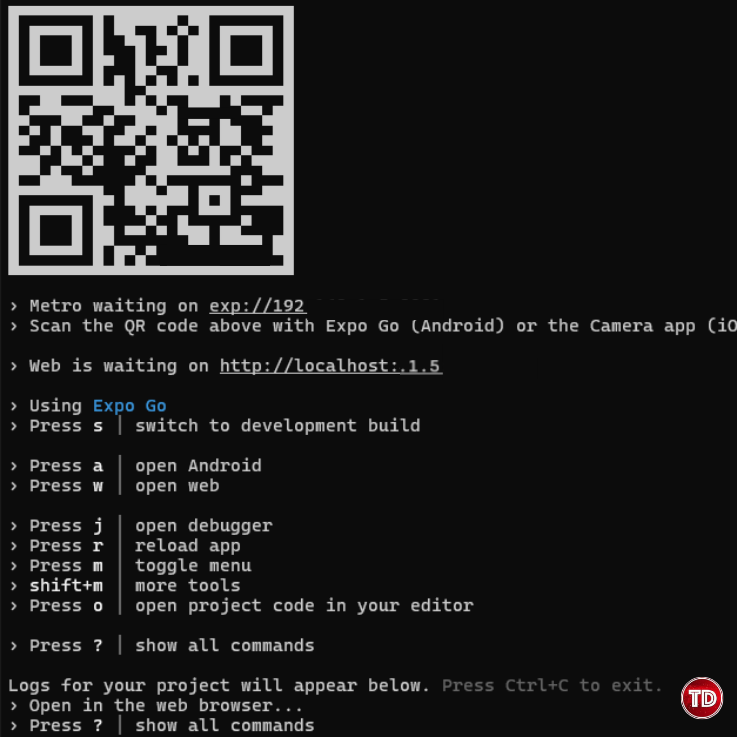
Scanning the terminal’s automatically generated QR code allows instant testing using the Expo Go mobile app.
How Everything Works Together To Create Your First App
Now that we have explored each tool individually, it becomes easier to understand the overall workflow.
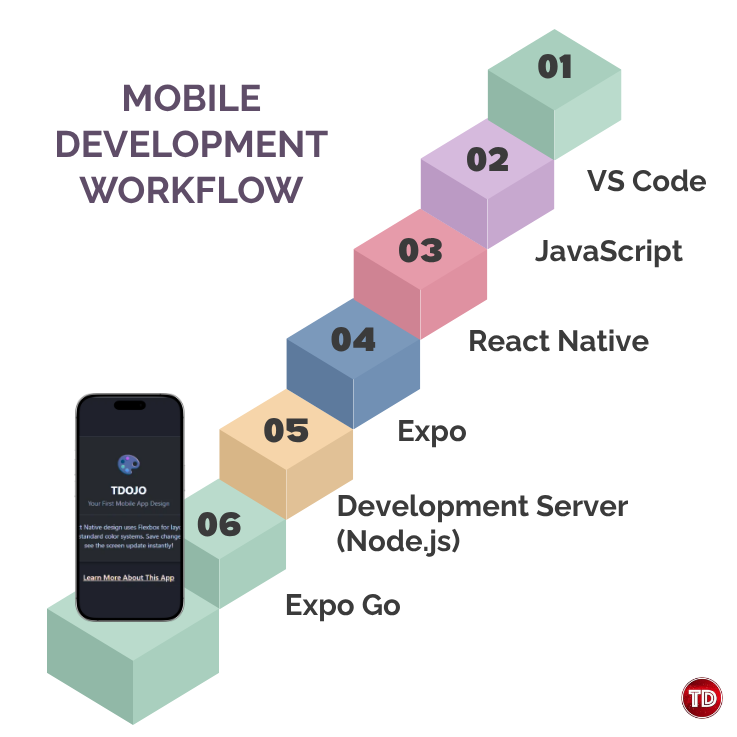
In this workflow:
- Developers write code in VS Code.
- JavaScript serves as the programming language.
- React Native provides the mobile framework.
- Expo simplifies development and testing.
- Node.js powers the development server.
- Expo Go displays the application on a physical device.
Several tools are working together behind the scenes. This is why so many installations are required before building a mobile application.
That’s pretty much the gist of using React Native and Expo! If you want to dive deeper into local development setups, definitely check out Tutorial Dojo’s blog post on setting up environments for web and mobile apps.
Conclusion
At first glance, the React Native ecosystem can appear overwhelming because of the number of tools involved. However, each tool serves a specific purpose within the development workflow.
VS Code provides the workspace, JavaScript powers the application logic, React Native provides the framework, Expo simplifies development, Node.js powers the tooling, package managers handle dependencies, and Android development tools provide platform-specific capabilities.
Understanding these responsibilities makes it easier to follow setup guides, troubleshoot issues, and learn new technologies. More importantly, it also helps developers like you to move beyond simply following instructions and begin understanding how modern mobile applications are actually built.
The next time a tutorial asks you to install a new tool, you will not only know how to install it, but you will also understand the role it plays in the development process.
References
🤖 $3.74 ONLY for Claude eBooks and Get 25% OFF All Claude Reviewers

Turn Your Team Into Cloud-Ready Professionals Today

Learn AWS with our PlayCloud Hands-On Labs

$2.99 AWS and Azure Exam Study Guide eBooks

Learn GCP By Doing! Try Our GCP PlayCloud

Learn Azure with our Azure PlayCloud

FREE AI and AWS Digital Courses

FREE AWS, Azure, GCP Practice Test Samplers


Subscribe to our YouTube Channel

Follow Us On Linkedin


Written by: Bryce Anrie Bombales




