
Claude Science Cheat Sheet
Claude Science is Anthropic’s desktop workbench for scientific research. It can help plan an analysis, write and run code, work with approved data sources and compute resources, and save results as versioned artifacts. Researchers can use it to produce figures, tables, and analysis records for review.
What Is Claude Science?
Claude Science combines a conversational research assistant with a sandboxed analysis environment. It can read folders you grant access to, use supported connectors, and work with compute through your own high-performance computing (HPC) cluster or Modal account. Its provenance records help reviewers trace how outputs were produced.
The Core Concept
- You provide the research question, approved data, methodological constraints, and any remote compute accounts.
- Claude Science provides analysis planning, code execution, and versioned outputs with provenance.
- Your team owns data access, statistical choices, interpretation, verification, and publication decisions.
Architecture Overview
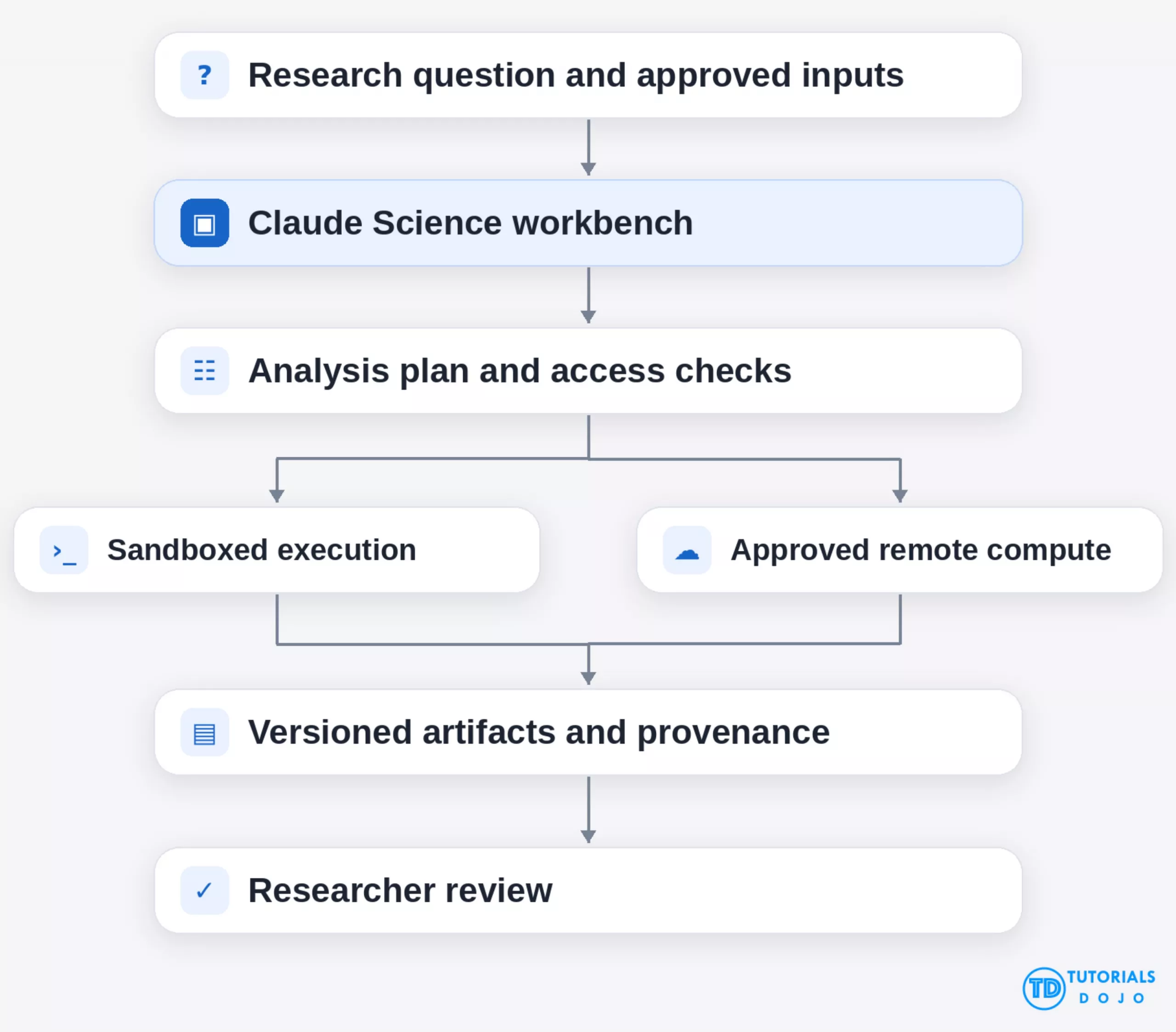
Key Components & Features
| Component | What it does |
|---|---|
| Research session | Keeps the question, analysis, and results together while you iterate. |
| Sandboxed execution | Runs analysis code for tasks such as cleaning data, computing summaries, and generating figures. |
| Folders and connectors | Supply inputs from approved local folders or supported external sources. |
| Remote compute | Can submit heavier jobs to an authorized HPC cluster over SSH or your Modal account. |
| Versioned artifacts and provenance | Retain outputs and a record of how Claude produced them so researchers can inspect the work. |
| Access approvals | Let you review a plan before Claude reaches new resources or submits work. |
Primary Use Cases
-
Summarize missing values and distributions in an environmental or materials dataset.
-
Generate a chart from approved data and keep the analysis code with the output.
-
Compare results across versions and inspect what inputs and analysis steps changed.

Key Benefits & Value Proposition
-
Review the code and provenance alongside the output.
-
Use the same workbench for an initial analysis and an approved larger job.
-
Share the relevant outputs and analysis record so a colleague can check the reasoning and rerun key steps.
Deployment Process & Timeline
| Phase | Activities | Estimated duration |
|---|---|---|
| Define the analysis | Specify the question, approved dataset, units, method, and expected output. | Depends on research scope and data readiness. |
| Setup | Install the desktop app, sign in, and grant access to the required folder or connector. Configure remote compute if needed. | Depends on account and resource approvals. |
| Run a pilot | Inspect the plan and code, then run a small representative analysis. Check that outputs and provenance are usable. | Depends on data size and analysis complexity. |
| Validate and share | Verify results independently, record limitations, and share approved artifacts. | Depends on review and replication needs. |
Ideal Customer Profile
-
Researchers and analysts who need auditable, code-backed outputs from approved datasets.
-
Research teams that want to use existing shared compute and keep analysis outputs available for review.
Key Considerations & Planning Factors
-
Anthropic lists Claude Science in beta on Pro, Max, Ultra, Team, and Enterprise. Team and Enterprise generally require an Owner or Primary Owner to enable it. Anthropic lists an exception for the Claude Team plan for scientists, where it is on by default.
-
Anthropic lists macOS 13 or later, Windows 11 (x64), and Linux x64.
-
Check your Claude plan’s usage limits. Budget separately for any compute or connected services billed through your lab or cloud account.
-
Confirm folder and connector permissions, data licenses, and institutional rules before using sensitive or unpublished material.
-
Preserve the input version, code, dependencies, and relevant settings. Rerun key calculations and review claims before publication.
Claude Science vs. Adjacent Tools
| Factor | Claude Science | Claude Cowork | Claude Code |
|---|---|---|---|
| Best fit | Scientific data analysis with traceable outputs. | Multi-step work across documents and apps. | Engineering work in a codebase. |
| Typical input | Research question, datasets, and analysis constraints. | Task brief and approved business sources. | Repository and implementation requirements. |
| Typical output | Research figures, tables, code, and provenance. | Report, briefing, or other work product. | Code changes and test results. |
Conclusion
Use Claude Science when the work requires both an analysis and a record of how it was produced. Start with an approved dataset and verify one representative result before expanding to larger runs.
References
https://support.claude.com/en/articles/16563838-get-started-with-claude-science
🛍️ $0.99 eBooks Are Here and Save Up to 75% on All Practice Exams & Video Courses

Turn Your Team Into Cloud-Ready Professionals Today

Learn AWS with our PlayCloud Hands-On Labs

50% OFF ON OUR YEARLY PLAN

Learn GCP By Doing! Try Our GCP PlayCloud

Learn Azure with our Azure PlayCloud
FREE AI and AWS Digital Courses

FREE AWS, Azure, GCP Practice Test Samplers


Subscribe to our YouTube Channel

Follow Us On Linkedin


Written by: Ace Kenneth Batacandulo