Ends in
00
days
00
hrs
00
mins
00
secs
ENROLL NOW

💝 Valentine's Sale! Get 30% OFF Any Reviewer. Use coupon code: VDAYSALE2026 & 5% OFF Store Credits/Gift Cards

github actions

Home » github actions

GitHub Mobile

2026-02-13T07:10:23+00:00

GitHub Mobile Cheat Sheet GitHub Mobile is an official Android and iOS application that allows you to triage, collaborate, and manage your work on GitHub from anywhere. It provides a secure way to stay connected to your projects, manage notifications, review code, and interact with your team directly from your mobile device, integrating high-impact work into your daily workflow. Core Capabilities The following actions are supported within the GitHub Mobile app: Manage, triage, and clear your notifications. Read, review, and collaborate on issues and pull requests. Edit files within pull requests. Search for, browse, and interact with users, repositories, and [...]

GitHub Mobile2026-02-13T07:10:23+00:00

GitHub CLI

2026-02-13T07:02:56+00:00

GitHub CLI Cheat Sheet GitHub CLI (gh) is a command-line interface to GitHub for use in your terminal. It helps you interact with many GitHub features—issues, pull requests, checks, releases, and more—without needing to switch to a web browser. Key Concepts Authentication: Required for most operations. gh uses OAuth tokens or Personal Access Tokens (PATs) to authenticate with GitHub. Repository: The primary location for your project's code and collaboration. Many gh commands operate within the context of a repository. Issue: A unit for tracking work, such as bug reports or feature requests. Pull Request (PR): A proposal to merge changes from one branch into [...]

GitHub CLI2026-02-13T07:02:56+00:00

Kubernetes Development Workflow with GitHub Codespaces

2026-01-25T14:45:46+00:00

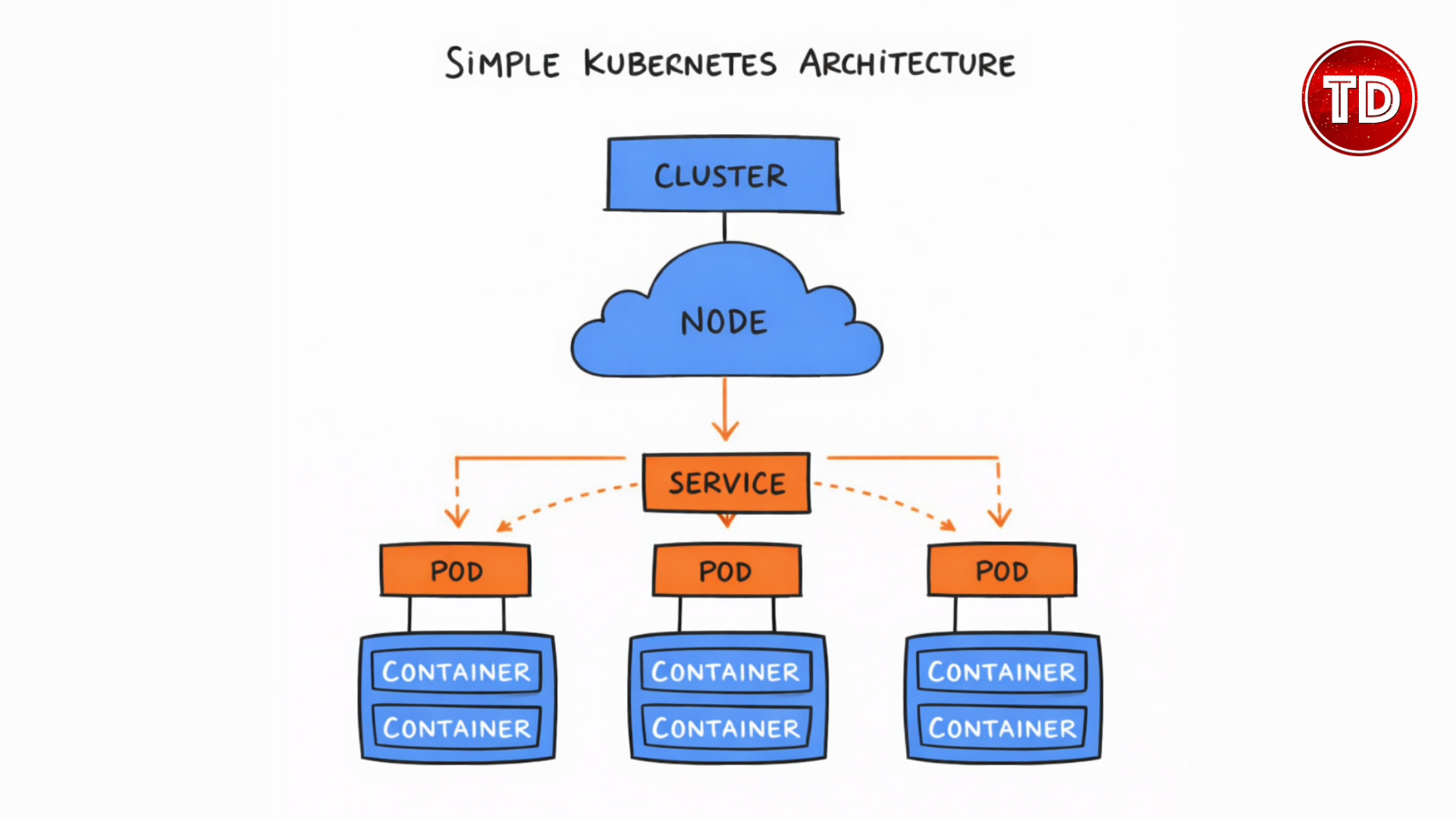
Setting up Kubernetes locally often becomes the most challenging part of learning it. Between installing Docker Desktop, configuring kubectl and Minikube, resolving version mismatches, and managing heavy resource usage, hours can be lost before a single workload is successfully deployed. There’s a better way to approach Kubernetes development without the overhead of local setup and maintenance. GitHub Codespaces provides a fully configured Kubernetes development environment that runs entirely in your browser. By removing local installations, dependency conflicts, and hardware constraints, it allows you to focus on understanding Kubernetes concepts and applying them in practice rather than troubleshooting your machine. In [...]

Kubernetes Development Workflow with GitHub Codespaces2026-01-25T14:45:46+00:00

GitHub Packages

2026-02-13T06:49:58+00:00

GitHub Packages Cheat Sheet GitHub Packages is an integrated package hosting service that allows you to host software packages—including containers, npm modules, and Java libraries—privately or publicly alongside your source code. It leverages your existing GitHub permissions, billing, and workflows to provide a seamless experience for managing your software dependencies and distribution. Key Concepts Package: A bundled unit of software (code, dependencies, metadata) Registry: A storage and distribution system for packages Scope: Organization/user namespace for packages Versioning: Semantic versioning support for package management Visibility: Public (open source) or Private (requires authentication) Supported Package Registries GitHub Packages supports multiple package ecosystems. [...]

GitHub Packages2026-02-13T06:49:58+00:00

Github Actions

2026-02-13T06:45:01+00:00

GitHub Actions Cheat Sheet GitHub Actions is a continuous integration and continuous delivery (CI/CD) platform that allows you to automate your build, test, and deployment pipeline. You can create workflows that build and test every pull request to your repository, or deploy merged pull requests to production. Key Components Workflow: An automated procedure that you add to your repository. Defined by a YAML file in .github/workflows/. Event: A specific activity that triggers a workflow run (e.g., push, pull_request, release). Job: A set of steps that execute on the same runner. Jobs run in parallel by default. Step: An individual task that can run commands [...]

Github Actions2026-02-13T06:45:01+00:00

GH-200 GitHub Actions Exam Study Path

2025-11-20T18:31:43+00:00

The GitHub Actions (GH-200) certification is designed to validate a candidate's expertise in implementing and managing GitHub Actions automation workflows. This certification is intended for professionals who want to demonstrate their ability to automate continuous integration and delivery (CI/CD) processes and manage enterprise-level workflows using GitHub Actions. It is ideal for DevOps engineers, software developers, and automation professionals looking to enhance their GitHub skills and manage workflows at scale. Overview of the GH-200 GitHub Actions Certification Exam Duration: 100 minutes Total Questions: 65 questions, approximately Passing Score: 700/1000 (scaled score) Languages Available:  English, Spanish, Portuguese (Brazil), Korean, Japanese GitHub Actions [...]

GH-200 GitHub Actions Exam Study Path2025-11-20T18:31:43+00:00

Deploy a Next.js Static Site to AWS with GitHub Actions and Bunjs

2024-12-11T16:15:36+00:00

At the AWS Community Day Philippines 2024, during the preparation for the event, the organizers assigned me the responsibility of setting up a Continuous Integration and Continuous Deployment (CI/CD) strategy for the website. Therefore, in this blog, I will explain the approach I took and how I utilized GitHub Actions and BunJs to create a swift and efficient CI/CD pipeline for deployment on Amazon Simple Storage Service (S3) along with Amazon CloudFront. AWS Community Day Philippines 2024 Website Next.js is a widely-used React framework that offers a variety of features for full-stack web applications, as well as multiple rendering options, [...]

Deploy a Next.js Static Site to AWS with GitHub Actions and Bunjs2024-12-11T16:15:36+00:00

AWS, Azure, and GCP Certifications are consistently among the top-paying IT certifications in the world, considering that most companies have now shifted to the cloud. Upskill and earn over $150,000 per year with an AWS, Azure, or GCP certification!

Follow us on LinkedIn, Facebook, or join our Slack study group. More importantly, answer as many practice exams as you can to help increase your chances of passing your certification exams on your first try!